


Yo! Are you tired of staring at a blank canvas, wondering where the heck that data flow arrow is supposed to go? 🎨 We’ve all been there—trying to map out a complex system while your brain feels like it’s running on a 56k modem. But hold onto your seats because the AI data flow diagram generator in Visual Paradigm is here to turn that frustration into pure productivity magic! Imagine just typing a quick sentence about how your online store handles orders and—BAM!—a professional, structured DFD appears before your eyes. In this deep dive, we’re looking at how this high-energy tool takes the “ugh” out of system analysis and gives you back hours of your life. 🚀
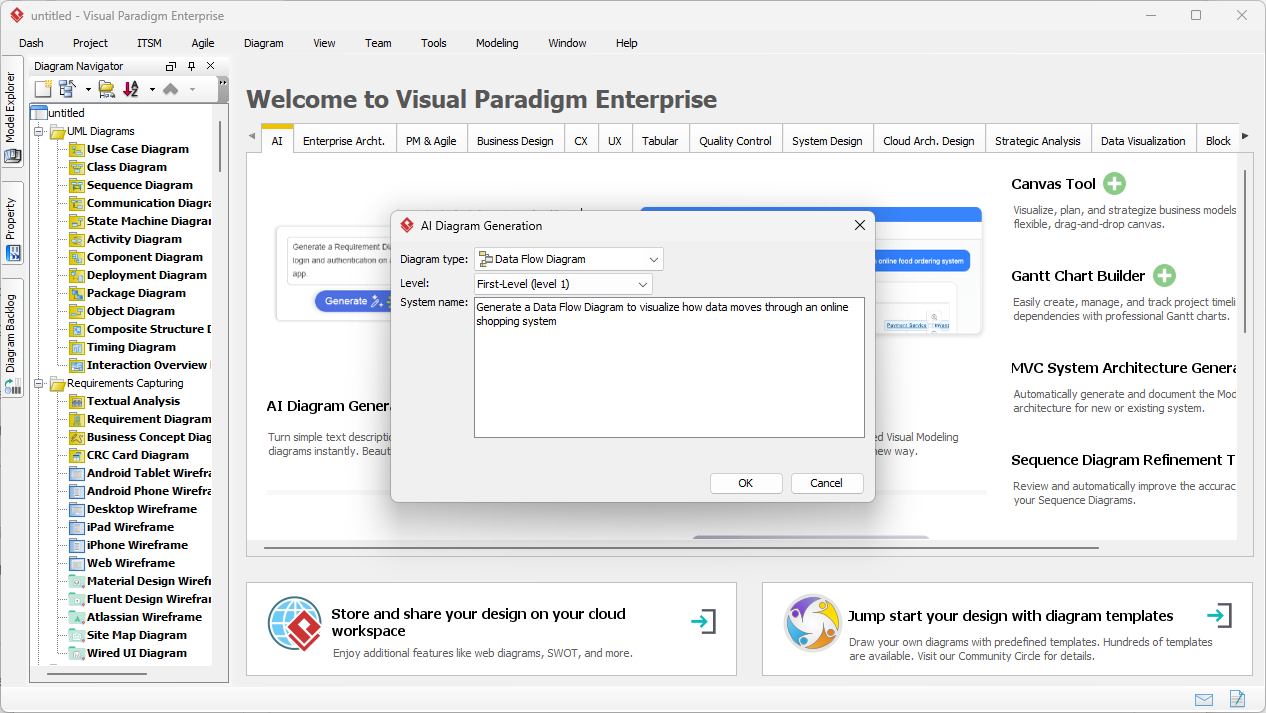
In the first image we’re looking at, you can see the Visual Paradigm Desktop interface in action. The user has pulled up the “AI Diagram Generation” window, which is essentially the cockpit for your automated design journey. They’ve selected “Data Flow Diagram” as the type and “First-Level (level 1)” for the depth. The prompt is simple but effective: “Generate a Data Flow Diagram to visualize how data moves through an online shopping system.” It’s basically telling the AI, “Hey, show me the guts of how an e-commerce site works!” and the software is ready to deliver. 💻
Quick Summary: Why This AI DFD Tool Rocks!
-
Instant Structure: Transforms a few lines of text into a full-blown system map in seconds. ⏱️
-
Multiple Notations: Supports Gane-Sarson, Yourdon & Coad, and Yourdon DeMarco styles—whatever your boss or teacher demands!
-
Smart Inference: The AI isn’t just guessing; it identifies external entities, data stores, and processes like a pro.
-
Fully Editable: It’s not just a flat image; you get a native, interactive diagram you can tweak until it’s perfect.
-
Zero Learning Curve: You don’t need to be a DFD master to start; let the AI handle the notation rules while you focus on the logic. 🧠
The Magic Behind the Prompt: How AI Understands Your Data
Let’s get real—writing out every single data transformation by hand is a total drag. The AI-powered DFD editor works by scanning your natural language description for key indicators. When you mention “Customer,” it knows that’s an external entity. When you say “Store order info,” it realizes you need a data store. It’s like having a senior systems analyst sitting right next to you, whispering the answers! This professional data flow diagram maker doesn’t just draw; it thinks about the relationships between your components. 🧐
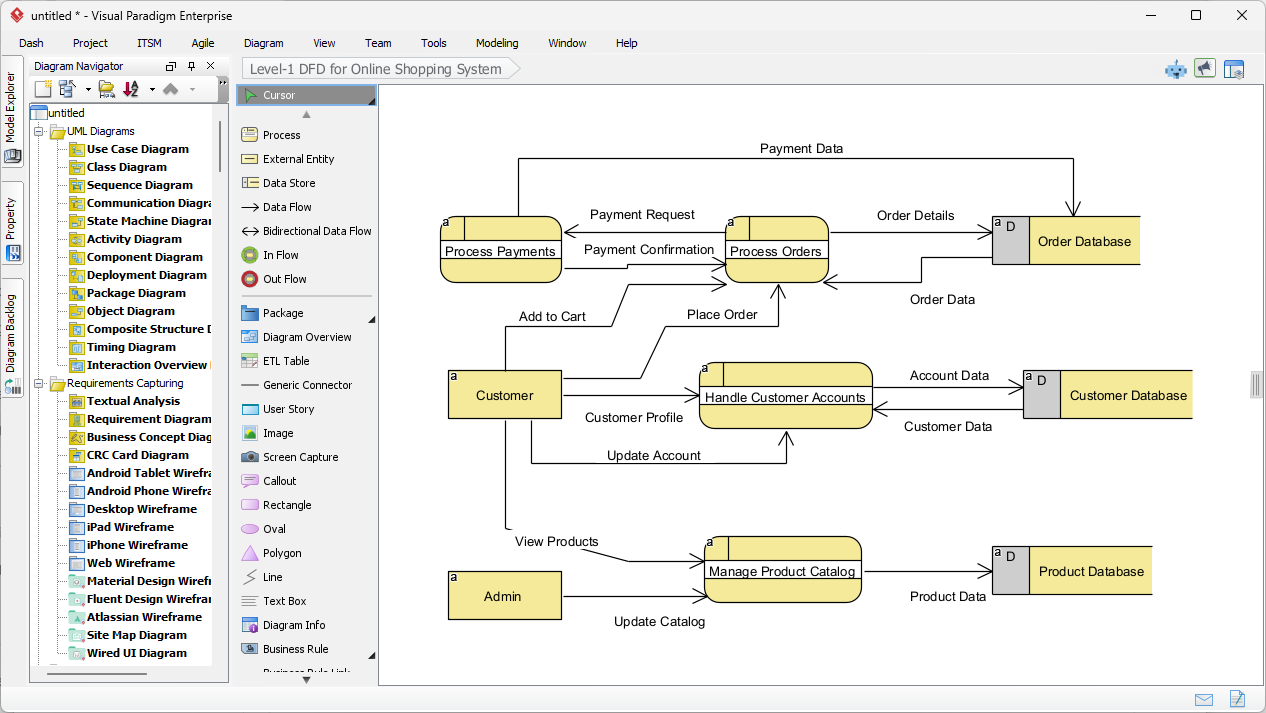
Once you hit that “OK” button, the transformation is honestly kind of insane to watch. The second image shows the direct result of that online shopping prompt. Look at that layout! We’ve got clear processes like “Process Payments” and “Manage Product Catalog,” all neatly connected to a “Customer” entity and various databases like the “Order Database.” The lines are clean, the flows are labeled (check out those “Payment Request” and “Order Data” labels!), and the whole thing is logically sound. It’s a best-in-class automated system analysis tool that turns your ideas into visual reality without the manual clicking and dragging nightmare. 🖱️✨
Feature Deep Dive: Customizing Your AI-Generated DFD
One of the coolest things about using an easy-to-use AI diagramming software like Visual Paradigm is that it doesn’t lock you into one look. Are you a fan of the classic Yourdon & Coad circles? Or do you prefer the Gane-Sarson rounded rectangles? You can choose your notation style right from the start! The AI is smart enough to swap the symbols while keeping the underlying logic identical. This is a game-changer for teams that have strict documentation standards but want to move at the speed of light. ⚡
Leveling Up: From Context to Detail
In the world of system design, one size definitely does not fit all. Sometimes you need a Context Diagram (Level 0) to show the big picture to stakeholders. Other times, you need to dive deep into a Level 1 or Level 2 DFD to help developers understand the nitty-gritty of data transformation. The Visual Paradigm AI DFD tool allows you to specify the level of detail you need. You can even generate a high-level view first and then use the AI again to decompose a specific process into a more detailed sub-diagram. It’s recursive, it’s logical, and it’s incredibly satisfying! 🏗️
Real-World Applications: Who is This For?
If you’re a Business Analyst, this is your new secret weapon. You can sit in a meeting, type out the requirements as the client speaks, and show them a draft DFD before the meeting is even over! Software Architects can use it to quickly prototype data movements before committing to code. Even Students can use it to learn the ropes—seeing how a text description maps to symbols is the fastest way to master structured analysis. It’s truly a versatile DFD generation app for anyone who deals with complex workflows. 🎓
Don’t forget the power of seamless workflow integration. These aren’t just pretty pictures; these diagrams live inside your Visual Paradigm project. You can link a process in your DFD directly to a Use Case diagram or an Activity diagram. This ensures that your entire project stays “in sync.” No more “where did I save that DFD?” moments—it’s all there, integrated and ready for your next big presentation or sprint planning session. 📂
Wrapping It Up: Your Shortcut to Professional Diagrams
To wrap things up, the AI data flow diagram generator in Visual Paradigm isn’t just a flashy gimmick—it’s a robust, professional-grade modeling tool that solves the “blank page syndrome” once and for all. By taking your natural language and turning it into a structured, multi-notation DFD, it allows you to focus on the high-level strategy while it handles the tedious drawing. Whether you’re mapping a simple online shop or a massive enterprise system, this tool gives you a massive head start! 🏁
Ready to ditch the manual drawing and start generating? It’s time to see what this AI-powered system modeling software can do for your specific projects. Go ahead and give it a spin—your future, less-stressed self will thank you for it! 🌟
Ready to transform your ideas into visuals?
Stop wasting time on manual layouts and let the power of AI do the heavy lifting for you. Download Visual Paradigm today and experience the future of system modeling first-hand!
👉 Get Started with Visual Paradigm Now!
Related Links
Data flow diagrams (DFD) graphically represent the movement of data within a system, illustrating key processes, data stores, and external entities to simplify the understanding of information transfers. Modern AI-powered generators have expanded these capabilities, allowing for the instant creation of editable DFDs directly from natural language descriptions.
-
Interactive Data Flow Diagram Maker Tool: This tool provides a user-friendly interface for building professional and clear data flow models.
-
Free Online DFD Drawing Solution: A browser-based solution that allows teams to create and share DFDs without requiring any software installation.
-
What is Data Flow Diagram? – Visual Paradigm Guide: An in-depth overview explaining the core components and strategic role of DFDs in business process analysis.
-
How to Create Data Flow Diagram (DFD)? – Visual Paradigm Tutorial: A practical guide detailing how to use standard symbols and notations to map system information transfers.
-
Step-by-Step DFD Tutorial Guide: A beginner-friendly resource that walks users through the essential steps of creating effective data flow models.
-
Mastering Data Flow Diagrams with Visual Paradigm: An advanced guide focusing on utilizing specialized modeling tools to build complex and precise data flow structures.
-
Demystifying Information Flow with DFDs: This article explains how DFDs clarify the movement of information across various system components for architectural clarity.
-
AI-Powered Instant Creation of DFDs: This resource explores how AI diagram generators can instantly create editable DFDs from text prompts.
-
Advanced Data Flow Diagram Tool Features: An overview of professional functionalities available for creating and sharing technically precise DFDs.
-
Data Flow Diagram Templates – Visual Paradigm Gallery: A collection of ready-to-use templates designed to speed up the modeling of system information flows.
This post is also available in Deutsch, Español, فارسی, Français, English, Bahasa Indonesia, 日本語, Polski, Portuguese, Ру́сский, Việt Nam, 简体中文 and 繁體中文.