


Introduction to Modern Software Architecture
In the fast-paced world of software development, maintaining clear, consistent, and up-to-date documentation is a perennial challenge. Software architects and developers often struggle to visualize complex systems without spending hours on manual diagramming. Enter the Visual Paradigm AI C4 Studio, an innovative tool integrated into Visual Paradigm Online that leverages artificial intelligence to streamline the creation of architecture diagrams.
This comprehensive guide explores how this AI-powered tool simplifies the C4 model methodology, transforming natural language descriptions into professional, editable diagrams. By combining the structured clarity of the C4 model with the automation of AI and the rendering power of PlantUML, Visual Paradigm offers a solution that significantly reduces the barrier to entry for effective architectural communication.
Understanding the C4 Model
Before diving into the tool, it is essential to understand the underlying framework. Created by software architect Simon Brown, the C4 model is a lightweight, hierarchical approach to visualizing software architecture. Unlike the extensive complexity of full Unified Modeling Language (UML), C4 focuses on clarity and abstraction levels, allowing teams to “zoom in” from a high-level overview down to implementation details.
The model is organized into four core levels, each answering specific questions about the system:
- Level 1: System Context: This is the highest level of abstraction. It shows the software system as a single box in the center, surrounded by the users and external systems it interacts with. It answers the question: How does the system fit into its environment?
- Level 2: Containers: Zooming in, this level depicts the major building blocks of the software. A “container” represents a deployable unit, such as a web application, mobile app, database, or microservice. It answers: What are the major technical choices and responsibilities?
- Level 3: Components: At this level, containers are broken down into finer-grained components. It details the internal structure and interactions within a specific container.
- Level 4: Code: This level represents the implementation details, such as class diagrams. However, the C4 philosophy often suggests that this level should be generated automatically from IDEs rather than manually drawn, as it changes too frequently.
Beyond these core levels, the model includes supplementary views such as the System Landscape (a broader ecosystem view), Dynamic/Runtime diagrams (behavior over time), and Deployment diagrams (infrastructure mapping).
What is Visual Paradigm AI C4 Studio?
The Visual Paradigm AI C4 Studio (sometimes referred to as C4-PlantUML Studio) is a cloud-based environment designed to accelerate the C4 modeling process. It functions by interpreting a project’s context and problem statement provided in natural language and then using AI to generate the corresponding diagrams.
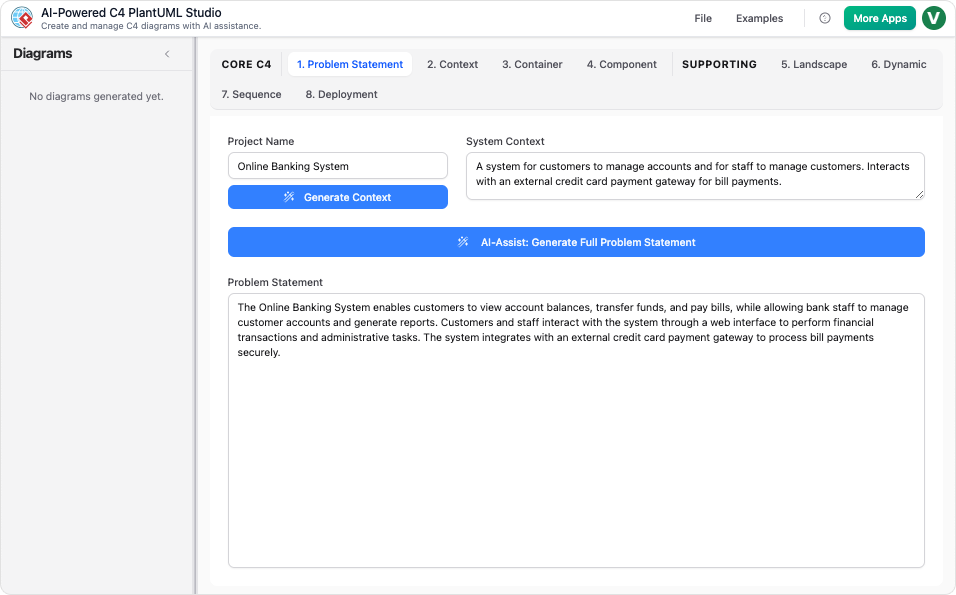
Under the hood, the tool utilizes PlantUML, a text-based scripting language for diagramming. This ensures that while the initial diagrams are AI-generated, they remain fully editable text. This hybrid approach offers the best of both worlds: the speed of AI automation and the precision of code-based diagramming.
Step-by-Step Walkthrough: Creating an Online Food Delivery Platform
To demonstrate the power of the AI C4 Studio, we will walk through a practical example based on a common scenario: designing an architecture for an Online Food Delivery Platform.
1. Accessing the Tool
Begin by logging into your Visual Paradigm Online workspace. Navigate to the AI features by clicking on “Create with AI” in the top right corner, then browse the AI apps. Search for “C4” and select the AI C4 Studio to start a new session.
2. Defining the Project Scope
The quality of the AI output depends on the clarity of the input. Start by entering the project name. You will then be prompted to define two critical text blocks:
- System Context: Provide a high-level description of the system. You can type this manually or use the “Generate context” feature to let the AI suggest a description based on your project title.
- Problem Statement: Describe the specific challenges the system solves. This context helps the AI infer the necessary components and interactions.
3. Generating Core C4 Diagrams
Once the context is defined, you can generate the hierarchical diagrams sequentially:
- System Context Diagram (Level 1): Switch to the System Context tab and click “Generate diagram.” The AI will produce the PlantUML code in the left panel and render the visual diagram on the right. This will show your food delivery platform interacting with customers, restaurants, and drivers.

- Container Diagram (Level 2): Navigate to the Container tab and generate the diagram. The tool will identify the necessary containers, such as the Customer Mobile App, Restaurant Web Portal, Backend API, and Database.
- Component Diagram (Level 3): To drill down further, select a specific container (e.g., the Backend API) within the Component tab and generate the diagram. This will reveal the internal controllers, services, and repositories.
4. Creating Supplementary Views
Visual Paradigm AI C4 Studio extends beyond the static structural views. You can generate supplementary diagrams to capture behavior and infrastructure:
- System Landscape: Generates a broader view showing how your system sits within a larger enterprise or ecosystem.
- Dynamic Diagrams: Select a container or component to generate runtime views. These illustrate how elements interact over time to fulfill a specific user request.
- Sequence Diagrams: Similar to dynamic views but focused on message flows between entities, these are essential for understanding complex logic.
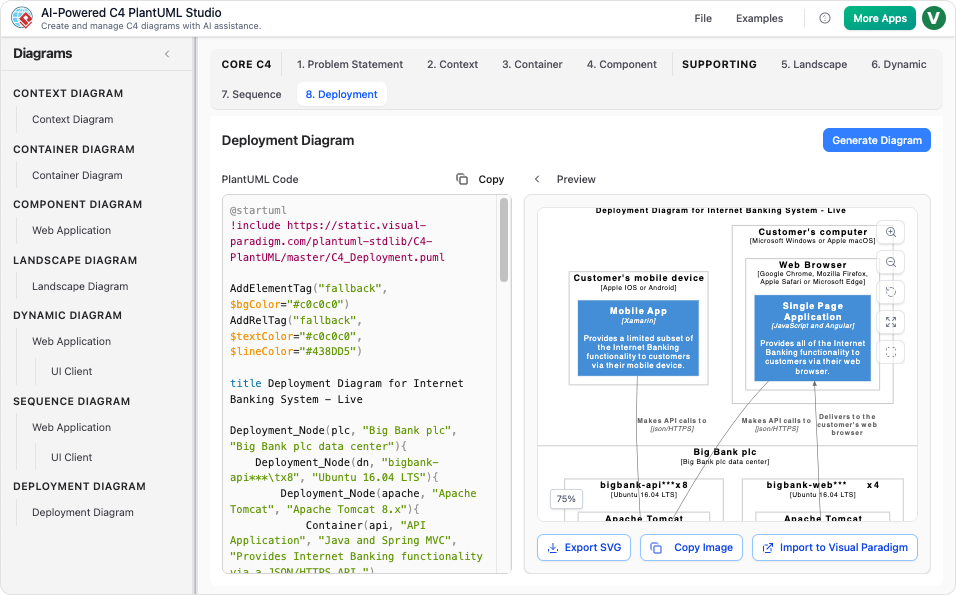
- Deployment Diagrams: Map your containers to infrastructure nodes, such as cloud servers, CDNs, or mobile devices.
5. Management and Export
The tool organizes all generated diagrams in a tree structure on the left panel. Since the output is standard PlantUML, you can manually edit the text to refine relationships or styling. Work can be saved directly to the Visual Paradigm Online cloud, or exported as JSON. For advanced styling and manual tweaking, the diagrams can be imported into the full Visual Paradigm diagram editor.
Key Benefits of Using AI for C4 Modeling
Adopting Visual Paradigm AI C4 Studio offers several distinct advantages for agile teams and software architects:
- Rapid Prototyping: Move from a rough idea to a full suite of architectural diagrams in minutes rather than days.
- Standardization: The tool enforces the notation and hierarchy of the C4 model, ensuring consistency across different projects.
- Editability and Flexibility: Because the diagrams are backed by PlantUML code, they are easy to version control and modify. The JSON export allows for easy backup and transfer.
- Collaboration: Being part of the Visual Paradigm Online ecosystem means these diagrams are readily available for team review and collaboration.
Conclusion
Visual Paradigm AI C4 Studio democratizes software architecture visualization. By removing the manual labor associated with drawing boxes and lines, it allows architects to focus on the actual design and decision-making process. Whether you are onboarding new team members, presenting to stakeholders, or maintaining “living documentation,” this tool provides a powerful, AI-driven workflow to communicate complex software systems with clarity and speed.
This post is also available in Deutsch, Español, فارسی, Français, Bahasa Indonesia, 日本語, Polski, Portuguese, Ру́сский, Việt Nam, 简体中文 and 繁體中文.