


Introduction
In today’s rapidly evolving digital landscape, organizations face a persistent challenge: bridging the gap between dynamic visual modeling and comprehensive technical documentation. Traditional workflows often force teams into cumbersome cycles of exporting static images, manually uploading files, and struggling to keep documentation synchronized with evolving designs. This disconnect not only wastes valuable time but also introduces risks of version mismatches and outdated information.
The Visual Paradigm OpenDocs Pipeline is an intelligent ecosystem that transforms static technical documentation into a living knowledge base. By bridging professional design environments with a built-in text editor, it treats architectural models, UML schemas, and data charts as dynamic, version-controlled assets. This case study explores how the Pipeline redefines knowledge management by creating a seamless, living documentation workflow where diagrams remain editable, versions are tracked automatically, and teams can focus on innovation rather than file management.
Whether you’re an enterprise architect, agile developer, or technical writer, understanding this integrated approach can unlock significant efficiency gains and improve the quality of your organizational knowledge base.
Core Ecosystem Components
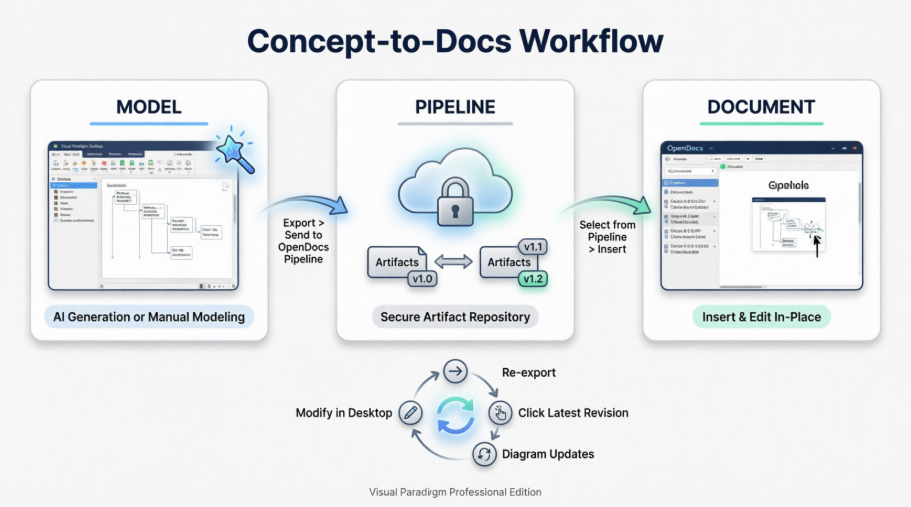
The Visual Paradigm OpenDocs Pipeline ecosystem comprises three interconnected tiers that work in harmony to streamline the documentation workflow:
1. Visual Paradigm (Desktop / Online / AI Chatbot)
The generation tier where raw visual materials—such as software architectures, BPMN flows, and data charts—are constructed manually or via conversational AI prompts. This serves as the creative foundation where models are initially developed and refined.
2. The Pipeline
A secure, cloud-based asset transit hub and repository. It tracks continuous asset modifications, logs user comments, and automates revision histories without requiring screenshots or manual file saves. The Pipeline acts as the central nervous system connecting all Visual Paradigm tools.
3. OpenDocs
A unified, AI-powered knowledge management workspace with real-time visual embeddings. This is where documentation comes alive, integrating textual content with dynamic visual assets.
The Challenge: Fragmented Workflows in Modern Development
Before the introduction of the OpenDocs Pipeline, teams using Visual Paradigm tools often encountered several friction points:
Manual Export Cycles
Diagrams created in Visual Paradigm Desktop or VP Online required manual export as PNG/JPG files before being uploaded to documentation platforms. This tedious process consumed valuable developer time and introduced opportunities for human error.
Loss of Editability
Once exported as static images, diagrams could not be easily modified without returning to the source tool and repeating the entire export process. This created a rigid separation between design and documentation that hindered agile development.
Version Control Gaps
Keeping documentation aligned with evolving models demanded meticulous manual tracking, often leading to inconsistencies. Teams frequently found themselves unsure whether their documentation reflected the latest design decisions.
Collaboration Barriers
Different team members working in different tools struggled to share and update assets efficiently. This fragmentation created silos that impeded effective communication and slowed project progress.
These challenges were particularly acute in agile environments where requirements and designs evolve rapidly, demanding documentation that can keep pace without becoming a bottleneck.
The Solution: OpenDocs Pipeline as a Centralized Asset Transit Hub
The Visual Paradigm OpenDocs Pipeline addresses these challenges by functioning as a secure, cloud-based repository for “artifacts”—the valuable assets created across the Visual Paradigm ecosystem. Rather than treating diagrams as static outputs, the Pipeline preserves them as live, editable cloud assets that maintain a direct link to their source models.
Core Architecture
The Pipeline operates as a bidirectional bridge connecting:
- Visual Paradigm Desktop: For professional-grade modeling and AI-assisted diagram generation
- VP Online: For cloud-based collaborative diagramming
- AI Chatbot: For rapid concept visualization through natural language prompts
- OpenDocs: For integrated knowledge management and documentation
This architecture ensures that a diagram created in any environment can flow seamlessly into documentation while retaining its intelligence and editability.
Key Benefits Realized
Elimination of Manual File Handling
Teams no longer need to download images, take screenshots, or manage file uploads. The Pipeline automates the transfer process, reducing administrative overhead and minimizing human error.
Preserved Editability and Fidelity
Diagrams inserted into OpenDocs via the Pipeline maintain their vector quality and remain fully editable. Changes made to source models can be reflected in documentation without recreating visuals from scratch.
Automatic Change Synchronization
When a source model is updated and pushed to the Pipeline, OpenDocs receives sync notifications. Users can compare revisions and update embedded diagrams with a single click, ensuring documentation always reflects the current design state.
Built-in Version Control
Every artifact pushed to the Pipeline is automatically versioned. Teams can attach contextual notes to revisions, browse historical versions, and roll back if needed—all without leaving the OpenDocs interface.
Implementation Workflow: A Three-Step Cycle
Step 1: Send the Artifact to the Pipeline
From Visual Paradigm Desktop:
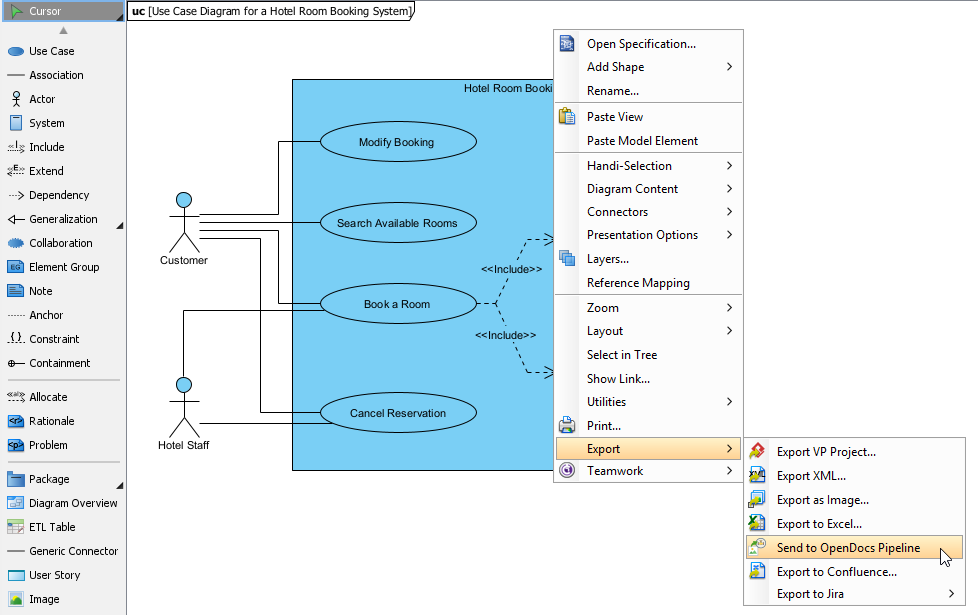
- Open your diagram in the Desktop application
- Right-click anywhere on the canvas
- Select Export > Send to OpenDocs Pipeline (or use the drawer button on the right edge)
- Add an optional comment to provide context for the artifact
- Confirm to save and push the diagram to the cloud repository
From VP Online:
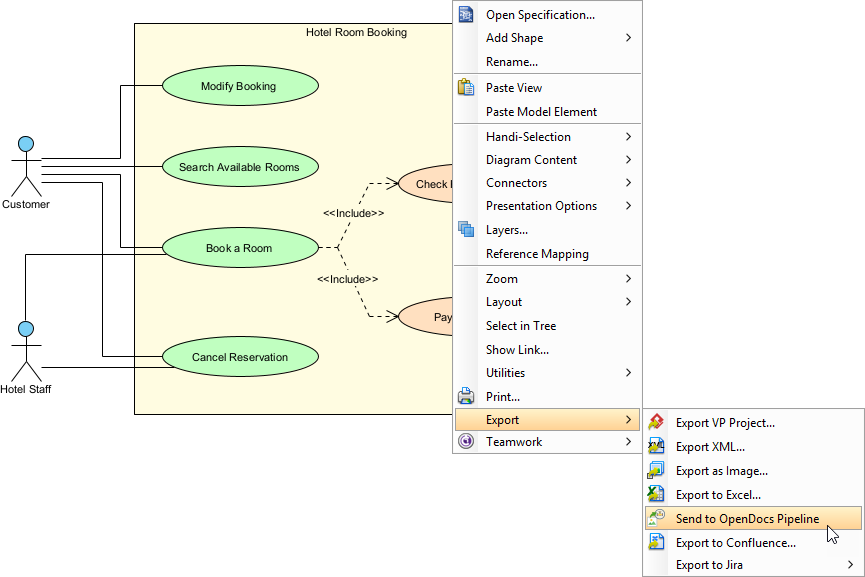
- Open your canvas or design in the web interface
- Click Export in the top-right corner
- Choose Send to OpenDocs Pipeline
- The artifact is immediately available in your OpenDocs workspace
From AI Chatbot:
- Generate a diagram using natural language prompts
- Once the AI renders your process or architecture, click the Export command
- Select Send to OpenDocs Pipeline to transfer the artifact directly
Step 2: Insert into OpenDocs
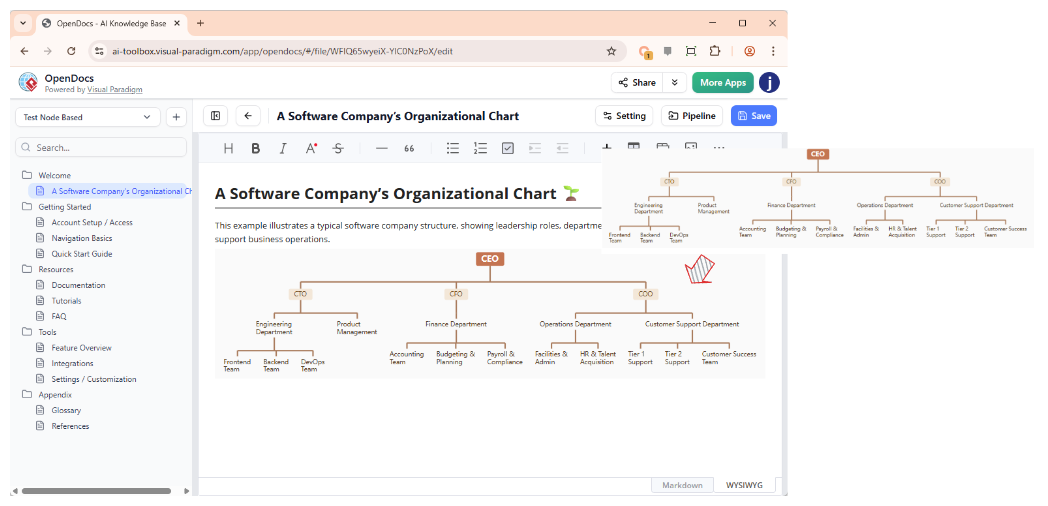
- Open your web-based OpenDocs workspace and navigate to the text page you wish to edit
- Click the Insert button on the editor toolbar
- Select Pipeline from the pop-up options to access your asset repository
- Browse your list of artifacts, filter by name or revision if needed
- Select your desired artifact and insert its current revision directly at your cursor position
The inserted diagram appears as a live, interactive element within your document—not a static image.
Step 3: Update and Manage Revisions
When source models evolve:
- Update the diagram in your modeling software (Desktop, Online, or via AI)
- Push the revised version to the Pipeline using the same export workflow
- For VP Desktop users: After the initial manual push, subsequent project commits can automatically update the artifact’s history stream
In OpenDocs:
- An update indicator appears in the Pipeline side panel whenever a newer diagram version is available
- Click the indicator to compare revision histories side-by-side
- Instantly switch your document to the preferred layout revision with a single action
Native Ad-Hoc Workspace Workflow
Alternatively, users can bypass external authoring tools entirely by designing directly within their documents using the OpenDocs Integrated Diagram Editor:
Create Ad-Hoc Canvas
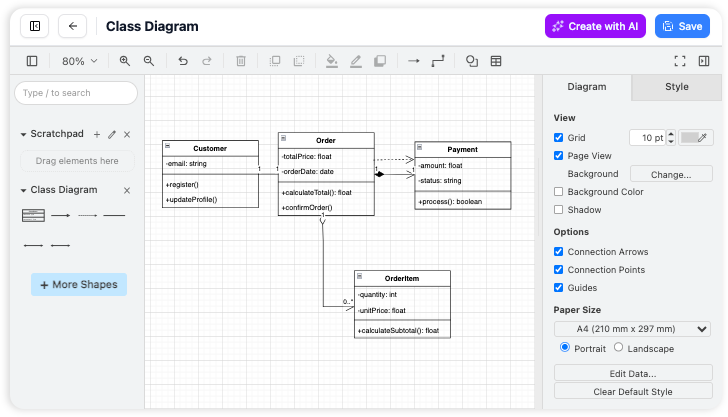
While authoring a text section, click Insert > Diagrams and choose your notation standard (such as UML or Data Flow Diagrams).
Employ AI Assistance
Use the Create with AI prompt helper to generate functional initial layouts from plain text descriptions.
Save Directly
Hit save to embed the finalized visual structure immediately into the document flow.
This integrated approach provides maximum flexibility, allowing teams to choose the workflow that best suits their needs while maintaining consistency across all documentation.
Real-World Impact: Transforming Documentation Practices
Case Scenario: Enterprise Architecture Team
A mid-sized financial services company adopted the OpenDocs Pipeline to manage documentation for a core banking system modernization project. Previously, their architecture team spent approximately 15 hours per week manually synchronizing UML diagrams with Confluence documentation. After implementing the Pipeline:
- Time Savings: Reduced diagram maintenance overhead by 80%, freeing ~12 hours weekly for higher-value analysis
- Accuracy Improvement: Eliminated version mismatches that previously caused 3-4 documentation errors per sprint
- Collaboration Enhancement: Enabled business analysts to view live diagrams in OpenDocs while architects refined models in Desktop—without coordination delays
- Onboarding Acceleration: New team members could explore versioned diagram histories to understand design evolution, reducing ramp-up time by 40%
Case Scenario: Agile Product Development
A SaaS startup integrated the Pipeline into their two-week sprint cycles. Product managers used the AI Chatbot to rapidly prototype user journey maps, which were then pushed to OpenDocs for stakeholder review. Key outcomes included:
- Faster Iteration: Concept-to-documentation time reduced from 2 days to under 2 hours
- Stakeholder Alignment: Live, editable diagrams in shared OpenDocs spaces improved feedback quality and reduced revision cycles
- Knowledge Retention: Versioned artifact histories created an auditable trail of design decisions for compliance and retrospective analysis
Best Practices for Maximizing Pipeline Value
1. Establish Naming Conventions
Use consistent, descriptive artifact names and comments to simplify browsing and retrieval in the Pipeline repository. A standardized naming approach ensures that team members can quickly locate the assets they need.
2. Leverage Optional Comments
When pushing artifacts, add contextual notes explaining the diagram’s purpose, scope, or key changes—this metadata proves invaluable during revision reviews and helps maintain a clear audit trail.
3. Schedule Regular Sync Reviews
Incorporate Pipeline revision checks into sprint retrospectives or documentation maintenance cycles to ensure living docs stay current. Regular reviews prevent documentation debt from accumulating.
4. Train Cross-Functional Teams
Ensure both modelers and documentation specialists understand the end-to-end workflow to maximize collaboration benefits. Comprehensive training eliminates adoption barriers and ensures consistent usage across the organization.
5. Utilize Version Context Notes
Attach meaningful descriptions to revisions to create a narrative of design evolution alongside the visual artifacts. This contextual information helps team members understand not just what changed, but why.
Architectural Considerations
When implementing the OpenDocs Pipeline, organizations should consider several key factors to optimize their deployment:
Your Primary Design Environment
Whether your team primarily uses the Desktop application or Online browser space will influence your workflow configuration and training priorities.
The Specific Types of Visuals You Model
Different project types may emphasize UML, BPMN, or Data Flow Diagrams. Understanding your team’s primary modeling needs helps tailor Pipeline usage patterns.
Automated Change Tracking Requirements
Consider whether your team requires automated change tracking across multiple documentation platforms. The Pipeline’s versioning capabilities can be customized to meet varying governance and compliance needs.
Conclusion
The Visual Paradigm OpenDocs Pipeline represents more than a technical integration—it embodies a philosophical shift toward living, intelligent documentation. By treating diagrams as dynamic, versioned assets rather than static outputs, the Pipeline enables organizations to build knowledge bases that evolve in lockstep with their designs.
This case study demonstrates that when visual modeling and documentation workflows are unified through a centralized asset transit hub, teams achieve measurable gains in efficiency, accuracy, and collaboration. The Pipeline eliminates the friction that has traditionally plagued documentation processes, allowing teams to focus on what matters most: innovation and quality.
For organizations navigating complex system designs, agile development cycles, or enterprise architecture initiatives, the Pipeline offers a practical path to reduce documentation debt while enhancing knowledge accessibility. As AI-assisted modeling continues to accelerate the pace of design exploration, tools like the OpenDocs Pipeline become essential infrastructure for ensuring that documentation remains a strategic asset rather than a maintenance burden.
The future of technical communication lies not in static manuals but in adaptive, interconnected knowledge ecosystems. With the Visual Paradigm OpenDocs Pipeline, that future is already here—ready to transform how your team creates, shares, and maintains the visual intelligence that drives innovation.
References
- A Case Study on Streamlining Knowledge Management with Visual Paradigm OpenDocs Pipeline: Comprehensive overview of the Pipeline’s impact on knowledge management workflows
- From Concept to Knowledge Base: A Third-Party Review of Visual Paradigm’s OpenDocs Workflow: Independent analysis of the OpenDocs ecosystem and its benefits
- From Silos to Synergy: How Visual Paradigm OpenDocs Transforms Team Documentation Through AI-Powered Visual Collaboration: Exploration of AI capabilities within the OpenDocs platform
- Visual Paradigm OpenDocs: The Definitive Guide: Comprehensive documentation and feature overview
- Sync AI Diagram to OpenDocs Pipeline Guide: Step-by-step tutorial for AI diagram synchronization
- AI Diagram to OpenDocs Pipeline: Technical documentation on AI-powered Pipeline integration
- OpenDocs Features Overview: Official feature listing and capabilities
- AI Breakdown Structure Chart Maker OpenDocs: AI-powered chart creation capabilities
- Visual Paradigm Pipeline YouTube Tutorial: Video demonstration of Pipeline functionality
- OpenDocs Pipeline YouTube Overview: Video overview of the Pipeline workflow
- My Journey with Visual Paradigm Pipeline: How This Asset Transit Hub Transformed My Documentation Workflow: Personal experience and implementation insights
- My Journey to Seamless Documentation: Sending Visual Paradigm Creations Directly to OpenDocs: User perspective on the direct export workflow
- Visual Paradigm’s Pipeline: Hands-On Review of Visual Paradigm’s Desktop-to-OpenDocs Integration: In-depth review of desktop integration capabilities
- Visual Paradigm Online to OpenDocs Export: Technical documentation for web-based exports
- From Model to Manual: A Software Engineer’s Guide to Syncing Visual Paradigm Desktop Diagrams with OpenDocs: Engineering-focused implementation guide
- Solving the Documentation Chaos: How Visual Paradigm’s Pipeline Creates a Frictionless Concept-to-Docs Workflow: Problem-solution analysis of Pipeline implementation
- OpenDocs AI-Powered Knowledge Platform: AI capabilities and platform features
- OpenDocs AI-Powered Knowledge Platform Release: Release notes and new feature announcements
- OpenDocs Features: Comprehensive feature documentation
- Sync AI Diagram to OpenDocs Pipeline Guide: Complete synchronization workflow guide
- New in OpenDocs: AI-Powered Data Flow Diagram (DFD) Support: Latest AI features and DFD capabilities
- OpenDocs YouTube Tutorial: Video walkthrough of OpenDocs functionality
- OpenDocs YouTube Overview: Comprehensive video overview of the platform
- OpenDocs YouTube Introduction: Introductory video to the OpenDocs platform
This post is also available in Deutsch, Español, فارسی, Français, English, Bahasa Indonesia, 日本語, Polski, Portuguese, Ру́сский, Việt Nam, 简体中文 and 繁體中文.
Related posts:
 OpenDocs by Visual Paradigm: Revolutionizing Knowledge Management with AI and Visual Thinking
 Comprehensive Guide: Fishbone Diagrams (Ishikawa) in OpenDocs
 Comprehensive Guide to OpenDocs (February–March 2026 Update): The AI-Powered Visual Knowledge Engine
Mastering the Visual Paradigm AI Ecosystem: A Comprehensive Guide
Comprehensive Guide to OpenDocs (February–March 2026 Update): The AI-Powered Visual Knowledge Engine
Mastering the Visual Paradigm AI Ecosystem: A Comprehensive Guide