


Enterprise architecture requires a shared language to bridge the gap between business strategy and technical execution. Without a structured framework, complex systems become difficult to visualize, communicate, and manage. ArchiMate provides this standard. It is a modeling language designed to describe, analyze, and visualize enterprise architecture. This guide breaks down the mechanics of ArchiMate, offering a clear path for new architects to understand its structure and application. 🧭
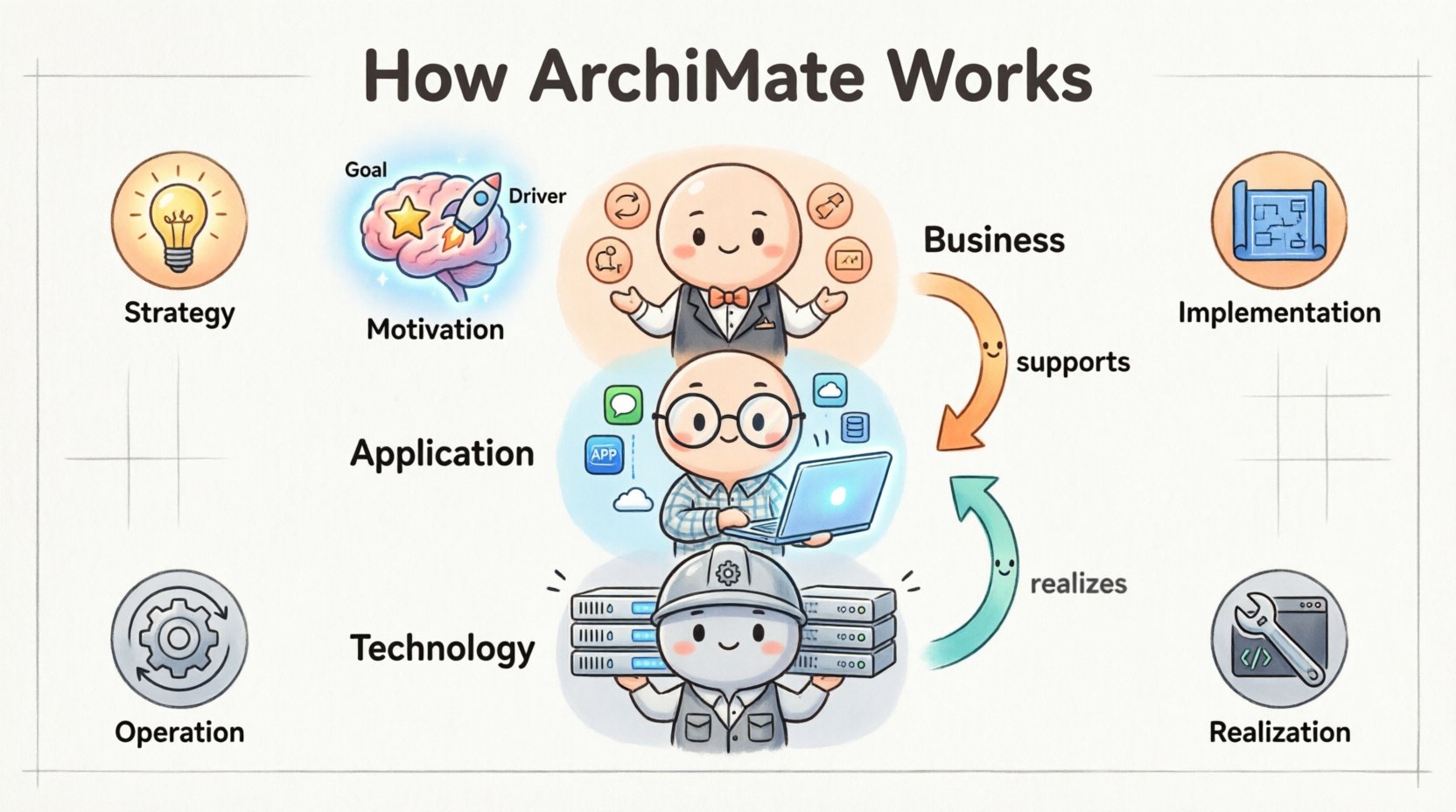
The Foundation of Enterprise Architecture 🏛️
ArchiMate is not merely a diagramming tool; it is a conceptual framework. It defines how different parts of an organization relate to one another. Think of it as the grammar of enterprise architecture. Just as grammar ensures sentences make sense, ArchiMate ensures architectural descriptions are logical and consistent. The language was developed by The Open Group and is widely adopted across industries.
For a new architect, the primary challenge is understanding the abstraction levels. ArchiMate allows you to view the enterprise from different perspectives. You can zoom in on specific technology details or zoom out to see high-level business goals. This flexibility is essential for managing complexity. The framework supports the entire lifecycle of an enterprise, from strategy definition to implementation and operation. 🔄
When you begin modeling, you must focus on the core components. These components are organized into layers and domains. They are connected by specific relationships that define how they interact. Understanding these building blocks is the first step toward effective modeling. There is no need to rush; clarity comes from understanding the basics deeply.
The Core Layers Explained 📚
The most recognizable aspect of ArchiMate is its layered structure. This structure separates concerns and prevents confusion. Each layer represents a specific aspect of the enterprise. By keeping them distinct, you maintain clarity. However, connections between layers are just as important as the layers themselves.
Business Layer
The Business Layer describes the business aspects of the enterprise. It includes processes, roles, and organizational structures. This is where the value proposition of the organization is defined. Key elements include:
- Business Process: A set of activities that deliver value to a stakeholder.
- Business Function: The capability of the organization to perform a specific activity.
- Business Role: A person or group responsible for a business function.
- Business Object: A conceptual representation of data within the business context.
These elements help you map out how work gets done. They do not focus on the software or hardware used, but rather on the logic and organization of the work itself. This separation allows business stakeholders to participate in the modeling process without needing technical expertise. 👥
Application Layer
The Application Layer sits between the business and the technology layers. It describes the software systems that support the business processes. This layer focuses on functionality rather than infrastructure. Key elements include:
- Application Component: A software unit that provides functionality.
- Application Service: A collection of functionality exposed to users.
- Application Interface: The point of interaction between components.
- Application Function: The logical grouping of application capabilities.
When modeling this layer, the goal is to show how software enables business activities. It answers the question: “Which application supports which business process?” This connection is critical for impact analysis. If a process changes, you need to know which applications are affected. 🖥️
Technology Layer
The Technology Layer describes the physical and logical infrastructure. It includes servers, networks, and software platforms. This is where the application layer is deployed. Key elements include:
- Device: A hardware unit like a server or router.
- System Software: Software that controls the hardware (e.g., OS, database).
- Network: The communication infrastructure.
- Technology Service: A capability provided by the technology infrastructure.
This layer is often the domain of IT operations. However, architects need to understand it to ensure business requirements can be met technically. The relationship between applications and technology is direct. Applications run on devices. Understanding this flow is vital for capacity planning and infrastructure design. 💻
Layer Interaction Table 📊
The following table summarizes the flow of value and dependency across the layers.
| Layer | Focus | Example Element | Dependency |
|---|---|---|---|
| Business | What the organization does | Order Processing | Depends on Application Services |
| Application | Software capabilities | CRM System | Depends on Technology Services |
| Technology | Infrastructure | Database Server | Physical foundation |
Notice that the Business layer relies on the Application layer, which in turn relies on the Technology layer. This dependency chain is fundamental to ArchiMate. It ensures that technical decisions align with business needs.
The Four Domains of Scope 🌐
Beyond the layers, ArchiMate defines domains. These domains represent the scope of the architecture. They help you organize your model based on the lifecycle stage or strategic intent. There are four main domains.
Strategy Domain
The Strategy Domain focuses on the long-term goals of the enterprise. It includes the motivation layer elements. This is where you define the vision. It answers the question: “Where are we going?” Elements here include:
- Goal: A desired outcome the enterprise wants to achieve.
- Principle: A guideline that guides decision-making.
- Requirement: A condition that must be met.
By placing goals at the top, you ensure that every technical component traces back to a business objective. This traceability is a key benefit of the framework. It prevents “technology for technology’s sake.” 🎯
Implementation and Migration Domain
This domain deals with the transition from the current state to the future state. It involves projects and initiatives. It answers the question: “How do we get there?” Elements include:
- Work Package: A set of related activities.
- Project: A temporary endeavor to create a unique result.
- Milestone: A significant point in time in the project timeline.
Using this domain helps architects manage change. It allows you to map specific projects to specific architectural changes. This makes it easier to track progress and resource allocation. 📅
Realization Domain
The Realization Domain focuses on the specific components that make up the solution. It includes the detailed building blocks of the architecture. It answers the question: “What is being built?” This domain often overlaps with the three core layers but focuses on the solution structure. Elements include:
- Construction: A component that realizes another component.
- Artifact: A logical representation of a component.
This is where the blueprint meets the construction site. It ensures that the high-level design is translated into concrete deliverables. 🛠️
Operation Domain
The Operation Domain covers the running of the enterprise. It focuses on the day-to-day activities. It answers the question: “How does it run?” This domain is crucial for understanding the ongoing state of the organization. It includes:
- Event: Something that happens at a specific time.
- Outcome: The result of an activity.
By modeling the operation domain, you can identify bottlenecks and inefficiencies in the current state. This informs future improvements. 🔄
Understanding Relationships and Connections 🔗
Elements alone do not tell a story. Relationships connect the elements. They define how one element influences another. There are many types of relationships in ArchiMate, but the most critical ones involve dependency, association, and specialization.
Dependency Relationships
Dependency is the most common relationship. It indicates that one element requires another to function. If the supplier is removed, the client cannot work. There are specific types of dependencies:
- Assignment: A role is assigned to a process.
- Flow: Objects flow between processes.
- Access: A process accesses an object.
- Realization: A component realizes another component.
- Serving: A service serves a business function.
Understanding the direction of the arrow is vital. The arrow usually points from the client to the supplier. For example, a Business Process uses an Application Service. The arrow points from the Process to the Service. This visual cue clarifies the direction of usage. ➡️
Association Relationships
Association indicates a looser connection. It suggests that elements are related but not dependent. For example, a Business Role might be associated with a Business Object. This means the role interacts with the object, but the object does not necessarily fail if the role is removed. It is a semantic link rather than a functional one. 🔗
Specialization Relationships
Specialization allows you to create hierarchies. It is similar to inheritance in object-oriented programming. A specific element is a type of a more general element. For example, a “Loan Application” is a specialization of a generic “Application.”
This helps in managing complexity. You can define general rules at the parent level and override them at the child level. It keeps the model clean and reusable. 🌳
The Motivation Layer 🧠
The Motivation Layer is often overlooked by new architects, but it is essential for context. It explains why the architecture exists. Without motivation, architecture is just a drawing. With motivation, it is a strategic tool.
Key elements in this layer include:
- Driver: A factor that forces the enterprise to change.
- Goal: A desired outcome.
- Requirement: A constraint or need.
- Principle: A rule to follow.
- Assessment: An evaluation of the current state.
By linking drivers to goals, and goals to requirements, you create a line of reasoning. You can trace a technical change back to a market driver. This justification is crucial when presenting architecture to leadership. It shows that decisions are grounded in business reality, not just technical preference. 📉
Putting It Together: Modeling Patterns 🧩
Once you understand the layers and relationships, you can start building models. However, raw elements can become messy. Modeling patterns help structure the information logically. Here are some common patterns.
The Service-Oriented Pattern
This pattern focuses on the interaction between business and application layers. It shows how business functions are supported by application services. It is useful for identifying service gaps. If a business function exists but has no supporting application service, you have identified a risk. 📈
The Deployment Pattern
This pattern maps applications to technology devices. It is essential for infrastructure planning. It shows where software is running and what hardware is required. It helps in capacity planning and cost estimation. 💾
The Change Pattern
This pattern maps the current state to the future state. It uses the Implementation and Migration domain. It shows which projects will deliver which changes. This is vital for project portfolios. It ensures that investments align with architectural direction. 🚀
Common Pitfalls for Beginners ⚠️
Even with a solid understanding, mistakes happen. New architects often fall into specific traps. Avoiding these will improve the quality of your models.
- Mixing Layers: Do not put business elements in the technology layer. Keep the layers distinct. Mixing them creates confusion about responsibility and ownership.
- Over-Modeling: Do not model every single detail. Focus on the relevant scope. A model that is too complex is useless. Simplicity is a virtue.
- Ignoring Relationships: Do not just draw boxes. Draw the lines. The value lies in the connections. Without relationships, the model is just a list of items.
- Skipping Motivation: Do not forget the “Why.” Architecture without goals is just documentation. Always link your changes to business drivers.
- Using Proprietary Notations: Stick to the standard ArchiMate notation. Custom symbols confuse readers who expect the standard. Consistency aids communication.
Building good architecture takes time. It requires iteration. You will refine your models as you learn more about the enterprise. This is normal. The goal is continuous improvement, not perfection on the first try. ✅
Integrating ArchiMate into Your Workflow 🔄
How do you actually use this in practice? You need to integrate the modeling into your daily tasks. ArchiMate is not a separate activity; it is part of the design process.
Start with the Business
Begin your modeling session by defining the business context. Identify the key processes and roles. Do not start with servers. Start with value. This keeps the focus on the business outcome. 🏁
Iterate with Stakeholders
Share your models with stakeholders. Business architects should review the business layer. IT architects should review the application and technology layers. Collaboration ensures accuracy. Feedback loops are essential for validation. 🤝
Keep It Up to Date
Architecture changes. Your models must change too. Establish a process for updating the models when projects are completed. An outdated model is worse than no model. It creates false confidence. 🛠️
Link to Standards
Use ArchiMate to map to industry standards. If you follow ITIL, TOGAF, or ISO standards, map your elements to their definitions. This enhances interoperability and compliance. 📜
Final Thoughts on Architectural Clarity 🌟
ArchiMate provides a robust structure for enterprise architecture. It breaks down complexity into manageable pieces. By understanding the layers, domains, and relationships, you can create models that communicate effectively. The goal is not just to draw diagrams, but to facilitate decision-making.
New architects should focus on mastering the core concepts before attempting complex integrations. Practice is key. Start with small models and expand them gradually. Remember that the framework is a tool to serve the enterprise, not an end in itself. When used correctly, ArchiMate brings clarity to chaos. It turns abstract ideas into concrete plans. 🎨
As you continue your journey, keep refining your understanding. The landscape of technology evolves, but the need for clear communication remains constant. ArchiMate adapts to these changes, providing a stable foundation for your work. Stay curious, stay structured, and keep building value. 🚀
This post is also available in Deutsch, Español, فارسی, Français, English, Bahasa Indonesia, 日本語, Polski, Portuguese, Ру́сский, Việt Nam, 简体中文 and 繁體中文.