


Business Process Model and Notation (BPMN) serves as the universal language for defining, visualizing, and analyzing workflows. When a process model is executed or simulated, accuracy is paramount. A single logical flaw can halt an entire operation, leading to data loss, delays, or system failures. This guide addresses the most critical structural issues found in BPMN models: deadlocks and parallelism errors. By understanding the root causes and applying systematic troubleshooting techniques, you can ensure your process diagrams are robust and executable.
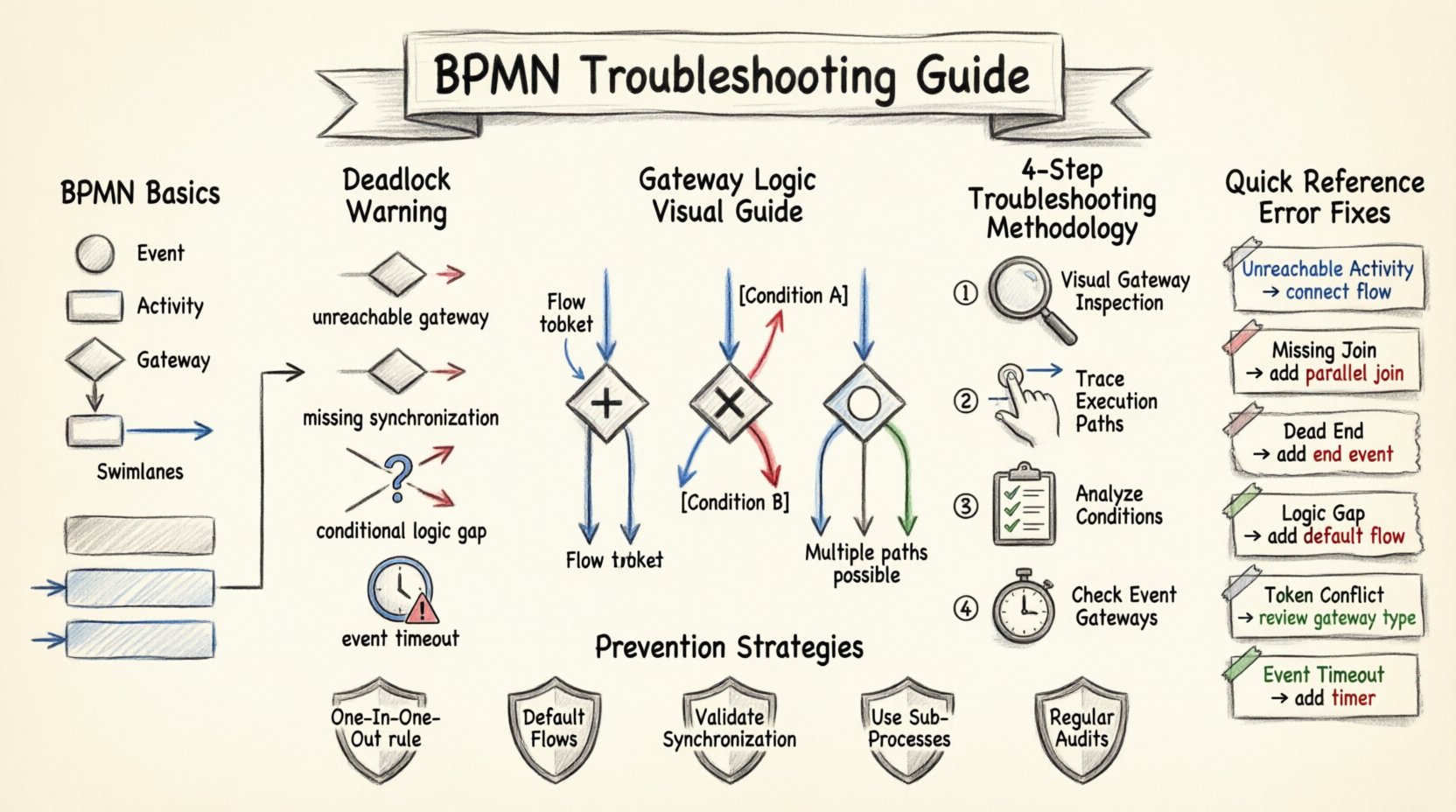
🧩 Understanding BPMN Structure and Flow
Before diagnosing errors, it is essential to review the foundational elements of the notation. BPMN relies on specific flow objects, connecting objects, and swimlanes to dictate the journey of a process instance.
- Flow Objects: These include events (circles), activities (rounded rectangles), and gateways (diamonds). They form the core logic of the diagram.
- Connecting Objects: Sequence flows (solid arrows) drive the order of activities, while message flows (dashed arrows) represent communication between pools.
- Swimlanes: These organize activities by participant, ensuring clear responsibility assignment.
When these elements are connected incorrectly, the execution engine cannot determine the next step. This often manifests as a deadlock or a parallelism error.
⚠️ What is a Deadlock in BPMN?
A deadlock occurs when a process instance reaches a state where no further progress can be made. The engine waits for a condition that will never be met. In technical terms, the execution path is blocked indefinitely. This is different from a simple error where the process fails; a deadlock implies the system is stuck in an infinite wait state.
Common Causes of Deadlocks
- Unreachable Gateways: A path leading to a gateway exists, but no path exists leaving that gateway.
- Missing Synchronization: Parallel branches split off but never converge before a subsequent activity.
- Conditional Logic Errors: All conditional paths evaluate to false, leaving no valid route forward.
- Event-Based Gateways: Waiting for an event that never triggers within the defined timeframe.
🔄 Parallelism Errors and Gateway Logic
Parallelism errors often stem from a misunderstanding of how gateways manage flow. BPMN distinguishes between gateways that split flow (exclusive, parallel, inclusive) and gateways that merge flow.
The AND Gateway (Parallel Split and Join)
The Parallel Split Gateway (often shown as a diamond with a plus sign) directs the flow down multiple paths simultaneously. To resolve this correctly, a Parallel Join Gateway must be present to wait for all incoming paths to complete before proceeding.
- Error Scenario: You split the flow into three branches, but one branch ends in an event without reaching the join point.
- Error Scenario: You use a Parallel Split, but the join gateway expects only two paths while three arrive.
The XOR Gateway (Exclusive Gateway)
The Exclusive Gateway routes the flow down exactly one path based on conditions. This is often used for decision points.
- Error Scenario: All conditions evaluate to false, or no condition is defined, causing the engine to pause waiting for a truth value.
- Error Scenario: Multiple paths are taken when only one is intended, leading to data duplication or logic conflicts.
The OR Gateway (Inclusive Gateway)
The Inclusive Gateway allows one or more paths to be taken based on conditions. This is the most complex gateway type and prone to synchronization errors.
- Error Scenario: The join gateway waits for all incoming paths to complete, but some paths were not activated.
- Error Scenario: Conditions are not mutually exclusive, causing ambiguity in the routing logic.
🔍 Troubleshooting Methodology
Resolving these issues requires a structured approach. Do not rely on guesswork. Follow this systematic process to identify and fix errors in your model.
Step 1: Visual Inspection of Gateways
Start by scanning every diamond shape in your diagram. Check the incoming and outgoing arrows.
- Ensure every split has a corresponding join.
- Verify that all paths lead to a valid termination event.
- Check if any path ends abruptly in the middle of a lane without a gateway or event.
Step 2: Trace Execution Paths
Manually trace a single instance through the diagram. Start from the start event and follow the sequence flows.
- Split Point: If you encounter an XOR gateway, choose one condition and follow it. Then backtrack and choose another. Repeat until all conditions are tested.
- Join Point: When merging paths, ensure that the gateway waits for the correct number of tokens. If using a Parallel Join, all branches must be active.
Step 3: Analyze Conditions
Look at the expressions attached to sequence flows. Are they valid? Do they cover all possibilities?
- For XOR gateways, ensure the sum of probabilities is 100% (or logically covers all outcomes).
- For OR gateways, ensure the logic handles the case where no conditions are met (usually requires a default flow).
Step 4: Check Event Gateways
Event-based gateways wait for specific events to occur. If the event does not happen, the process waits forever.
- Ensure that for every event gateway, there is a fallback path that triggers after a timeout or error.
- Verify that the events are actually available in the execution environment.
📊 Common Error Patterns and Fixes
The following table summarizes frequent mistakes and their corrective actions. Use this as a quick reference during your review.
| Error Type | Description | Fix Strategy |
|---|---|---|
| Unreachable Activity | An activity cannot be reached from the start event. | Connect the activity to a valid sequence flow or remove it. |
| Missing Join | A parallel split has no corresponding join gateway. | Add a Parallel Join Gateway to synchronize the paths. |
| Dead End Path | A path ends without a termination event. | Connect the end of the path to an End Event. |
| Logic Gap | No condition is met at an Exclusive Gateway. | Add a default flow (marked with an ‘X’ or ‘D’) to catch unmet conditions. |
| Token Conflict | Multiple tokens arrive at a join point that expects one. | Review the gateway type. Use an XOR Join if only one path should arrive. |
| Event Timeout | Process waits indefinitely for an event. | Implement a timer event or a timeout mechanism to break the wait. |
🛡️ Prevention Strategies
While troubleshooting fixes existing issues, prevention ensures new models are built correctly. Adopting best practices during the design phase reduces the likelihood of encountering deadlocks later.
1. Adhere to the “One In, One Out” Rule
Except for the Start and End events, every element should ideally have one incoming flow and one outgoing flow. This simplifies the logic and makes tracing easier. Avoid branching directly from an activity without a gateway unless the activity itself handles the branching logic internally.
2. Define Default Flows
Always specify a default flow for Exclusive Gateways. If a specific condition fails, the process should not hang. The default flow acts as a safety net, ensuring the process can continue to a termination event or a fallback activity.
3. Validate Synchronization Points
When using Parallel Gateways, explicitly define where the paths converge. Do not rely on implicit synchronization. If a branch ends early (e.g., in a sub-process), ensure the main flow accounts for this. Use intermediate events to signal completion if necessary.
4. Use Sub-Processes Wisely
Complex logic should be encapsulated in sub-processes. This keeps the main diagram clean and allows you to validate the internal logic of the sub-process independently. However, be aware that events inside a sub-process may not trigger on the main level unless explicitly configured.
5. Regular Model Audits
Implement a review cycle where models are inspected by a second pair of eyes. Fresh perspectives often catch logical gaps that the original designer missed. Use simulation tools to run test cases against the model before deployment.
🧪 Testing and Validation Techniques
Validation is not just about running the model; it is about stress-testing the logic under various scenarios.
Scenario Testing
- Happy Path: Verify the process works when all conditions are met perfectly.
- Edge Cases: Test scenarios where conditions are on the boundary (e.g., values equal to thresholds).
- Error Paths: Intentionally trigger errors to see if the process handles them gracefully or deadlocks.
Token Simulation
Some modeling tools allow for token simulation. This visualizes the flow of control (tokens) through the diagram. Watch for tokens getting stuck at gateways. If a token disappears or accumulates unexpectedly, it indicates a synchronization error.
Data Consistency Checks
Ensure that data variables passed between activities match the expected types. A mismatch can cause an activity to fail, which might look like a deadlock if the failure is not handled. Check that variable scopes are correct, especially when crossing boundaries between pools or lanes.
🔄 Complex Scenarios: Nested Loops and Event-Based Gateways
Advanced models often introduce complexity that increases the risk of errors. These scenarios require careful attention.
Nested Loops
Loops are created by connecting an End Event back to a Start Event or an Activity. Nested loops can create infinite cycles if not bounded.
- Ensure there is a condition to break the loop.
- Verify that the exit condition is reachable.
- Check that the loop does not create a deadlock by waiting for a condition that changes outside the loop.
Event-Based Gateways
These gateways wait for multiple events to occur. Only the first event to arrive triggers the path.
- Timeout Risk: If no event occurs, the process hangs. Always add a timer event.
- Conflict Risk: If two events occur simultaneously, the behavior may be undefined. Ensure events are mutually exclusive.
- State Management: Ensure the process state is correctly updated when an event triggers, so subsequent logic does not fail.
📝 Summary of Best Practices
Maintaining a healthy BPMN model requires discipline and attention to detail. By focusing on the following areas, you can minimize errors and improve process reliability.
- Clarity: Use clear names for events, activities, and gateways.
- Simplicity: Avoid unnecessary complexity in the diagram. Use sub-processes to hide detail.
- Completeness: Ensure every path leads to a termination event.
- Validation: Test the model with real data and edge cases.
- Documentation: Document the logic behind complex gateways to aid future troubleshooting.
By applying these principles, you create a foundation for process automation that is resilient and efficient. Remember that a well-structured model is easier to maintain and modify over time. Regular reviews and adherence to BPMN standards will keep your workflows running smoothly without unexpected interruptions.
This post is also available in Deutsch, Español, فارسی, Français, English, Bahasa Indonesia, 日本語, Polski, Portuguese, Ру́сский, Việt Nam, 简体中文 and 繁體中文.