


As of February and March 2026, OpenDocs, Visual Paradigm’s flagship AI-driven knowledge management platform, has undergone a transformative evolution. No longer just a documentation tool, OpenDocs is now redefined as a “Visual Knowledge Engine”—a unified, intelligent workspace that seamlessly blends natural language input, AI-powered diagramming, and rich, real-time visual content creation.
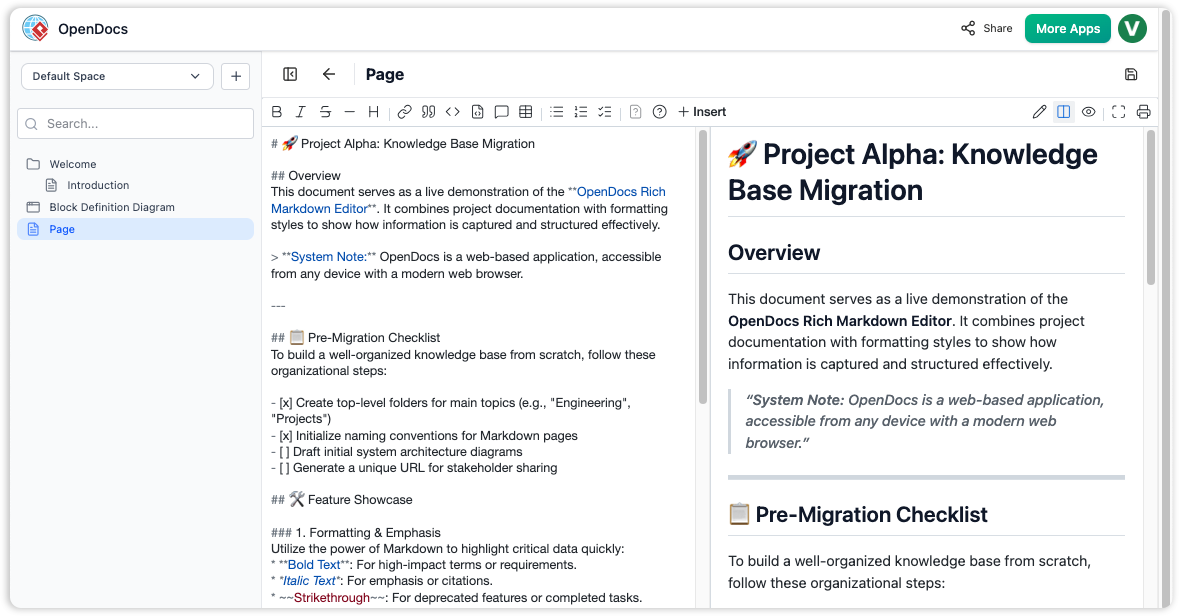
This guide provides a complete overview of OpenDocs’ latest features, architectural improvements, use cases, and integration capabilities, based on the official updates released through January to March 2026.
🔍 What Is OpenDocs?
OpenDocs is a web-based, AI-powered knowledge management platform designed for teams to create, organize, visualize, and share technical documentation, wikis, architectural models, and project plans—all within a single, collaborative environment.
It acts as a “living library” for modern engineering, product, and enterprise teams, bridging the gap between traditional text-heavy documentation and dynamic visual modeling. With deep integration of AI, OpenDocs enables users to generate diagrams from plain language, enrich content with visuals, and maintain knowledge in a structured, searchable, and shareable format.
✅ Included with:
- Visual Paradigm Online (Combo Edition)
- Visual Paradigm (Professional Edition)
🚀 Key Evolution: From Knowledge Base to Visual Knowledge Engine
The 2026 updates mark a paradigm shift in how teams manage knowledge:
- Natural language → Visual output via AI
- Real-time WYSIWYG editing
- Native mind maps, timelines, PERT charts, ERDs, and more
- Unified workspace for writing, diagramming, and collaboration
This evolution positions OpenDocs not just as a documentation tool, but as the central nervous system of knowledge-driven teams.
📌 Core Features & Updates (Feb–Mar 2026)
1. WYSIWYG Editor (Jan/Feb 2026)
- Replaces pure Markdown with a “What You See Is What You Get” editor.
- Enables real-time formatting: bold, italics, headings, lists, tables, code blocks, and embedded visuals.
- Supports inline diagram insertion and live preview of visual elements.
- Ideal for non-technical contributors and content creators who prefer visual editing over code.
📌 Why it matters: Eliminates the learning curve of Markdown while preserving full control over formatting and structure.
2. AI-Powered Mind Maps (February 2, 2026)
- Introduces native mind map support directly in OpenDocs.
- Users can generate mind maps from natural language prompts (e.g., “Brainstorm features for a customer portal”).
- Mind maps can be:
- Embedded within documents
- Created as standalone pages
- Exported or shared via read-only links
- AI auto-suggests branches, hierarchies, and related concepts.
📌 Use Case: Ideation sessions, product backlog grooming, requirement gathering, and strategic planning.
3. Expanded AI Diagramming Suite (Feb 2026)
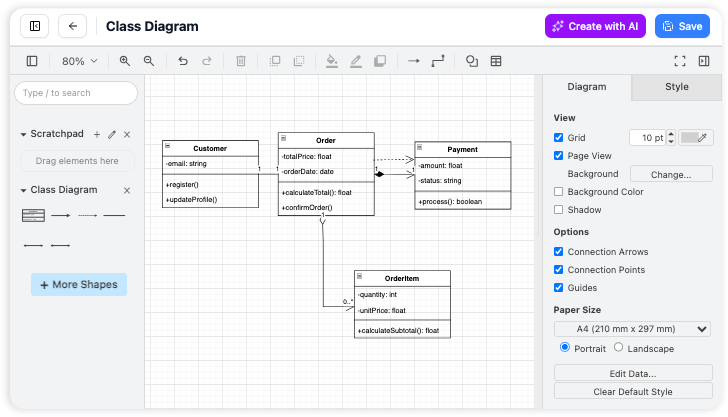
OpenDocs now supports eight new AI-powered diagram types, significantly enhancing its modeling capabilities across domains:
| Diagram Type | Key AI Features | Use Case |
|---|---|---|
| UML Profile Diagrams | AI generates custom stereotypes, tagged values, and constraints from text. | Custom domain modeling, metamodeling, and specification of specialized UML extensions. |
| Component & Deployment Diagrams | AI creates architecture diagrams from textual descriptions (e.g., “Microservices with Kafka and PostgreSQL”). | Software architecture design, cloud deployment planning. |
| Entity Relationship Diagrams (ERD) | AI-driven database schema design from natural language (e.g., “Users can post comments; each comment belongs to one user”). | Database design, data modeling, backend system documentation. |
| Data Flow Diagrams (DFD) | Supports Gane-Sarson and Yourdon & Coad methodologies. AI interprets process flows and data movements. | System analysis, business process modeling, legacy system documentation. |
| PERT Charts | AI generates project timelines with dependencies, critical paths, and estimated durations from text. | Project planning, Agile sprint forecasting, milestone tracking. |
| Timeline Diagrams | Visualizes events, milestones, and phases over time. AI suggests timing based on input. | Roadmap planning, release schedules, historical analysis. |
| Breakdown Structures | AI generates Work Breakdown Structures (WBS) and Product Breakdown Structures (PBS) from project goals. | Project management, deliverable tracking, scope definition. |
| Process Flowcharts | AI converts step-by-step descriptions into visual flowcharts with decision points and loops. | Business process optimization, SOP creation, compliance documentation. |
📌 Why it matters: Teams can now generate complex, accurate diagrams in seconds—no manual drag-and-drop or coding required.
4. Advanced AI Features (Visual Paradigm 18.0 – January 2026)
The 18.0 release introduced enterprise-grade AI capabilities, positioning OpenDocs as a strategic tool for large-scale architecture and process improvement:
- AI-Driven TOGAF Guide Through:
AI walks users through the TOGAF (The Open Group Architecture Framework) methodology step-by-step, suggesting artifacts, templates, and alignment checks based on project context. - AI Value Stream Mapping (VSM):
Automatically identifies process steps, bottlenecks, and lead times from textual descriptions of workflows. Generates visual VSMs with cycle time, value-added vs. non-value-added analysis.
📌 Use Case: Digital transformation initiatives, Lean/Agile adoption, continuous improvement programs.
5. AI Content & Visual Enhancements
- Revamped AI Infographic Generator:
Now supports more templates, dynamic data visualization, and real-time theme customization (e.g., dark mode, corporate branding). - Hand-Drawn Styling Options:
Users can apply a “hand-drawn” aesthetic to diagrams for informal presentations, brainstorming, or agile workshops. - Smart Visual Suggestions:
AI recommends relevant diagrams, charts, and visual elements based on the content being written.
6. Collaboration & Sharing
- Shared Workspaces:
Entire OpenDocs spaces can be shared via read-only or edit-access links. - Real-Time Collaboration:
Multiple users can edit documents and diagrams simultaneously. - Version History & Audit Trail:
All changes are tracked, with the ability to revert to previous versions. - Space-Level Permissions:
Admins can assign roles (Viewer, Editor, Admin) at the folder or document level.
✅ Ideal for: Cross-functional teams, distributed engineering squads, enterprise architecture offices.
🗂️ Core Architecture: Spaces and Structure
OpenDocs uses a hierarchical “Spaces” system to organize knowledge:
- Spaces = Top-level containers (e.g., “Product A,” “Enterprise Architecture”).
- Sub-Spaces = Folders for organizing documents and diagrams (e.g., “Requirements,” “Architecture,” “Project Plans”).
- Documents = Pages with rich text, embedded diagrams, and AI-generated content.
- Diagrams = First-class citizens, editable inline or in dedicated editors.
This structure supports both project-specific and enterprise-wide knowledge management.
💡 Use Cases & Practical Applications
| Use Case | How OpenDocs Helps |
|---|---|
| Software Development Teams | Generate UML, ERD, component diagrams from user stories; maintain living technical documentation. |
| Enterprise Architects | Use AI TOGAF guidance and Value Stream Mapping to standardize frameworks and identify inefficiencies. |
| Product Managers | Create timelines, PERT charts, and mind maps to plan releases and gather feedback. |
| IT & DevOps Teams | Automate deployment diagrams from text; document system architectures with minimal effort. |
| Consulting & Training Firms | Deliver client-ready diagrams and reports using AI-generated visuals and infographics. |
| Academic & Research Teams | Build annotated mind maps and process flows for research papers and proposals. |
🛠️ Getting Started with OpenDocs (2026 Edition)
- Access: Log in to your Visual Paradigm Online (Combo) or Professional Edition account.
- Create a Space: Click “New Space” and name it (e.g., “Q2 Product Roadmap”).
- Add a Document: Use the WYSIWYG editor to write content or start with AI prompts.
- Insert AI Diagrams: Type a prompt like “Create a PERT chart for the new feature launch with 5 tasks and dependencies.”
- Enhance with Visuals: Use hand-drawn style, infographics, or mind maps.
- Share & Collaborate: Generate a link and invite team members.
✅ Pro Tip: Use the AI assistant (available in the editor toolbar) to generate diagrams, summarize content, or suggest improvements.
⚠️ Important Note on AI Accuracy
❗ AI can make mistakes.
While OpenDocs’ AI is highly advanced, always review and validate generated diagrams and content—especially for production or compliance-critical use cases.
📚 Reference List
- OpenDocs – Visual Paradigm: Official feature overview of OpenDocs, including integration with Visual Paradigm and core capabilities.
- OpenDocs WYSIWYG Editor Update – Visual Paradigm: Details on the introduction of the real-time, visual editor replacing Markdown.
- AI-Powered Mind Map Integration – Visual Paradigm: Official announcement of native mind map support and its use in brainstorming and documentation.
- AI PERT Chart Generator – OpenDocs: Explains AI-driven PERT chart creation for project planning.
- AI Entity Relationship Diagram (ERD) Generation – OpenDocs: Covers AI-assisted database design using natural language input.
- AI Profile Diagram Generation – UML Support: Describes AI support for UML profile diagrams with stereotypes and constraints.
- AI Breakdown Structure Chart Maker – OpenDocs: Details on AI-generated Work Breakdown Structures (WBS) and Product Breakdown Structures (PBS).
- Timeline Diagram Update – OpenDocs: Information on AI-powered timeline visualization and scheduling.
- AI Component & Deployment Diagram Generator: Explains how AI generates software architecture diagrams from text.
- Visual Paradigm 18.0 Release – AI-Powered Features: Comprehensive overview of the 18.0 release, including TOGAF and Value Stream Mapping.
- Visual Paradigm 18.0 – AI Evolution for Agile Architecture: In-depth analysis of how OpenDocs supports agile and future-ready teams.
- AI-Driven TOGAF Guide Through – Visual Paradigm: Explains the new AI-guided TOGAF framework navigation feature.
- OpenDocs – AI-Powered Knowledge Platform: Foundational release note describing OpenDocs as a living knowledge library.
- CyberMedian – OpenDocs Revolutionizing Knowledge Management: Article highlighting OpenDocs’ role in visual thinking and AI integration.
Visual Paradigm Desktop Product Updates (Page 2): Additional technical details and release notes from the 18.0 update cycle.
✅ Conclusion
As of February–March 2026, OpenDocs has evolved into a true Visual Knowledge Engine—a powerful, intelligent, and collaborative platform that redefines how teams create, manage, and share knowledge.
With WYSIWYG editing, AI-generated mind maps and diagrams, enterprise-grade architecture support, and seamless collaboration, OpenDocs is no longer just a documentation tool—it’s the central hub for visual thinking, technical storytelling, and strategic planning in modern organizations.
Whether you’re an architect, developer, product manager, or consultant, OpenDocs empowers you to think visually, act faster, and communicate clearly—all powered by AI.
📌 Final Tip: Explore the AI assistant in OpenDocs—it’s your co-pilot for turning ideas into diagrams, documents, and deliverables in seconds.
This guide is based on official release notes and product updates from Visual Paradigm (January–March 2026). Always verify information through the official sources.
This post is also available in Deutsch, Español, فارسی, Français, English, Bahasa Indonesia, 日本語, Polski, Portuguese, Ру́сский, Việt Nam, 简体中文 and 繁體中文.