


In today’s fast-paced software development landscape, creating accurate, detailed, and maintainable use case models is essential for successful system design. Visual Paradigm’s AI-powered Use Case Refinement Tools revolutionize the way teams approach use case modeling by automating the transformation of high-level user stories into professional, structured UML diagrams. This guide walks you through the full lifecycle of use case refinement using Visual Paradigm’s AI capabilities — from initial setup to final documentation — while highlighting best practices and important caveats.
🔍 Why Use AI for Use Case Refinement?
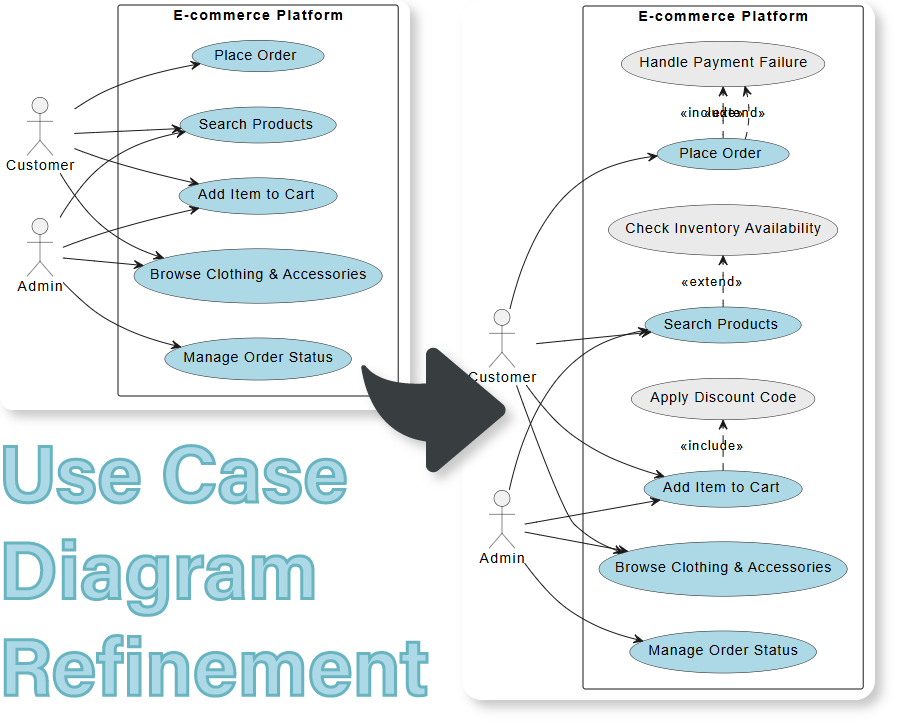
Traditional use case modeling often involves time-consuming manual analysis, risk of missing edge cases, and inconsistent notation. Visual Paradigm’s AI-driven approach addresses these challenges by:
-
Automatically identifying actors, goals, and system functionalities
-
Detecting and generating “include” and “extend” relationships
-
Expanding base scenarios into alternative flows, exception handling, and validation steps
-
Ensuring consistency, completeness, and professional formatting in UML diagrams
✅ Benefit: Reduce manual effort by up to 70%, uncover hidden requirements, and accelerate the design phase.
⚠️ Note: AI is a powerful assistant, but it can make mistakes — always review and validate generated content before finalizing models. [10]
🧠 Key Features of Visual Paradigm’s AI Use Case Refinement Tool
1. Automatic Generation of UML Use Case Diagrams
Input a simple user story or description, and the AI instantly generates a complete, structured UML Use Case Diagram with actors, use cases, and basic relationships.
📌 Example:
“As a user, I want to log in so I can access my account.”
→ AI generates:Useractor,Loginuse case, with potential extensions likeForgot Password,Invalid Credentials.
🔗 Learn more: Free AI Use Case Diagram Tool – Visual Paradigm Updates
2. AI Refine Function: Enhance Existing Diagrams
The “Refine Diagram with AI” feature analyzes existing diagrams and intelligently adds missing components such as:
-
Alternative flows (e.g., “User enters incorrect password”)
-
Exception scenarios (e.g., “Database connection fails”)
-
Validation checks (e.g., “Password must be at least 8 characters”)
-
Security considerations (e.g., “Rate limiting after 5 failed attempts”)
This ensures your use cases are not just functional, but robust and production-ready.
🔗 Explore the feature: AI Use Case Diagram Refinement – Visual Paradigm Features
3. Smart Relationship Detection: Include & Extend
AI automatically identifies and applies correct UML relationships:
-
<<include>>: For mandatory sub-flows (e.g.,Authenticate Useris included inLogin) -
<<extend>>: For optional behaviors (e.g.,Send Confirmation EmailextendsRegister Useronly if email verification is enabled)
This improves clarity and supports modular, reusable design patterns.
📌 Pro Tip: Use <<extend>> for features that are optional or context-dependent (e.g., multi-factor authentication).
4. Actor & Goal Identification
The AI scans your input text to:
-
Identify primary and secondary actors (e.g.,
Customer,Admin,Payment Gateway) -
Extract core system goals and map them to corresponding use cases
-
Suggest improvements in actor roles and responsibilities
This ensures your model starts with a solid foundation based on real-world behavior.
🔗 See how it works: Mastering AI-Driven Use Case Diagrams – Archimetric
🛠️ Step-by-Step Guide to Refining Use Cases with Visual Paradigm AI
Follow these five steps to transform a simple idea into a comprehensive, professional use case model.
✅ Step 1: Access the AI Tool
Open Visual Paradigm Online or the desktop application, then navigate to:
Tools > App > Use Case Driven Development Assistant
This launches the AI-powered assistant specifically designed for use case modeling.
🔗 Video Tutorial: How to Use the AI Use Case Refinement Tool
✅ Step 2: Describe Your Domain
Provide a clear, natural-language description of your system. Include:
-
Key actors (users, systems, external entities)
-
Main functionalities or goals
-
Any known constraints or business rules
📝 Example Input:
“An e-commerce platform allows customers to browse products, add items to a cart, and complete checkout. The system must validate payment details and send a confirmation email upon successful purchase.”
The AI uses this context to build a foundational model.
✅ Step 3: Generate the Initial Diagram
Click the “Generate Diagram” button.
The AI will:
-
Create a base UML Use Case Diagram
-
Place actors and use cases based on your input
-
Establish initial relationships (e.g.,
Customer→Browse Products,Checkout)
You’ll see a clean, well-structured diagram ready for refinement.
📹 Watch the process: YouTube: Generate Diagram with AI
✅ Step 4: Refine with AI
Click the “Refine Diagram with AI” button.
The AI will now:
-
Expand the happy path into detailed steps
-
Add alternative flows (e.g., “Cart is empty”, “Product out of stock”)
-
Insert exception scenarios (e.g., “Payment declined”, “Server timeout”)
-
Suggest include/extend relationships (e.g.,
Validate Paymentis included inCheckout) -
Propose additional actors (e.g.,
Payment Gateway,Shipping Service)
This step transforms a basic flow into a comprehensive, production-grade use case model.
🔍 Pro Tip: Use this feature iteratively — refine, review, refine again.
✅ Step 5: Edit and Export Your Diagram
After AI refinement, you can:
-
Edit any element directly in the diagram (rename use cases, adjust relationships)
-
Add notes or constraints for documentation
-
Export the diagram in multiple formats:
-
SVG for high-quality documentation and web use
-
PNG, PDF, or XMI for integration with other tools
-
📌 Exporting to SVG ensures scalability and clarity in reports, presentations, and user manuals.
🔗 Learn more: AI Use Case-Driven Development Tool – Visual Paradigm Updates
🎯 Best Practices for Effective Use Case Refinement
| Practice | Why It Matters |
|---|---|
| Start with clear user stories | AI performs better with well-structured input |
| Review AI suggestions critically | AI may over-include or miss context-specific logic |
| Use consistent naming conventions | Improves readability and maintainability |
| Validate with stakeholders | Ensures alignment with real business needs |
| Iterate with feedback | Refine the diagram after team or client review |
⚠️ Always double-check AI-generated content, especially exception flows and relationships. [10]
📚 Additional Learning Resources
To deepen your understanding of AI-enhanced UML modeling, explore these resources:
-
How AI Chatbot Can Help You Learn UML Faster
This article details how Visual Paradigm’s AI chatbot provides an interactive environment to practice UML, offering instant visualization and feedback for learners — ideal for students and beginners. -
Comprehensive Guide to Using the AI Use Case Diagram Refinement Tool
A detailed walkthrough of every feature, including real-world examples and tips for enterprise adoption. -
Free AI Use Case Description Generator
Explore how AI can generate detailed use case descriptions from simple inputs — perfect for documentation and requirements gathering.
📌 Summary: Key Takeaways
| Feature | Benefit |
|---|---|
| ✅ Automatic Diagram Generation | Speeds up initial modeling |
| ✅ AI Refine Function | Adds missing flows and exceptions |
✅ Smart <<include>> / <<extend>> |
Improves model accuracy |
| ✅ Actor & Goal Detection | Ensures completeness |
| ✅ Editable & Exportable Output | Ready for documentation and sharing |
✅ Final Advice: Use AI as a co-pilot, not a replacement. Combine AI efficiency with human expertise to create robust, accurate, and stakeholder-approved use case models.
🔗 References
[1] Free AI Use Case Diagram Tool – Visual Paradigm Updates
[2] AI Use Case Diagram Refinement – Visual Paradigm Features
[3] Mastering AI-Driven Use Case Diagrams – Archimetric
[4] Free AI Use Case Diagram Tool – Visual Paradigm Updates (2nd)
[5] YouTube: AI Use Case Diagram Generation
[6] YouTube: AI Use Case Refinement Demo
[7] Comprehensive Guide to AI Use Case Refinement – Archimetric
[8] YouTube: Refine Diagram with AI – Step-by-Step
[9] AI Use Case-Driven Development Tool – Visual Paradigm Updates
[10] Free AI Use Case Description Generator – Visual Paradigm Updates
[11] How AI Chatbot Can Help You Learn UML Faster – Visual Paradigm Blog
📌 Ready to get started?
👉 Visit: https://updates.visual-paradigm.com/releases/free-ai-use-case-diagram-tool/
Download the free AI Use Case Diagram Tool today and begin building smarter, faster, and more accurate use case models.
💡 Pro Tip: Combine this AI tool with Visual Paradigm’s AI Chatbot for an even more powerful workflow — ask questions, generate use cases, and visualize them instantly.
🔗 Learn how AI chatbots accelerate UML learning
This post is also available in Deutsch, Español, فارسی, Français, English, Bahasa Indonesia, 日本語, Polski, Portuguese, Ру́сский, Việt Nam, 简体中文 and 繁體中文.