


Master UML Class, Object, Component, Package, and Composite Structure Diagrams with AI Assistance
Introduction: The Future of Structural Modeling with AI
Structural modeling in Visual Paradigm (VP) focuses on the static architecture of a system—its classes, objects, components, packages, and relationships. Traditionally, this requires deep knowledge of UML syntax and design patterns. However, with the integration of AI-powered tools, developers and designers can now generate accurate, best-practice-compliant structural diagrams using natural language prompts.
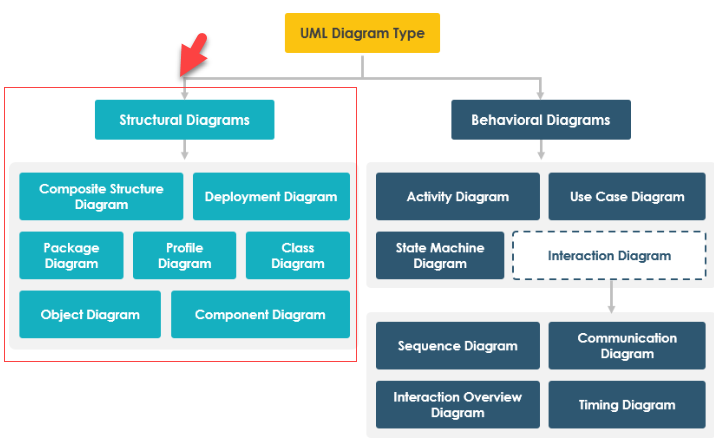
This guide walks you through the full workflow of AI-assisted structural modeling in Visual Paradigm, covering:
-
AI-Assisted UML Class Diagram Generator
-
AI Chatbot for Interactive Diagram Creation
-
Component, Package, and Composite Structure Diagrams
-
Integrated Desktop Workflow
-
Real-world example: A Smart Home Network System
All tools are backed by real-world updates and tutorials from Visual Paradigm’s official resources.
1. AI-Assisted UML Class Diagram Generator: Build Complex Systems Without UML Expertise
The AI-Assisted UML Class Diagram Generator is a guided, step-by-step tool designed for both beginners and experienced users to rapidly prototype class structures using plain English.
✅ Step-by-Step Workflow
1. Define Scope
Enter a high-level system description such as:
“Online Shopping System”
The AI will:
-
Analyze the domain
-
Generate a system purpose (e.g., “A web-based platform for customers to browse, purchase, and track products”)
-
Output a preliminary list of classes (e.g.,
Product,Customer,Order,Payment,ShoppingCart)
📌 Tip: Be specific. Use phrases like “e-commerce platform,” “user authentication,” or “inventory management” to improve accuracy.
2. Iterative Identification & Refinement
🔹 Class Identification
Review the AI-generated classes. Add or remove classes based on your domain needs:
-
✅ Keep:
Customer,Product,Order -
❌ Remove:
ShippingAgent(if not needed) -
➕ Add:
Review,Wishlist,PromoCode
🔹 Members (Attributes & Operations)
The AI auto-generates:
-
Attributes (e.g.,
Product: id, name, price, stockQuantity) -
Operations (e.g.,
Customer: login(), placeOrder(), updateProfile())
You can:
-
Modify data types (e.g., change
pricefrominttodouble) -
Add new methods (e.g.,
Product: applyDiscount()) -
Remove irrelevant operations
🔹 Relationships
The AI intelligently identifies and suggests:
-
Associations:
Customer↔Order(one-to-many) -
Aggregation/Composition:
OrdercontainsOrderItem(composition) -
Inheritance:
PremiumCustomerextendsCustomer -
Dependencies:
Paymentdepends onOrder
You can:
-
Adjust multiplicities (e.g.,
1..*for orders per customer) -
Change relationship types
-
Add navigability or constraints
3. Validation & Rendering
Use the AI Validation Checklist to ensure:
-
No cyclic dependencies
-
Correct multiplicity usage
-
Proper naming conventions (e.g., PascalCase for classes)
-
Avoidance of God classes
Once validated, the AI renders a PlantUML-based SVG diagram that can be:
-
Exported directly
-
Imported into your desktop project
-
Further refined with VP’s full UML editing suite
2. Structural Modeling via AI Chatbot: Conversational UML Creation
The Visual Paradigm AI Chatbot enables a natural language, conversational approach to building various structural diagrams. It’s ideal for rapid prototyping, learning, and collaborative design.
✅ Key Features & Use Cases
🔹 Object Diagrams: Visualize Real-World Instances
Describe a specific scenario:
“Create an object diagram for a vehicle maintenance system showing John Doe’s car repair order.”
The AI will:
-
Identify relevant classes (
Customer,Car,RepairOrder,Service) -
Instantiate objects with attributes (e.g.,
John Doe,Toyota Camry,2024-05-10) -
Show links between objects (e.g.,
John DoeownsToyota Camry, which hasRepairOrder)
📌 Perfect for testing system behavior in real-world contexts.
🔹 Composite Structure Diagrams: Model Internal Class Structure
Use advanced prompts to visualize internal parts and ports:
“Show the internal structure of a Flight Control System with parts like NavigationModule, EngineController, and CommunicationPort.”
The AI generates:
-
Parts (e.g.,
NavigationModule,EngineController) -
Ports (e.g.,
DataInPort,ControlOutPort) -
Connectors between parts
-
Internal structure with proper composition
📌 Enhanced stability for complex hierarchies – ideal for embedded systems or microservices.
🔹 Package Diagrams: Organize Your System Logically
Prompt the chatbot:
“Generate a package diagram for an onboard flight management system.”
The AI will:
-
Group related classes into packages:
-
FlightOperations -
PassengerManagement -
CrewScheduling -
SafetySystems
-
-
Show dependencies between packages (e.g.,
PassengerManagementdepends onFlightOperations) -
Use standard notation for package boundaries
📌 Great for architecture planning and team collaboration.
🔹 Component Diagrams: Model Software Architecture
With the major upgrade in AI component diagram generation, you can now:
“Generate a component diagram for a mobile banking app with secure authentication, transaction processing, and notification services.”
The AI outputs:
-
Components:
AuthenticationService,TransactionProcessor,NotificationService -
Interfaces:
LoginInterface,PaymentInterface -
Dependencies:
TransactionProcessordepends onAuthenticationService -
Improved layout with automatic placement and routing
📌 Bonus: The AI chatbot supports multi-turn conversations, allowing you to refine diagrams iteratively:
“Add a
FraudDetectioncomponent.”“Show how it connects to
TransactionProcessor.”
3. Integrated Desktop Workflow: Seamlessly Merge AI Output with Your Project
If you’re using the Visual Paradigm Desktop Application, you can fully integrate AI-generated models into your existing projects.
✅ Step-by-Step Integration
-
Open Visual Paradigm Desktop
-
Navigate to Tools > Apps
-
Choose:
- AI Assisted UML Class Diagram Generator
- AI Chatbot (for other diagram types)
-
Enter your prompt (e.g., “Generate a class diagram for a smart home network”)
-
Review and refine the AI output
-
Click Import to Visual Paradigm
- The diagram is merged into your current project
- Full editing capabilities remain available
- Supports traceability, version control, and model consistency checks
📌 This ensures your AI-generated models are not just prototypes, but part of a professional, maintainable design process.
4. Real-World Example: Smart Home Network System
Let’s apply the AI tools to a real-world system.
🎯 Prompt:
“Generate a UML class diagram for a smart home network system with devices like lights, thermostats, and security cameras, controlled via a mobile app.”
✅ AI-Generated Output (Suggested Classes & Relationships)
| Class | Attributes | Operations | Relationships |
|---|---|---|---|
SmartHome |
id, location, status | addDevice(), removeDevice(), updateSettings() | — |
Device (abstract) |
deviceId, name, status | turnOn(), turnOff(), getStatus() | Abstract base class |
Light |
brightnessLevel, color | setBrightness(), setColor() | Inherits from Device |
Thermostat |
currentTemp, targetTemp | setTargetTemp(), getTemp() | Inherits from Device |
SecurityCamera |
resolution, recordingEnabled | startRecording(), stopRecording() | Inherits from Device |
MobileApp |
userId, version | connectToDevice(), sendCommand() | — |
User |
userId, name, email | login(), logout() | — |
🔗 Relationships:
SmartHomecontainsLight,Thermostat,SecurityCamera(composition)MobileAppusesUser(association)MobileAppcommunicates withDevice(dependency)UsercontrolsMobileApp(association)
💡 Pro Tip: Use the AI Chatbot to generate a component diagram showing:
MobileApp→AuthenticationComponent
SmartHome→DeviceManager,SensorHub,NotificationService
5. Learning UML Faster with AI: A Game-Changer for Beginners
The AI chatbot isn’t just for professionals—it’s a powerful learning tool.
📌 Reference:
[1] How AI Chatbot Can Help You Learn UML Faster – Blog
This article explains how the AI chatbot:
- Provides instant visualization of UML concepts
- Offers real-time feedback on incorrect relationships or syntax
- Encourages experimentation without fear of errors
- Supports self-paced learning through conversational prompts
Example learning path:
-
“Show me a UML class diagram for a library system.”
-
“Change the relationship between
BookandBorrowerto aggregation.” -
“Add a
Fineclass and link it toBorrower.”
👉 You learn by doing—no textbooks needed.
Conclusion: Embrace AI-Powered Structural Modeling
With Visual Paradigm’s AI tools, structural modeling is no longer a barrier to entry. Whether you’re:
- A beginner learning UML
- A developer prototyping a system
- A team lead designing architecture
You can now:
✅ Generate accurate class, component, package, and object diagrams in seconds
✅ Refine models with natural language
✅ Import and enhance them in your desktop project
✅ Learn UML interactively and efficiently
Final Recommendations
-
Start with simple prompts (e.g., “Online Shopping System”) to build confidence.
-
Use the AI Validation Checklist to ensure quality.
-
Combine AI-generated diagrams with manual refinement for production-ready models.
-
Explore the AI Chatbot for rapid experimentation and learning.
🔗 Explore More:
References (Numbered List, No Duplicates)
[1] How AI Chatbot Can Help You Learn UML Faster – Blog
[2] AI-Assisted UML Class Diagram Generator – Visual Paradigm
[3] Generate UML Class Diagrams with AI – Explore Visual Paradigm
[4] YouTube: Import AI Diagrams into VP
[5] Visual Paradigm AI Chatbot – Features
[6] AI Chatbot Turns Ideas into Diagrams Instantly – Blog
[7] Enhanced AI Composite Structure Diagram Generation – Updates
[8] YouTube: Composite Structure Diagram Demo
[9] Major Upgrade to AI Component Diagrams – Updates
[10] YouTube: Component Diagram Demo
[11] YouTube: Desktop Workflow – Importing AI Output
✅ Next Step: Try generating a class diagram for your own system—just type a description into the AI Chatbot and see the magic happen!
This post is also available in Deutsch, Español, فارسی, Français, English, Bahasa Indonesia, 日本語, Polski, Portuguese, Ру́сский, Việt Nam, 简体中文 and 繁體中文.