


In today’s fast-paced software development landscape, modeling complex system behaviors efficiently and accurately is critical. Visual Paradigm, a leading UML and BPMN modeling tool, has embraced artificial intelligence to revolutionize how developers, analysts, and architects design, refine, and validate behavioral models. This comprehensive guide walks you through how to leverage Visual Paradigm’s latest AI-powered features to generate, analyze, and optimize dynamic system views such as Activity, Sequence, and State Machine diagrams — all using natural language input and intelligent automation.
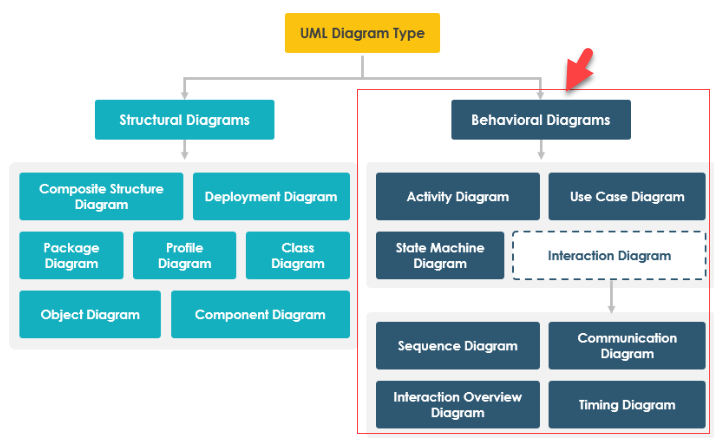
🔹 1. Generate Behavior Diagrams via AI Chatbot
The Visual Paradigm AI Chatbot (chat.visual-paradigm.com) is your conversational partner for UML modeling. It enables users to create, modify, and understand behavioral diagrams using plain English — making UML accessible even to beginners.
✅ How It Works:
-
Prompting: Simply describe a process or scenario in natural language.
Example:“Generate a sequence diagram for a user logging into a website.”
-
Iterative Refinement: Refine the diagram through conversational commands:
“Add a payment gateway after login.”
“Insert a validation step between login and dashboard access.” -
Complex State Modeling: Describe object state transitions for accurate UML State Machine diagrams.
Example:“Create a state machine for an F1 car’s engine module with states: Idle, Running, Error, and Overheating. Define transitions when RPM exceeds 15,000 or coolant temperature rises above 100°C.”
📌 Key Benefits:
-
Instant visualization of abstract processes.
-
Real-time feedback and correction.
-
Ideal for learning UML fundamentals interactively.
How AI Chatbot Can Help You Learn UML Faster: This article details how the AI chatbot provides an interactive environment to practice UML, offering instant visualization and feedback for learners. It reduces the learning curve by turning theoretical concepts into tangible diagrams through conversation.
🔹 2. Specialized Behavior Modeling Studios
Visual Paradigm offers dedicated AI-driven studios that automate the transformation of textual requirements into structured behavioral diagrams.
📌 Use Case to Activity Diagram Generator
-
Purpose: Converts use case narratives (main, alternate, exception flows) into UML Activity Diagrams.
-
Workflow:
-
Paste your use case text (e.g., “User places order → Payment processed → Order confirmed”).
-
AI parses the flow and generates a hierarchical activity diagram with decision nodes, forks, joins, and swimlanes.
-
-
Use Case: Ideal for business analysts transforming business rules into executable process models.
📌 Sequence Diagram Generator (Advanced AI Modeling Suite)
-
Purpose: Transforms use case descriptions into precise Sequence Diagrams with lifelines, messages, and activation bars.
-
How It Works:
-
Input: “When a customer submits an order, the system checks inventory, validates payment, and sends confirmation.”
-
Output: A fully rendered sequence diagram showing interactions between
Customer,OrderService,InventorySystem, andPaymentGateway.
-
-
Advanced Features:
-
Automatic detection of synchronous/asynchronous calls.
-
Support for loop and conditional fragments.
-
Integration with existing class diagrams.
-
Boost Productivity in Software Design: Visual Paradigm’s AI Use Case to Sequence Diagram Tools
🔹 3. Integrated AI in Desktop & Online Workspace
For professional teams using Visual Paradigm Desktop (Professional Edition or higher), AI features are deeply integrated into the modeling environment — enabling seamless workflow from idea to implementation.
✅ Step-by-Step Workflow:
-
Access AI Tools
Go toTools > Apps→ Select the desired AI generator (e.g., AI Activity Diagram Generator). -
Input Your Requirements
Paste your system description or workflow in the input field:“Model the e-commerce checkout process: user adds items → cart review → shipping info → payment → order confirmation.”
-
Generate & Import
-
AI generates a fully compliant UML Activity Diagram.
-
Click “Import to Visual Paradigm” to embed the diagram into your active project.
-
The diagram is ready for manual editing, annotation, and traceability.
-
-
Traceability & Collaboration
-
Link generated diagrams to requirements, test cases, or code.
-
Share with team members via cloud collaboration.
-
Visual Paradigm Desktop AI Activity Diagram Generation
Click Start AI: Official Introduction to AI-Powered Modeling in Desktop
🔹 4. Advanced Behavioral Analysis with AI
Beyond generation, Visual Paradigm’s AI tools provide intelligent analysis and validation to ensure high-quality, maintainable models.
✅ Validation Checklist
-
AI performs automatic checks against UML best practices:
-
Missing start/end nodes in activity diagrams.
-
Unconnected state transitions.
-
Invalid message ordering in sequence diagrams.
-
-
Flags issues in real time with suggestions.
✅ AI-Powered Critique Reports
-
Generate a detailed report analyzing your diagram’s:
-
Completeness (missing flows, edge cases).
-
Clarity (overly complex branches, unclear labels).
-
Maintainability (modular structure, reuse potential).
-
-
Example: “Your sequence diagram lacks error handling for failed payments. Consider adding a ‘Payment Failed’ state and retry option.”
AI-Assisted UML Class Diagram Generator (Note: While focused on class diagrams, the same AI engine powers behavioral analysis.)
✅ Test Case Generation from State Machine Diagrams
-
Convert your UML State Machine Diagram into automated test scenarios.
-
Each path through the diagram becomes a test case:
-
Path 1: Idle → Running → Error → Recovery
-
Path 2: Idle → Overheating → Shutdown
-
-
Output: Test scripts (e.g., in JUnit, Cucumber, or TestNG format) or test case templates in Excel/CSV.
UML State Machine Diagram: A Definitive Guide to Modeling Object Behavior with AI
🔹 Practical Example: E-Commerce Checkout Process
Let’s walk through a real-world scenario using Visual Paradigm’s AI tools.
🎯 Scenario: AI-Generated E-Commerce Checkout Flow
Prompt to AI Chatbot:
“Generate a sequence diagram for an e-commerce checkout process. Include steps: add item to cart, view cart, enter shipping details, select payment method, process payment, confirm order, and send email receipt.”
✅ AI Output:
-
A clean Sequence Diagram with:
-
Customer,ShoppingCart,OrderService,PaymentGateway,EmailService. -
Correct message ordering and lifeline activation.
-
Conditional branches for “Payment Failed” and “Insufficient Stock”.
-
-
Iterative refinement:
“Add a discount code validation step before payment.”
→ AI inserts a new message and decision node.
📊 Post-Generation Actions:
-
Validate the diagram using AI quality check.
-
Export the sequence diagram to a test case generator.
-
Derive test cases for:
-
Successful checkout.
-
Invalid credit card.
-
Expired discount code.
-
Low stock alert.
-
🔹 Best Practices for Effective AI-Powered Behavior Modeling
| Practice | Why It Matters |
|---|---|
| Use clear, step-by-step natural language | Improves AI accuracy and reduces ambiguity. |
| Start with use cases or user stories | Ensures behavioral models align with real-world needs. |
| Iterate with refinement prompts | Fine-tunes models without starting from scratch. |
| Combine AI generation with manual review | Ensures domain-specific logic is preserved. |
| Link diagrams to requirements and tests | Enables full traceability across SDLC. |
🔹 Conclusion: The Future of Behavior Modeling is AI-Driven
Visual Paradigm’s AI-powered tools are transforming behavior modeling from a time-consuming, skill-intensive task into an interactive, intuitive, and intelligent process. Whether you’re a student learning UML, a business analyst capturing workflows, or a developer designing complex systems, these tools empower you to:
-
Create diagrams faster using natural language.
-
Refine models through conversation.
-
Validate quality automatically.
-
Analyze and generate tests from behavioral logic.
By integrating AI into every stage of modeling — from ideation to deployment — Visual Paradigm is not just helping you model better; it’s helping you think better about system behavior.
📚 References
- How AI Chatbot Can Help You Learn UML Faster
A detailed guide on using the AI chatbot for interactive UML learning with instant feedback. - Visual Paradigm AI Chatbot
The official web-based AI assistant for UML diagram generation and refinement. - Use Case to Activity Diagram Generator
Automatically transforms use case narratives into structured UML activity models. - Advanced AI Modeling Suite (Sequence Diagram Generator)
AI toolset for converting use cases into precise sequence diagrams. - Visual Paradigm Desktop AI Features
Official documentation on integrating AI into the desktop environment. - AI Activity Diagram Generation (Desktop Release Notes)
Release details on the AI-powered activity diagram generator in Visual Paradigm Desktop. - AI-Powered UML State Machine Diagram Guide
Comprehensive tutorial on modeling complex object states with AI assistance. - AI-Assisted UML Class Diagram Generator
While focused on class diagrams, this AI engine underpins behavioral analysis and validation. - Visual Paradigm Official Website – AI Features Overview
Central hub for all AI-powered modeling tools and tutorials.
✅ Ready to Try It?
Visit chat.visual-paradigm.com today and start turning your ideas into UML diagrams with a single sentence.
This post is also available in Deutsch, Español, فارسی, Français, English, Bahasa Indonesia, 日本語, Polski, Portuguese, Ру́сский, Việt Nam, 简体中文 and 繁體中文.