


In agile development, user stories are the cornerstone of product backlog refinement. They’re meant to capture real user needs, drive collaboration, and guide development toward tangible value. Yet, too many teams fall into the trap of writing stories that are vague, overly technical, or disconnected from real-world outcomes. The result? Wasted effort, missed deadlines, and features that no one actually wants.
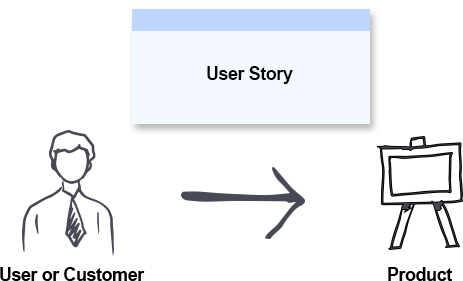
This comprehensive guide will walk you through how to write user stories that go beyond the backlog—stories that are clear, actionable, and, most importantly, deliver real business and user value.
1. The Problem with “Bad” User Stories
Before diving into best practices, let’s understand why many user stories fail:
-
“As a [role], I want to [feature] so that [benefit]” — But the benefit is vague or non-existent.
Example: “As a user, I want to log in so that I can use the app.” (Too generic—everyone needs to log in.)
-
Technical jargon instead of user needs.
Example: “As a developer, I want to refactor the authentication service.” (This is a task, not a user story.)
-
Too big, too abstract, or impossible to test.
Example: “As a customer, I want a better shopping experience.” (No measurable outcome.)
-
Focused on features, not outcomes.
Example: “As a user, I want a dark mode.” (The feature is clear, but why? What problem does it solve?)
These stories don’t fail because they’re written poorly—they fail because they miss the why. The real goal of a user story is not to describe a feature, but to capture a user’s need and the value it delivers.
2. The Anatomy of a Great User Story
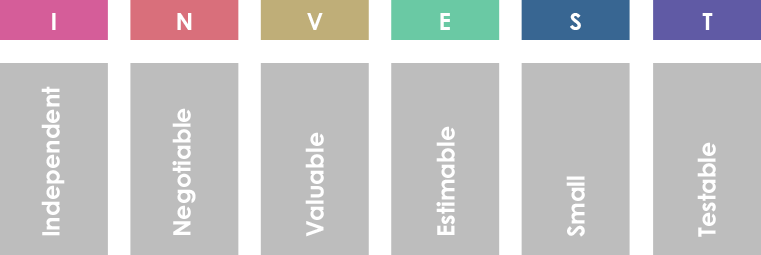
A well-crafted user story follows the INVEST principle and includes three key components:
✅ The Golden Formula:
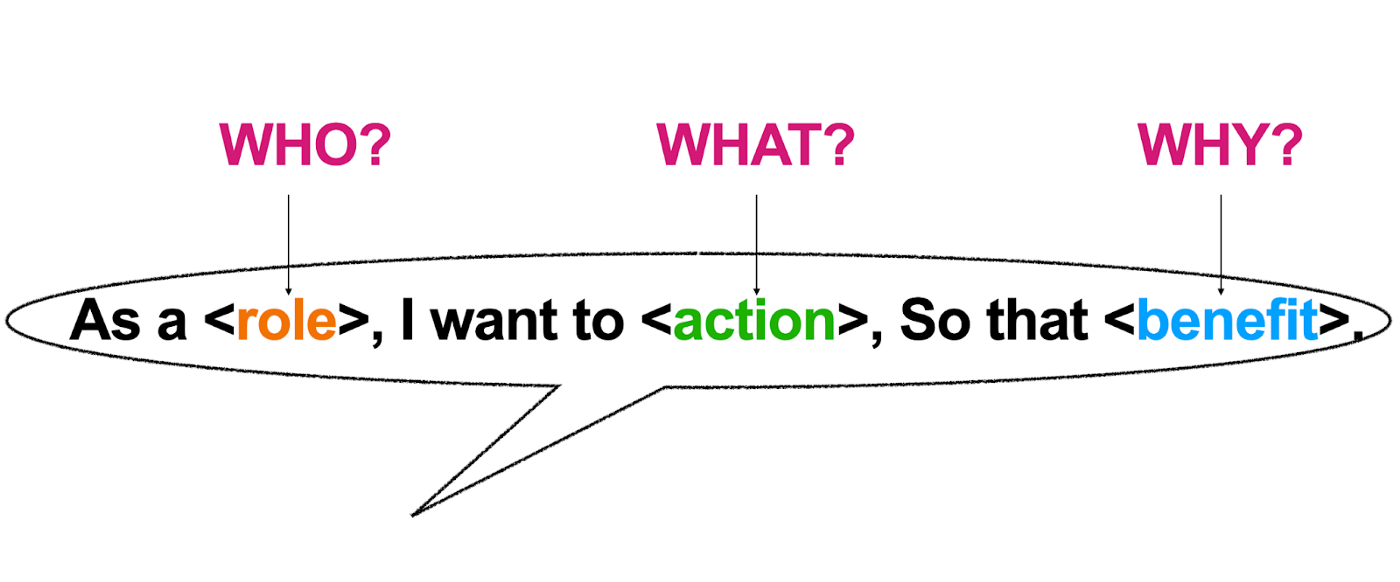
“As a [user role], I want [goal] so that [benefit].”
Let’s break it down:
| Component | Purpose |
|---|---|
| As a [user role] | Identifies the person who will benefit. Be specific: “As a returning customer”, not “As a user.” |
| I want [goal] | Describes the desired functionality or outcome. Focus on what the user wants, not how. |
| So that [benefit] | Explains the value—why this matters. This is where you link the story to real impact. |
🔍 Example of a Strong User Story:
“As a returning customer, I want to save my preferred delivery address so that I can check out in under 30 seconds.”
-
User Role: Returning customer (specific, not generic)
-
Goal: Save preferred delivery address
-
Benefit: Faster checkout (measurable, user-centered)
This story is testable, actionable, and tied to a business outcome.
3. Go Beyond INVEST: The 5 Pillars of High-Value User Stories
While INVEST (Independent, Negotiable, Valuable, Estimable, Small, Testable) is a solid foundation, we need deeper principles to ensure stories deliver real value.
🛠 Pillar 1: Start with the User’s Goal, Not the Feature
Ask: What problem is the user trying to solve?
-
❌ “I want a search bar.”
-
✅ “As a shopper, I want to search for products by name or category so I can find what I need quickly.”
The search bar is the means, not the end. The real goal is effortless product discovery.
💡 Pro Tip: Use the 5 Whys technique to dig into the root need:
Why do I want a search bar? → To find products faster.
Why do I want to find products faster? → To reduce cart abandonment.
Why is that important? → Because faster discovery increases conversion.
Now you have a story tied to a business KPI.
🎯 Pillar 2: Define the Value—Quantify It When Possible
Value isn’t just “it’s useful.” It’s measurable impact.
-
❌ “So that I can use the app more easily.”
-
✅ “So that I can complete my purchase in under 2 minutes, reducing cart abandonment by 15%.”
Use measurable outcomes:
-
Increase conversion rate by X%
-
Reduce support tickets by Y%
-
Save Z minutes per user per session
📊 Example:
“As a new user, I want a guided onboarding flow so that I can set up my profile in under 5 minutes, increasing first-time activation by 30%.”
🧩 Pillar 3: Keep It Small and Testable
A story should be small enough to be completed in a single sprint. Use the “Rule of One”—one story, one user goal.
-
❌ “As a customer, I want to manage my account, including payments, subscriptions, and preferences.”
-
Too big—this is multiple stories.
-
-
✅ “As a customer, I want to update my email address so that I can receive order confirmations.”
✅ Acceptance Criteria (for the above):
User can edit email in the profile settings.
System validates email format.
User receives a confirmation email with a link to verify.
If verification fails, user sees clear error message.
Testable criteria prevent ambiguity and ensure quality.
🤝 Pillar 4: Collaborate—Stories Are Conversations, Not Contracts
A user story is not a contract. It’s a starting point for discussion.
-
Co-create with developers, designers, and product owners.
-
Use story mapping to visualize the user journey and prioritize based on value.
-
Hold backlog refinement sessions where teams discuss:
-
Is the story clear?
-
Is the benefit real?
-
Are acceptance criteria sufficient?
-
🔄 Example:
A story about “saving a delivery address” might lead to a discussion:
Should it auto-fill?
Should users choose a default?
How many addresses can be saved?
These conversations shape the final feature and prevent rework.
🧪 Pillar 5: Validate with Real Users—Test the Value
A story may be well-written, but if users don’t care, it’s still waste.
-
Run prototypes or MVPs (Minimum Viable Products) to test assumptions.
-
Use A/B testing to compare user behavior.
-
Gather feedback through usability testing or surveys.
🛑 Example:
A story: “As a user, I want a notification when my order ships.”
But after testing, users say: “I don’t need a notification—I check my order status manually.”
→ The story may not deliver value, even if it’s well-written.
✅ Solution: Pivot or deprioritize. Replace with:
“As a user, I want to track my order in real-time on the dashboard so I can plan my day.”
4. Advanced Techniques to Elevate Your User Stories
🎯 1. Use “Job to Be Done” (JTBD) Framework
Instead of asking “What feature do users want?”, ask:
“What job is the user hiring this product to do?”
-
Example: A user doesn’t “want a calendar app”—they’re hiring it to “stay on top of deadlines and avoid missing meetings.”
✅ User Story (JTBD):
“As a project manager, I want to see upcoming deadlines in a timeline view so that I can prioritize tasks and reduce missed deliverables.”
This shifts focus from features to outcomes.
🗺️ 2. Practice Story Mapping
Visualize the user journey across sprints.
-
List all user tasks in order (e.g., Sign up → Browse products → Add to cart → Checkout → Confirm order).
-
Group related tasks into epics.
-
Break epics into user stories.
-
Prioritize by value and risk.
🔍 Benefit: Teams see the big picture, avoid scope creep, and deliver value incrementally.
📈 3. Tie Stories to Business KPIs
Every story should contribute to a measurable goal:
-
Increase conversion rate
-
Reduce support load
-
Improve retention
-
Boost customer satisfaction (CSAT/NPS)
✅ Example:
“As a returning customer, I want to see a summary of my recent orders so that I can reorder quickly, increasing repeat purchase rate by 10%.”
Now the story is not just user-centric—it’s business-aligned.
🧩 4. Use “Given-When-Then” for Acceptance Criteria
This format ensures clarity and testability.
Given I am on the checkout page,
When I click “Proceed to Payment,”
Then I should see a summary of my order and delivery address.
This format is widely used in BDD (Behavior-Driven Development) and makes testing and automation easier.
5. Common Pitfalls to Avoid
| Pitfall | Fix |
|---|---|
| Writing technical tasks as stories | Reframe as user needs: “As a user, I want the app to load faster so I don’t abandon the page.” |
| Overloading stories with multiple goals | Split into smaller, focused stories. |
| Ignoring the “so that” part | Always ask: “Why does this matter?” |
| Not involving the team in refinement | Hold collaborative sessions. Stories are not written in isolation. |
| Assuming users will want a feature | Validate with real feedback. |
6. From Backlog to Value: A Real-World Example
📌 Problem:
Users abandon their carts at a high rate.
🔍 Discovery Phase:
-
Interviews show: “I forget my delivery address.”
-
Survey: 68% of users want to save their address.
✅ User Story (Refined):
“As a returning customer, I want to save my preferred delivery address so that I can check out in under 30 seconds, reducing cart abandonment by 15%.”
✅ Acceptance Criteria:
-
User can save up to 5 addresses.
-
Default address is pre-selected at checkout.
-
User receives a confirmation toast when address is saved.
-
Saved addresses are synced across devices.
📊 Validation:
-
After launch, checkout time drops from 90 to 45 seconds.
-
Cart abandonment rate decreases by 18%.
-
NPS increases by 12 points.
✅ The story delivered real value.
7. Final Checklist: Is Your User Story Ready to Deliver Value?
✅ Does it start with a specific user role?
✅ Is the goal clear and focused?
✅ Does it include a measurable benefit?
✅ Can it be tested with acceptance criteria?
✅ Does it align with a business KPI or user outcome?
✅ Has it been discussed with the team?
✅ Does it pass the “So what?” test?
If yes to all—your story is not just in the backlog. It’s on the path to delivering real value.
Conclusion: Stories That Matter
User stories aren’t just placeholders in a backlog. They’re promises of value—to users, to teams, and to the business.
The best user stories don’t just describe features. They answer:
-
Who benefits?
-
Why does it matter?
-
How will we know it worked?
By shifting from feature-first to value-first thinking, and by grounding every story in real user needs and measurable outcomes, you transform your backlog from a graveyard of vague tasks into a dynamic roadmap of meaningful progress.
🎯 Remember:
A user story is not complete until it delivers value.
A backlog is not complete until every story is tested, validated, and proven to work.
Stop writing stories that collect dust. Start writing stories that change lives.
📌 Bonus: Quick Template for High-Value User Stories
As a [specific user], I want [clear goal] so that [measurable benefit], which will [impact on business KPI].
Acceptance Criteria:
Given [context], when [action], then [expected outcome].
[Other testable conditions]
Ready to write your next high-impact story? Start with the user, end with the value. The backlog is just the beginning. 🚀
-
What Is a User Story? A Complete Guide to Agile Requirements: This guide explains the concept of user stories in Agile development, highlighting their purpose, structure, and importance in capturing user needs effectively.
-
How to Write Effective User Stories: Best Practices and Templates: This resource provides step-by-step instructions and practical templates for writing clear, actionable, and user-focused stories.
-
Writing Effective User Stories: A Practical Guide for Agile Teams: This article offers a hands-on guide that walks teams through the process of crafting high-quality stories using real-world examples.
-
AI-Powered User Story 3Cs Editor: Enhance Clarity and Completeness: This tool assists Agile teams by guiding them through the 3Cs framework (Card, Conversation, and Confirmation) to write better requirements.
-
User Story Guide in the Agile Handbook: From Concept to Implementation: This section covers the full lifecycle of a story, from its initial creation to acceptance criteria and sprint integration.
-
What Is User Story Mapping? A Beginner’s Guide: This guide introduces story mapping as a method to visualize product development, align teams, and prioritize features.
-
Visualizing User Stories on Diagrams with Visual Paradigm: This article shows how to integrate user stories into diagrams, such as use cases and journey maps, to enhance understanding and traceability.
-
Creating User Story Scenarios with Visual Paradigm Doc Composer: This tutorial teaches users how to enrich stories with detailed scenarios to support testing and validation.
-
Automated Affinity Table for User Story Estimation: This article explains how to use automated affinity tables to group and estimate stories, improving accuracy and alignment.
-
Effective User Story Tool for Agile Development: This overview details how users can efficiently create and manage stories using specialized tools within the Visual Paradigm ecosystem.
This post is also available in Deutsch, Español, فارسی, Français, English, Bahasa Indonesia, 日本語, Polski, Portuguese, Ру́сский, Việt Nam, 简体中文 and 繁體中文.