


Visual Paradigm’s AI‑Powered ERD Generator
A Comprehensive Guide – Key Concepts, Platforms, & Practical Examples
1. What is an ERD?
Entity‑Relationship Diagrams (ERDs) are the backbone of database design.
They visually encode:
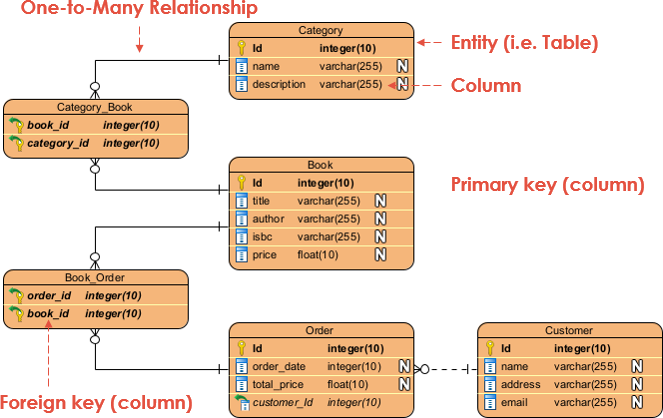
| Element | Meaning | Example |
|---|---|---|
| Entity | A real‑world object (noun) | Customer, Order |
| Attribute | A property of an entity | CustomerID, Email |
| Relationship | How entities interact (verb) | Places, Contains |
| Cardinality | One‑to‑one, one‑to‑many, many‑to‑many | 1:N, N:M |
| Key | Unique identifiers | Primary key (PK), foreign key (FK) |
| Constraint | Rules (e.g., NOT NULL) | Email must be unique |
Traditionally, ERDs are hand‑drawn or coded in diagramming tools—a process that can be slow and error‑prone. Visual Paradigm (VP) now harnesses Artificial Intelligence to generate ERDs directly from plain English descriptions, dramatically speeding up design and reducing mistakes.
2. How the AI Works
-
Natural‑Language Parsing – The AI scans the input for nouns, verbs, and modifiers.
-
Entity & Attribute Inference – Key nouns become entities; descriptive phrases become attributes.
-
Relationship Detection – Verbs linking nouns form relationships; context determines cardinality.
-
Key & Constraint Generation – Unique identifiers and foreign keys are auto‑generated.
-
Normalization – The model is automatically refined to 3NF (or higher) to eliminate redundancy.
-
Editable Output – The diagram is fully modifiable; you can add, delete, or adjust elements as needed.
3. Platforms That Offer AI ERD Generation
| Platform | Focus | Access | Key Features |
|---|---|---|---|
| VP Desktop | Enterprise‑grade, offline | Desktop app | Full diagramming tools, code generation, version control |
| DB Modeler AI | Guided, step‑by‑step | Web app | Wizard flow, automatic normalization, SQL export |
| Use Case Modeling Studio | Requirements ➜ data | Web app | Derives ERDs from use‑case descriptions, links to documentation |
| OpenDocs & AI Visual Modeling Chatbot | Embedded docs, quick queries | Web / API | Seamless integration, interactive chat |
All platforms support a free trial or a free tier, so you can prototype with no cost.
4. Using VP Desktop for AI ERD Generation
Step‑by‑Step
-
Install & Launch
Download from visual‑paradigm.com and open the app. -
Open AI Diagram Generation
Tools➜AI Diagram Generation→ Select Entity Relationship Diagram. -
Enter Your Description
Design a library system with books, members, loans, and authors. -
Generate
Click OK. The AI instantly creates an ERD. -
Refine
-
Drag‑and‑drop entities/attributes.
-
Adjust cardinalities and FK links.
-
Add constraints or inheritance if needed.
-
-
Export & Share
-
PNG/SVG/PNG.
-
SQL script generation.
-
Cloud sync or Git integration for team collaboration.
-
Key Features Highlight
| Feature | Benefit |
|---|---|
| Smart Inferencing | Detects keys and relationships automatically. |
| Offline Mode | No internet required after installation. |
| Code Generation | Direct SQL, Java, C#, and more. |
| Traceability | Link ERDs to use‑case diagrams or requirements. |
5. DB Modeler AI – The Guided Web Experience
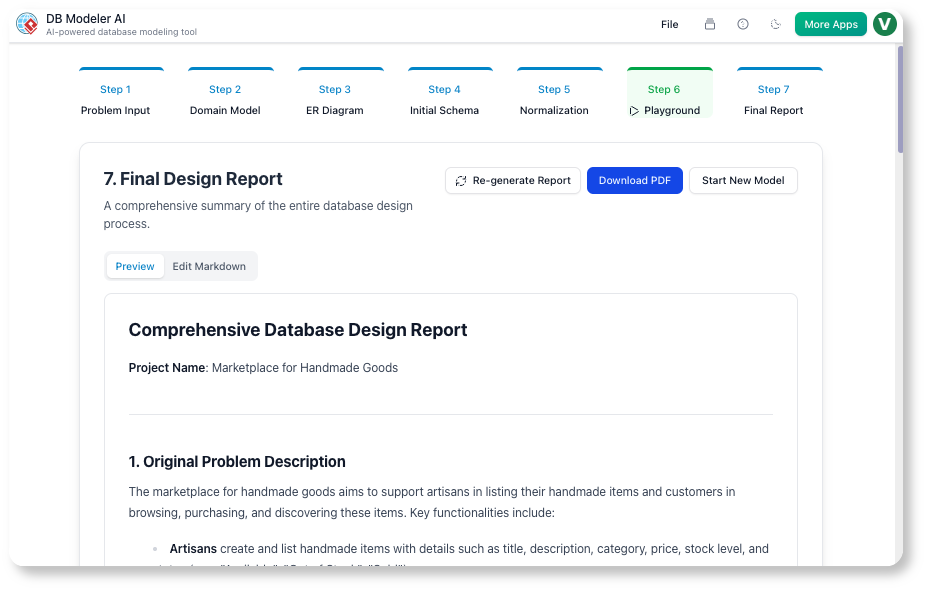
7‑Step Wizard
-
Start a New Project – Enter a high‑level business description.
Example: “E‑commerce platform for electronics with users, products, orders, and payments.” -
Step 1 – Domain Class Diagram – AI generates a class diagram.
-
Step 2 – Initial ERD – Converts the class diagram into an ERD.
-
Step 3 – Initial SQL Schema – Produces a draft SQL script.
-
Step 4–7 – Refinement – AI normalizes, adds constraints, and optimizes.
Editing
-
Click on any shape to add/remove attributes.
-
Drag connectors to adjust relationships.
-
Use the “Validate” button to check for anomalies.
Export Options
| Format | Use‑Case |
|---|---|
| PNG / SVG | Documentation |
| SQL | Database deployment |
| VP Desktop | Further refinement |
6. Use Case Modeling Studio – From Requirement to Data
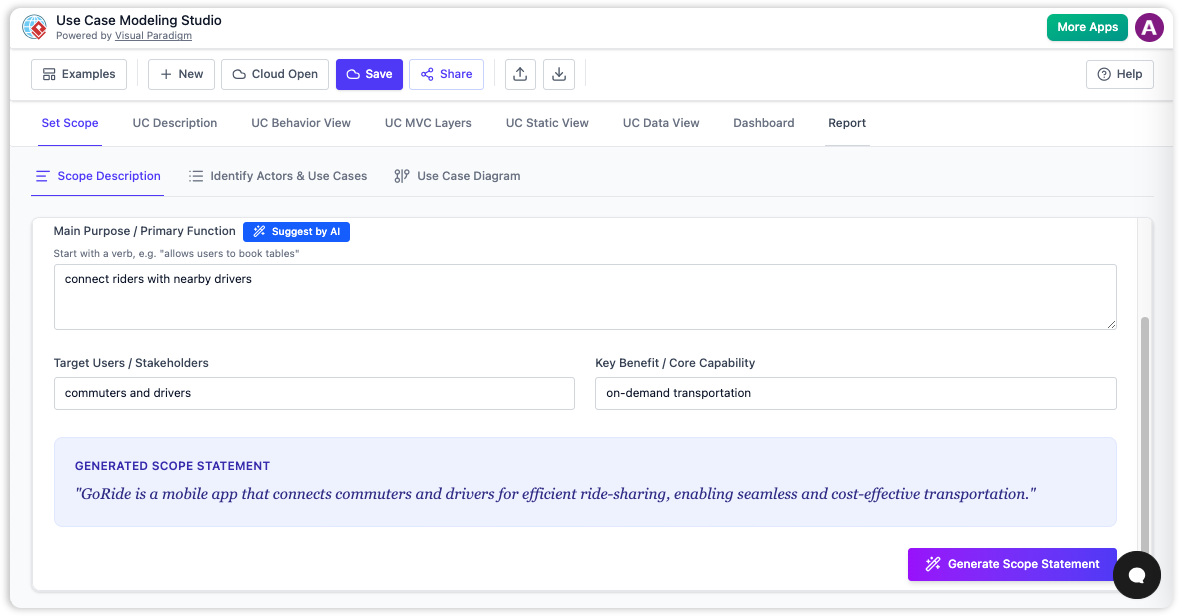
-
Input Use Cases – Describe scenarios in plain English.
Example: “In a hotel booking system, users search rooms, make reservations, and process payments.” -
AI Generates Class Diagram – Models actors, objects, and actions.
-
Derive ERD – Classes become entities; associations become relationships.
-
Refine – Add attributes, foreign keys, and cardinalities.
-
Export – Save as diagram or link back to the use‑case documentation.
Why It Matters
Bridging functional requirements to data models ensures consistency. The AI removes the guesswork of mapping “search” → “query” → “SELECT” and directly visualizes the underlying data structure.
7. Practical Examples
| Scenario | Input Description | AI‑Generated Entities & Relationships | Refinement Tips |
|---|---|---|---|
| Hospital Management | “Design a hospital system with patients, doctors, appointments, and rooms.” | Patient, Doctor, Appointment, Room; relationships: Patient‑>Appointment (1:N), Appointment‑>Doctor (N:1), Appointment‑>Room (N:1). | Add MedicalHistory as composite attribute; create RoomAvailability table. |
| E‑commerce Store | “Online store for books with customers, books, orders, and reviews.” | Customer, Book, Order, Review; relationships: Customer‑>Order (1:N), Order‑>Book (M:N via OrderItem), Customer‑>Review (1:N). | Separate Address into its own entity; add Payment table. |
| School System | “Students enroll in courses taught by teachers. Administrators manage grades.” | Student, Course, Teacher, Enrollment, Grade; relationships: Student‑>Enrollment (1:N), Course‑>Enrollment (1:N), Teacher‑>Course (1:N). | Add Classroom entity; set Grade as attribute of Enrollment. |
8. Advanced Features & Best Practices
| Feature | How to Use | Benefit |
|---|---|---|
| Traceability | Link ERD to use‑case or class diagrams in VP Desktop. | Clear lineage from requirements to implementation. |
| Collaboration | Share projects via cloud or Git. | Real‑time teamwork and version control. |
| Code Generation | Export SQL, Java, C#, or Python ORM scripts. | Speeds up development. |
| Customization | Manually adjust cardinalities, add derived attributes. | Fine‑tune domain nuances that AI may miss. |
Best‑Practice Checklist
-
Start Simple – Give a concise description first; refine later.
-
Provide Context – Mention cardinalities if known (e.g., “one doctor can treat many patients”).
-
Validate – Use the “Validate” tool to catch duplicates or missing FK links.
-
Normalize – Trust AI, but double‑check that no redundancy remains.
-
Iterate – Treat AI output as a first draft; iterate until the model matches business rules.
9. Conclusion
Visual Paradigm’s AI‑powered ERD generator turns natural language into professional data models in seconds. Whether you’re a solo developer prototyping an e‑commerce schema or an enterprise architect refining a complex hospital system, the combination of:
-
VP Desktop (deep control, code generation)
-
DB Modeler AI (guided wizard, normalization)
-
Use Case Modeling Studio (requirements‑to‑data bridge)
provides a full spectrum of tools for every stage of the design cycle.
Take the first step – try the free web apps to prototype, then bring your models into VP Desktop for collaboration and deployment.
Explore more – visit visual‑paradigm.com for tutorials, webinars, and community forums.
Happy modeling!
-
AI Chatbot Feature – Intelligent Assistance for Visual Paradigm Users: This tool provides instant guidance and task automation within the software. It is designed to enhance productivity through AI-powered diagram assistance.
-
AI Textual Analysis – Transform Text into Visual Models Automatically: This feature uses AI to analyze text documents and generate diagrams such as ERD and UML. It automates the process of document modeling and software design.
-
AI Chatbot for Diagramming: How It Works with Visual Paradigm: This assistant turns natural language into diagrams without requiring knowledge of specific modeling syntax. It acts as a specialized AI partner for visual modeling tasks.
-
Visual Paradigm’s AI Diagram Generator Expands Instant Creation Capabilities: The platform’s AI generator now supports the instant creation of ERDs, DFDs, and mind maps. This expansion helps architects and developers kick off projects faster.
-
New Diagram Types Added to AI Diagram Generator: DFD & ERD: This announcement details the addition of Entity Relationship Diagrams to the AI generation suite. It focuses on automating technical documentation through artificial intelligence.
-
Visual Paradigm AI Chatbot: The World’s First Purpose-Built AI Assistant for Visual Modeling: This article discusses a groundbreaking assistant tailored for visual modeling with intelligent guidance. It is engineered to understand complex modeling standards at a high level.
-
Kata AI Marketing Platform ERD – Sample Database Design: This real-world example provides an ERD for an AI-powered marketing platform. It demonstrates how to model relationships between users, campaigns, and analytics.
-
AI Chatbot for Diagram and Model Generation: This application in the AI Toolbox allows for the generation of models and diagrams through conversational natural language input. It supports a wide range of domains including both technical and strategic modeling.
-
Introducing Visual Paradigm AI Chatbot: A Smarter Way to Create Diagrams: The chatbot enables natural language generation and smart editing for enterprise modeling. It provides contextual analysis to keep complex systems aligned.
-
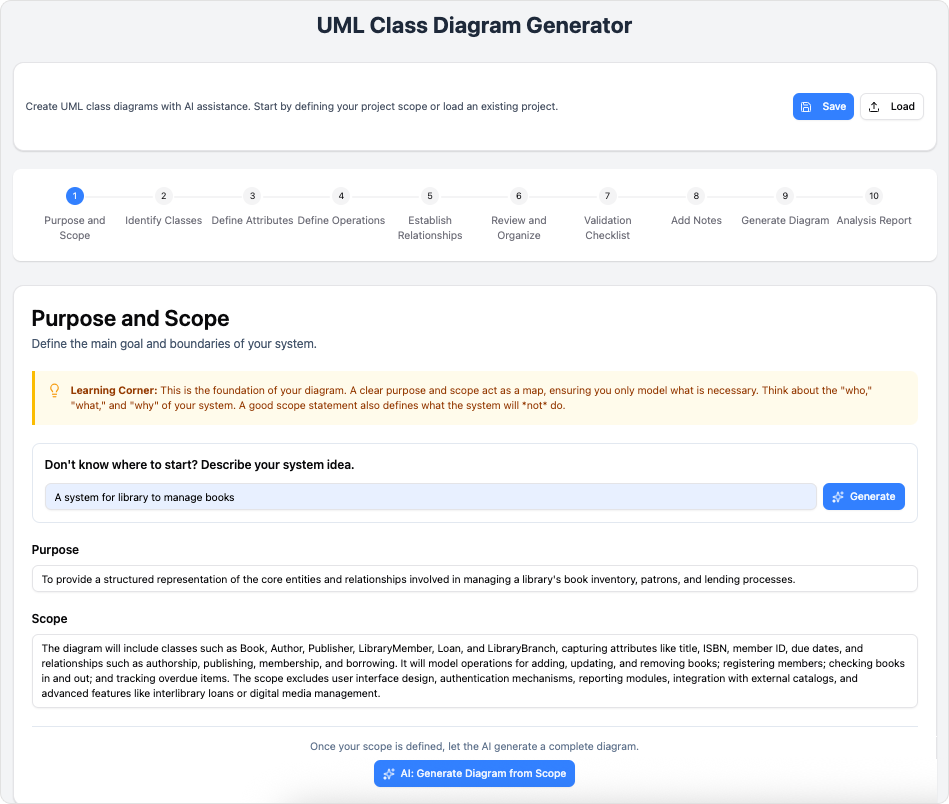
AI-Powered Database Modeling with DBModeler AI: This tool enables intelligent database schema design and automated modeling. It generates ER diagrams, domain models, and normalized schemas through an AI-powered seven-step workflow.
This post is also available in Deutsch, Español, فارسی, Français, English, Bahasa Indonesia, 日本語, Polski, Portuguese, Ру́сский, Việt Nam, 简体中文 and 繁體中文.
Related posts:
 Comprehensive Guide: From Problem Statement to Class Diagram, ERD, and Database Modeling with Visual Paradigm
 How Visual Paradigm’s AI Diagram Generation Turns Your Ideas into Professional UML & BPMN Diagrams in Seconds
 Why Teams Are Switching to Visual Paradigm: Powerful Modeling Meets Cutting-Edge AI
 AI-Powered UML Class Diagram Creation in Visual Paradigm