In today’s fast-paced digital landscape, visual modeling has evolved from a niche technical skill into a strategic asset for teams across industries. Visual Paradigm, a leader in visual modeling and documentation tools, has responded with a powerful, unified AI ecosystem—comprising four distinct platforms—each tailored to different workflows, user needs, and project stages.
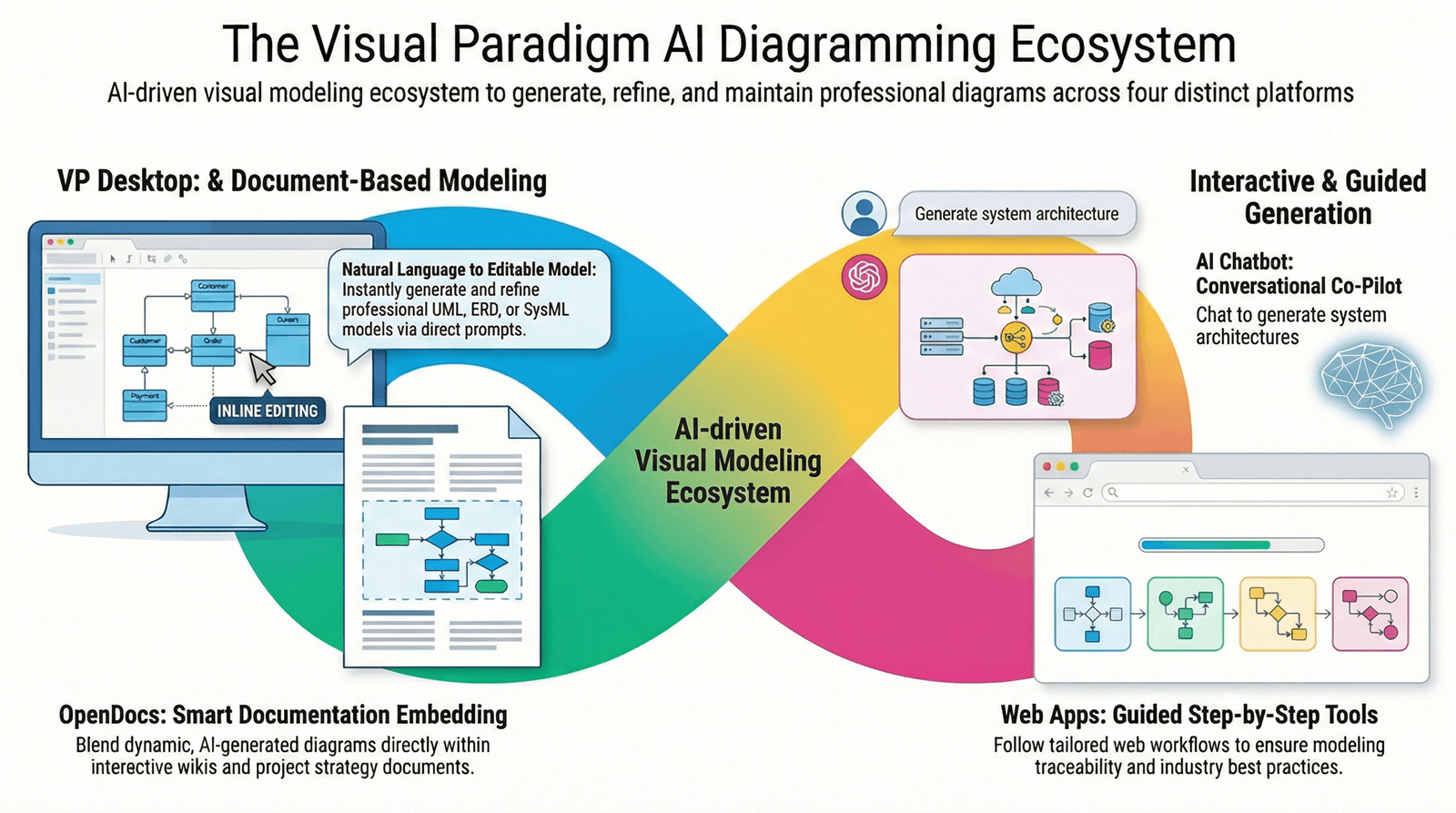
These AI-powered platforms don’t just automate diagramming; they redefine how teams conceptualize, collaborate, document, and engineer complex systems. From agile brainstorming to enterprise-grade code generation, Visual Paradigm’s AI ecosystem ensures that every stage of the modeling lifecycle is enhanced by intelligent assistance—without sacrificing precision, traceability, or collaboration.
Let’s explore each platform in detail and understand how they complement one another to deliver a seamless, intelligent visual modeling experience.
1. VP Desktop: The Powerhouse for Deep Modeling & Precision
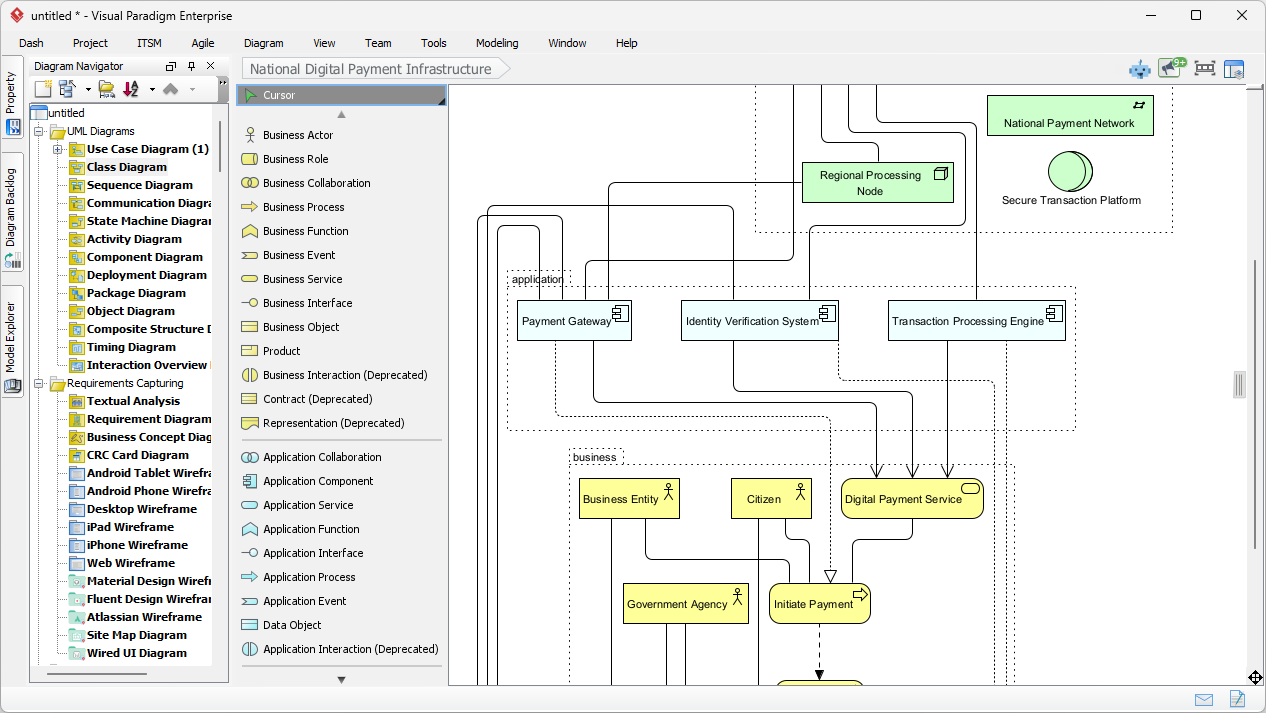
“For serious developers and architects who demand accuracy, scalability, and control.
Core Workflow: Professional, Offline Engineering
VP Desktop is the flagship desktop application designed for high-stakes modeling environments where reliability and performance are non-negotiable.
-
AI Integration: Seamlessly embedded AI tools accelerate initial design phases—automatically generating structure, suggesting class relationships, or validating model consistency.
-
Advanced Toolset: Offers full-featured editing, version control integration (Git, SVN), code generation, reverse engineering, and traceability matrices.
-
Offline Capability: Fully functional without internet access—ideal for secure, enterprise-level projects.
Ideal For:
-
Enterprise-level UML and SysML modeling
-
Large-scale software architecture and system design
-
Code generation and reverse engineering
-
Teams requiring strict compliance and audit trails
Unique Value Proposition:
Production-ready models, built for scale and precision.
VP Desktop ensures every diagram is not just visually accurate—but traceable, exportable, and ready for integration into CI/CD pipelines. It’s the go-to platform for engineering teams that need to deliver robust, maintainable designs under pressure.
2. OpenDocs: Collaborative Knowledge Management with Living Diagrams
“Where documentation and diagrams evolve together—like a living document.”
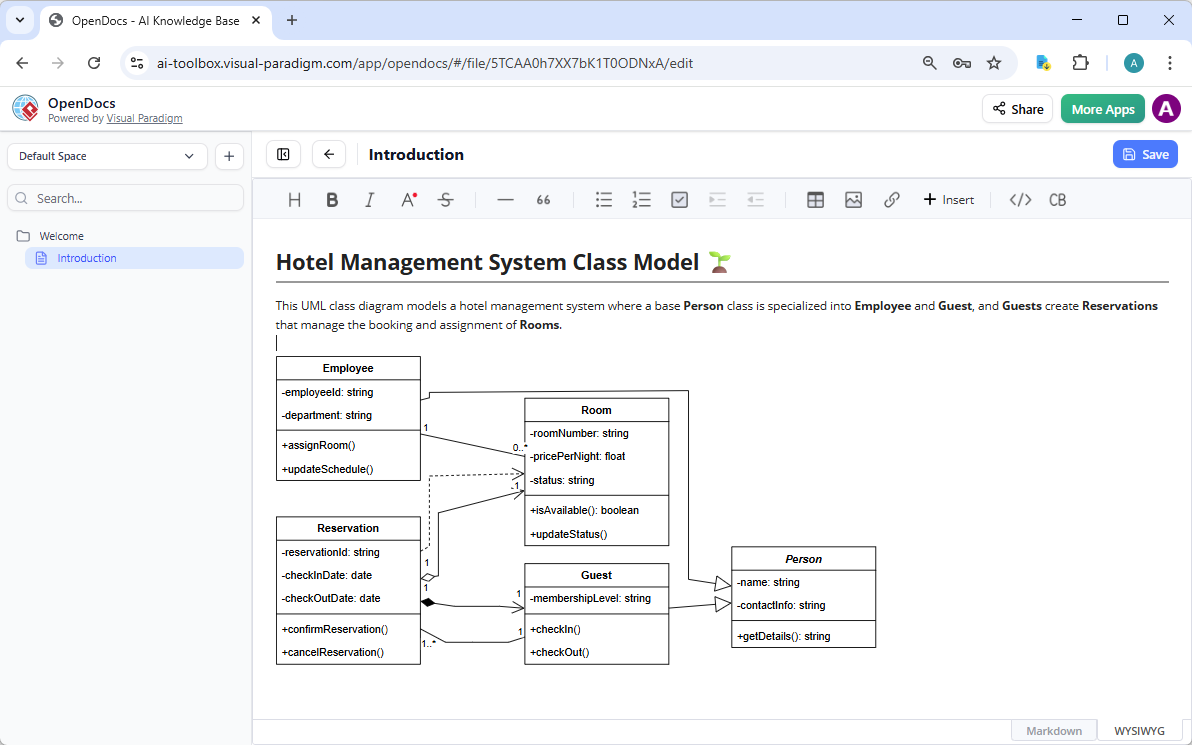
Core Workflow: Document-Centric, AI-Assisted Collaboration
OpenDocs transforms traditional documentation into a dynamic, collaborative workspace, where text and diagrams are not separate entities—but interdependent components.
-
AI-Powered Diagramming: Insert and refine diagrams inline using natural language prompts (e.g., “Create a flowchart showing user login steps”).
-
Real-Time Updates: Diagrams are not static images. Changes to the text or structure automatically update the diagram—ensuring consistency across the document.
-
Team-Centric Design: Supports real-time co-editing, comments, and versioning—perfect for remote or hybrid teams.
Ideal For:
-
Building internal wikis and knowledge bases
-
Creating strategy documents, onboarding guides, and technical reports
-
Aligning cross-functional teams (engineering, product, UX) around shared understanding
Unique Value Proposition:
Diagrams that breathe, adapt, and evolve with your content.
By treating diagrams as living elements, OpenDocs eliminates the disconnect between documentation and visual design. It’s the ideal platform for teams that value clarity, collaboration, and maintainability in their knowledge assets.
3. AI Visual Modeling Chatbot: The Agile Co-Pilot for Rapid Prototyping
“Turn your ideas into diagrams—through conversation.”
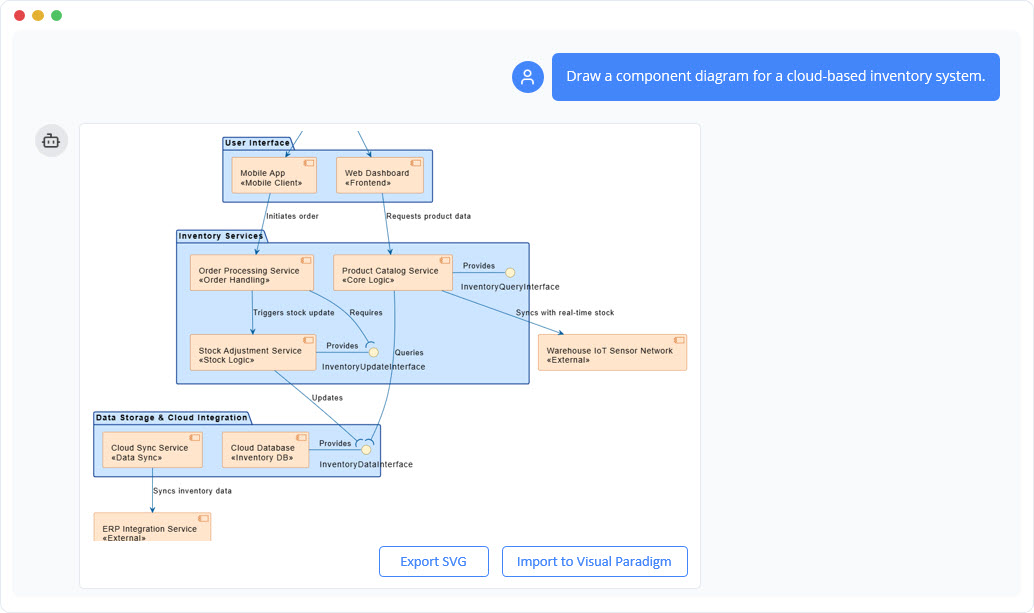
Core Workflow: Conversational & Iterative Design
The AI Chatbot reimagines modeling as a natural dialogue, making it accessible to both beginners and seasoned professionals.
-
Natural Language Input: Users describe a system in plain English—e.g., “Show me a sequence diagram of a user placing an order on an e-commerce site.”
-
Interactive Refinement: The AI generates a baseline diagram, then invites follow-up questions: “Should the payment be processed before or after order confirmation?”
-
Rapid Iteration: Perfect for brainstorming, spike sessions, and sprint planning.
Ideal For:
-
Agile teams needing quick visual validation
-
Product managers and UX designers without deep modeling experience
-
Overcoming “blank canvas” paralysis during early design stages
Unique Value Proposition:
From idea to diagram in seconds—no learning curve required.
The Chatbot acts as a visual thinking partner, helping users explore possibilities, refine logic, and arrive at better designs—faster. It lowers the barrier to entry while empowering experts to prototype at scale.
4. Web Apps: Structured, Guided Modeling for Systematic Design
“Follow best practices—step by step, with AI guidance.
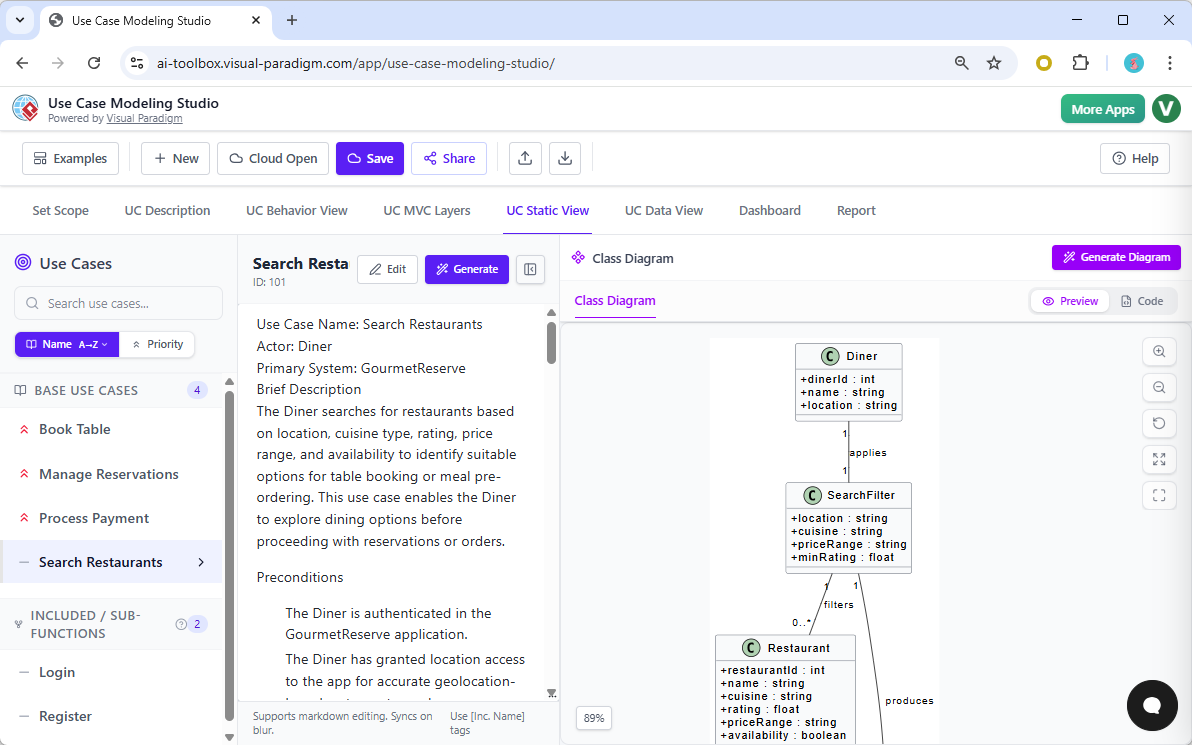
Core Workflow: Step-by-Step AI-Powered Design
Web Apps are browser-based, specialized tools that guide users through structured modeling processes—ensuring consistency, quality, and traceability.
-
AI Guidance: Walks users through each stage of diagram creation (e.g., “Define the context,” “Identify key actors,” “Sketch the first draft”).
-
Best Practice Enforcement: Promotes standards like C4 Model for architecture, or structured requirements modeling.
-
Traceability & Consistency: Ensures models are not isolated artifacts but part of a larger, interconnected system.
Ideal For:
-
Systematic software architecture (e.g., C4 Model, Layered Architecture)
-
Requirements analysis and specification
-
Regulatory or compliance-driven projects (e.g., aerospace, healthcare, finance)
Unique Value Proposition:
No more siloed models—only coherent, scalable, and auditable designs.
Web Apps are ideal for projects where consistency and process adherence are critical. They turn modeling into a repeatable, disciplined practice—reducing errors and improving long-term maintainability.
Summary: Choosing the Right Tool for Your Workflow
| Platform | Primary Workflow | Ideal Use Case | Best Suited For |
|---|---|---|---|
| VP Desktop | Deep engineering & offline precision | Enterprise UML/SysML, code engineering, version control | Architects, senior developers, regulated industries |
| OpenDocs | Documentation-integrated & dynamic | Wikis, strategy guides, team alignment | Product teams, documentation hubs, remote collaboration |
| AI Chatbot | Conversational & exploratory | Agile prototyping, brainstorming, rapid ideation | Product managers, UX designers, beginners |
| Web Apps | Structured & guided | Systematic architecture, requirements analysis | Teams needing consistency, compliance, or onboarding |
Conclusion: A Unified Ecosystem for Every Stage of Innovation
Visual Paradigm’s AI ecosystem is not about replacing human creativity—it’s about amplifying it.
-
Use the AI Chatbot to spark ideas.
-
Build and refine them in OpenDocs for collaborative documentation.
-
Dive deep into engineering with VP Desktop for precision and scale.
-
Or follow a guided path with Web Apps for structured, auditable design.
Together, these platforms form a cohesive, intelligent ecosystem—supporting everything from agile ideation to enterprise-grade delivery.
Whether you’re a solo developer, a product team, or a large enterprise, Visual Paradigm’s AI tools empower you to model smarter, collaborate better, and deliver faster—all while maintaining the integrity and traceability that modern systems demand.
Ready to transform your modeling workflow?
Explore Visual Paradigm’s AI ecosystem today and bring your ideas to life—intelligently.
- AI Chatbot Feature – Intelligent Assistance for Visual Paradigm Users: This resource introduces the AI-powered chatbot functionality designed to provide users with instant guidance, task automation, and enhanced productivity.
- Visual Paradigm Chat – AI-Powered Interactive Design Assistant: An interactive AI interface that helps users generate diagrams, write code, and solve design challenges in real time through a conversational assistant.
- AI Chatbot for Diagramming: How It Works with Visual Paradigm: This article explains how the chatbot acts as an AI-powered modeling assistant that turns natural language directly into diagrams without requiring knowledge of specific syntax.
- Introducing Visual Paradigm AI Chatbot: A Smarter Way to Create Diagrams: This update highlights how the chatbot enables natural language diagram generation, smart editing, and contextual analysis for enterprise modeling.
- Visual Paradigm AI Chatbot: Turn Your Ideas into Diagrams Instantly: A guide highlighting the assistant’s ability to visualize concepts through conversational prompts, allowing designs to grow from raw text into full models.
- How to Turn Requirements into Diagrams with an AI Chatbot: This article explores the workflow of converting project requirements into clear visual models through a continuous conversational interface.
- How AI Chatbot Can Help You Learn UML Faster: A resource detailing how the chatbot provides an interactive learning environment where users can practice UML concepts and receive instant feedback.
- Case Study: Enhancing System Modeling Efficiency with Visual Paradigm’s AI-Powered Chatbot: This case study demonstrates how the chatbot improves productivity and accuracy in system modeling by enabling conversational diagram creation.
- Visual Paradigm AI Chatbot: The World’s First Purpose-Built AI Assistant for Visual Modeling: This article highlights the launch of a groundbreaking AI assistant tailored specifically for visual modeling with intelligent guidance.
- Mastering Sequence Diagrams with Visual Paradigm: AI Chatbot Tutorial: A beginner-friendly tutorial that uses a real-world e-commerce case study to demonstrate conversational diagramming with the AI assistant.
This post is also available in Deutsch, Español, فارسی, Français, English, Bahasa Indonesia, 日本語, Polski, Portuguese, Ру́сский, Việt Nam, 简体中文 and 繁體中文.