“The best way to learn object-oriented design is not by memorizing patterns — it’s by playing the roles.”
In this article, we’ll walk through a step-by-step introduction to CRC cards (Class–Responsibility–Collaborator) using a real-world, beginner-friendly example: a Library Book Borrowing System. Whether you’re just starting your journey into software design or leading a team workshop, CRC cards offer a simple, powerful, and collaborative way to model object-oriented systems.
🎯 What Are CRC Cards?
CRC cards are a lightweight, physical (or digital) modeling technique used in object-oriented design. Each card represents a class and contains three key elements:
| Field | Description |
|---|---|
| Class | The name of the class (e.g., Book) |
| Responsibilities | What the class knows or does |
| Collaborators | Other classes this class needs to work with |
They’re especially effective for brainstorming, designing, and validating class structures early in development — before writing a single line of code.
📚 Case Study: Library Book Borrowing System
Let’s imagine a small public library where members can:
-
Search for books by title
-
Borrow available books (up to a limit)
-
Return books when done
The system must track:
-
Which books are borrowed
-
By whom
-
When they are due
We’ll use the CRC card method to discover and refine the classes in this system — step by step.
✅ Step 1: Find Candidate Classes (Brainstorm Nouns)
Start by reading the scenario and pulling out nouns — these are potential classes.
From the description, we identify:
-
Library
-
Member (or Patron)
-
Book
-
Loan (or Borrowing)
-
DueDate (possibly too small)
-
LibraryCard (might be part of Member)
We filter and keep only the most meaningful ones:
✅ Member, Book, Loan
⚠️ Note: Don’t worry about getting all classes right at first — that’s the beauty of CRC cards. You’ll discover missing ones through role-play!
✏️ Step 2: Create Initial CRC Cards
Now, we assign responsibilities and collaborators to each class.
📘 Class: Book
| Responsibilities | Collaborators |
|---|---|
| Know its title | — |
| Know its author | — |
| Know its ISBN | — |
| Know if it is currently available | Loan |
| Be borrowed | Loan |
| Be returned | Loan |
💬 The Book doesn’t “know” who borrowed it — it only knows whether it has an active loan.
👤 Class: Member
| Responsibilities | Collaborators |
|---|---|
| Know name | — |
| Know member ID | — |
| Know how many books are currently borrowed | Loan |
| Borrow a book (if allowed) | Book, Loan |
| Return a book | Book, Loan |
| Check if borrowing limit is reached | Loan |
💬 The Member manages its own borrowing behavior and checks limits via the Loan class.
📅 Class: Loan
| Responsibilities | Collaborators |
|---|---|
| Record which book was borrowed | Book |
| Record which member borrowed it | Member |
| Record borrow date | — |
| Calculate due date | — |
| Know if it is overdue | — |
| Mark as returned | Book |
💬 The Loan class holds the relationship between a Member and a Book, including timing details.
🎭 Step 3: Role-Play a Scenario — “Borrow a Book”
Now comes the fun part: role-playing the scenario as if the cards were real objects.
📖 Scenario: Curtis wants to borrow “Clean Code”, which is available.
Let’s walk through it step by step:
-
Member (Curtis) says: “I want to borrow ‘Clean Code’.”
→ First checks: “Do I have fewer than 3 books already?”
→ Asks Loan: “How many active loans do I have?” -
Loan responds: “You have 1 active loan → you can borrow.”
-
Member searches for the book: “Where is ‘Clean Code’?”
→ Asks Book: “Are you available?” -
Book checks: “Do I have an active (not returned) Loan?”
→ Asks Loan: “Is there an active loan for me?” -
Loan replies: “No — you’re available!”
-
Member creates a new Loan object:
-
Links to this Book and Member
-
Sets borrow date = today
-
Calculates due date = today + 14 days
-
-
Book is updated: “Now I have an active loan → I’m no longer available.”
✅ Result: The borrowing process feels natural, distributed, and logical.
🔄 Step 4: Another Scenario — “Return a Book”
📖 Scenario: Curtis returns “Clean Code”
-
Member (Curtis) says: “I want to return ‘Clean Code’.”
-
Member finds the matching Loan (likely by querying Loan with the book and member).
-
Loan marks itself as returned.
-
Loan tells Book: “You are now available again.”
✅ Clean, clear, and cohesive — no class is doing work outside its responsibility.
🔍 Step 5: Refine & Add Missing Classes
After role-playing, we notice a gap:
❓ Who finds the book by title?
Currently, Member is asking Book directly — but Book doesn’t know how to search!
We need a central coordinator.
➕ New Class: Library
| Responsibilities | Collaborators |
|---|---|
| Add a new book to the collection | Book |
| Find book by title | Book |
| Register a new member | Member |
| Process book borrowing request | Member, Book, Loan |
| Process book return | Member, Book, Loan |
| Know all current loans | Loan |
💬 The Library acts as the central hub — it knows all books, all members, and all loans.
✨ Updated Flow: “Borrow a Book” with Library
-
Member → Library: “Find book titled ‘Clean Code’.”
-
Library searches its collection and returns the Book (or
nullif not found). -
Member now knows the book exists → asks Library: “Can I borrow this book?”
-
Library checks:
-
Is the book available? (via
Book.isAvailable()) -
Is the member under the borrowing limit? (via
Loan.countActiveLoans(member))
-
-
If yes → Library creates a new Loan and updates both Book and Loan.
-
Book becomes unavailable; Loan tracks the relationship.
✅ Now the flow makes sense — the Library handles discovery and coordination.
🧩 Final CRC Cards Summary (Simplified for Beginners)
| Class | Key Responsibilities | Key Collaborators |
|---|---|---|
| Library | Manages books, members, loans; handles borrowing/returning | Book, Member, Loan |
| Member | Knows personal info; initiates borrow/return | Library, Loan |
| Book | Stores metadata; tracks availability | Library, Loan |
| Loan | Tracks borrowing history; calculates due dates; manages return status | Member, Book, Library |
✅ Design Principle: Each class has one clear purpose, and responsibilities are cohesive and well-distributed.
🌟 Why CRC Cards Work So Well (Beginner Takeaways)
| Benefit | Explanation |
|---|---|
| Responsibility-Driven Design | Forces you to think: “What does this class know or do?” instead of just storing data. |
| Natural Discovery of Missing Classes | Role-playing reveals gaps (like the missing Library) — no guesswork needed. |
| Immediate Feedback via Role-Play | If a flow feels awkward, you know the responsibility is in the wrong place. |
| Low-Ceremony & Collaborative | No complex tools — just index cards, sticky notes, or a whiteboard. Great for teams. |
| Bridges Requirements to Code | Turns user stories into real class interactions. |
🛠️ Quick Tips for Your First CRC Session
-
Use physical cards (3×5 index cards or sticky notes) — it’s more engaging.
-
One class per card — keep it simple.
-
Write large and legible — others should read it easily.
-
Role-play out loud — pass cards around like real objects.
-
Start with 3–6 core scenarios (e.g., borrow, return, search).
-
Don’t aim for perfection — the goal is iteration, not a final design. Refine as you go.
-
Use simple, domain-specific names — avoid technical jargon. Use “Member” instead of “Patron” if your team agrees.
-
Invite everyone to participate — even non-programmers can help spot missing responsibilities.
-
Sketch a simple class diagram afterward — to visualize relationships and confirm consistency.
-
Keep it fun — treat it like a game. The more engaged your team, the better the results.
🔄 Try It Yourself: Next Domains to Explore
Once you’ve mastered the library system, try applying CRC cards to other beginner-friendly domains:
☕ Coffee Shop Order System
-
Classes:
Customer,Order,MenuItem,Barista,CashRegister -
Scenarios: Place order → Add drink → Apply discount → Pay → Print receipt
🪙 Vending Machine
-
Classes:
VendingMachine,Product,Coin,Dispenser,ChangeCalculator -
Scenarios: Insert coin → Select item → Dispense product → Return change
🎮 Quiz Game
-
Classes:
Quiz,Question,Player,ScoreTracker,GameSession -
Scenarios: Start quiz → Answer question → Check correctness → Show final score
🚗 Parking Garage
-
Classes:
Garage,Car,ParkingSpot,Ticket,Gate -
Scenarios: Enter garage → Park car → Exit → Pay fee → Get ticket
Each of these systems builds on the same principles:
-
Identify nouns → assign responsibilities → role-play → refine → repeat.
📌 Final Thoughts: CRC Cards Are More Than a Technique — They’re a Mindset
The real power of CRC cards isn’t in the cards themselves — it’s in the conversation they spark.
When you write a card and say, “Who does this?” or “Who does it need to talk to?”, you’re already thinking like an object-oriented designer.
🔥 Pro Tip: Use CRC cards during sprint planning, tech spikes, or even in interviews to demonstrate your design thinking.
They’re not just for developers — they’re for anyone involved in building software: product managers, designers, testers, and students.
📎 Want More?
👉 Download a printable CRC card template (PDF or digital) to use in your next workshop.
👉 Try a live CRC session with a teammate — assign roles: “You’re the Member,” “You’re the Book,” etc.
👉 Share your results — post your cards on social media with #CRCcards or #OODesignJourney.
🏁 Conclusion
The Library Book Borrowing System is one of the most classic and effective CRC card examples — not because it’s complex, but because it’s simple, relatable, and revealing.
By following just five steps — brainstorming, card creation, role-playing, refining, and iterating — you can:
-
Discover classes naturally
-
Assign responsibilities clearly
-
Spot design flaws early
-
Build a shared mental model as a team
And best of all? You don’t need to be a senior developer to do it.
You just need curiosity, a few cards, and a willingness to play.
🚀 How Visual Paradigm’s AI-Powered CRC Tool Streamlines the Design Process
Creating effective CRC (Class–Responsibility–Collaborator) cards is a cornerstone of object-oriented design — but it’s often time-consuming, especially during early brainstorming or team workshops. That’s where Visual Paradigm’s AI-powered CRC card generator transforms the experience from tedious to transformative.
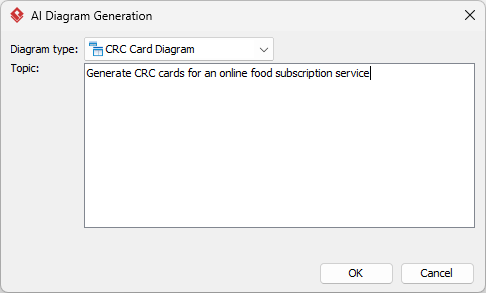
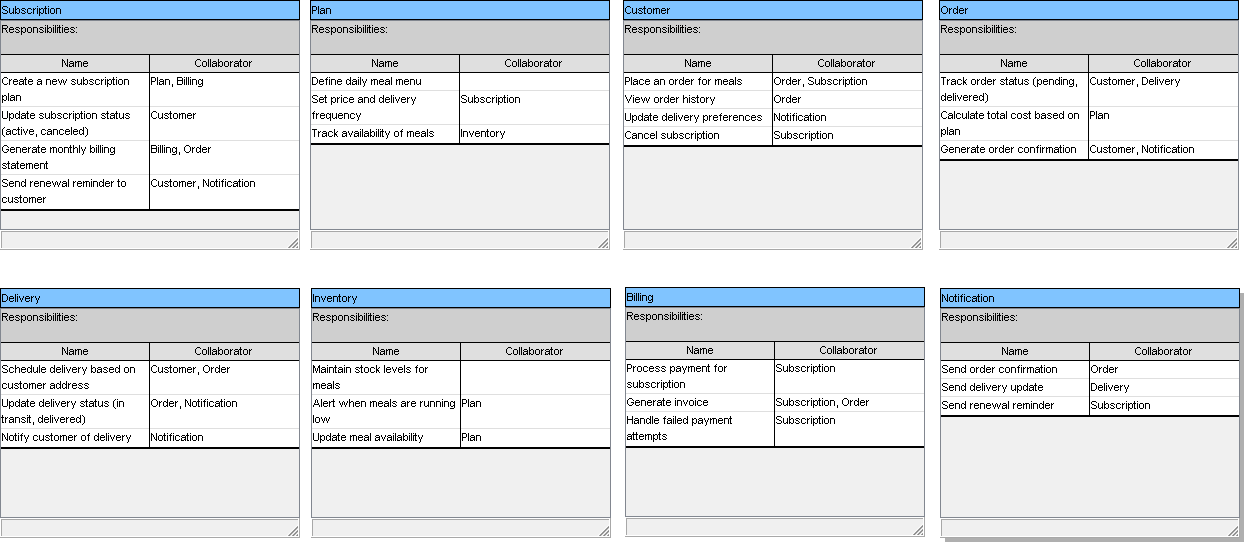
Instead of starting from scratch — listing classes, guessing responsibilities, and mapping collaborators — Visual Paradigm’s AI does the heavy lifting intelligently, giving you a smart, structured foundation to build upon. Here’s how it supercharges every step of the CRC design process:
✅ 1. Instant Brainstorming with Natural Language Input
No more blank cards or endless debate about “what should the class be?”
Just describe your system in plain English — like:
“I’m building a library system where members can borrow books, return them, and search by title. Each book has a title, author, and ISBN. There’s a borrowing limit of 3 books.”
Visual Paradigm’s AI instantly analyzes your input and suggests:
-
Candidate classes:
Member,Book,Loan,Library -
Responsibilities: e.g., “Check if book is available”, “Calculate due date”
-
Collaborators: e.g.,
Bookcollaborates withLoan,Membertalks toLibrary
👉 Result: Within seconds, you have a fully populated initial CRC card diagram — no guesswork, no wasted time.
✅ 2. Smart Suggestions That Match Real-World Design Principles
Unlike generic AI tools that spit out random class names, Visual Paradigm’s AI understands object-oriented design patterns and responsibility-driven thinking.
For example, when you mention “borrowing,” the AI:
-
Suggests a
Loanclass (not just aBorrowingorTransaction) -
Assigns meaningful responsibilities like “Record borrow date”, “Mark as returned”
-
Proposes correct collaborators:
Book,Member, andLibrary
This isn’t just automation — it’s AI-guided design wisdom that helps beginners learn best practices while experts save time.
✅ 3. Seamless Transition from Sketch to Professional Model
The AI doesn’t just generate a rough sketch. It creates a fully editable, native Visual Paradigm diagram — meaning you can:
-
Drag and drop cards to reorganize the layout
-
Edit responsibilities and collaborators in real time
-
Add icons, colors, or notes for clarity
-
Link cards to use cases, requirements, or code
💡 Pro Tip: Use the “Refine with AI” feature to ask:
“Suggest better responsibilities for the Member class based on borrowing rules.”
The AI will re-suggest more accurate or complete actions — like “Check if borrowing limit is reached” — helping you avoid common design flaws.
✅ 4. Role-Play Simulation Built-In (Yes, Really!)
One of the most powerful features? Visual Paradigm allows you to simulate scenarios directly in the diagram.
After generating the CRC cards, you can:
-
Click on a scenario (e.g., “Borrow a book”)
-
Use the AI to walk through the flow step-by-step
-
See which classes interact, in what order, and what responsibilities are triggered
This turns abstract cards into living design stories, making it easy to spot:
-
Misplaced responsibilities
-
Missing classes (like
Library) -
Broken collaboration chains
🔍 Example: The AI flags: “The Member class is trying to find a book — but no class handles search. Suggest adding a Library class.”
→ Instant insight. No guesswork.
✅ 5. Traceability & Integration with Full Development Workflows
The real power of Visual Paradigm’s AI CRC tool isn’t just in creating diagrams — it’s in connecting them to real development.
Once your CRC diagram is refined:
-
Generate UML Class Diagrams with one click
-
Export code skeletons (Java, C#, Python, etc.)
-
Link to requirements or user stories in your project
-
Share with team members via real-time collaboration
This means your CRC cards aren’t just a brainstorming artifact — they’re the starting point of your actual software design.
✅ 6. Perfect for Teams, Workshops, and Learning
Whether you’re:
-
A student learning OOP for the first time
-
A team lead running a design sprint
-
A developer prototyping a new feature
Visual Paradigm’s AI CRC tool adapts to your needs:
-
Use it in VP Desktop for deep editing and integration
-
Try it in VP Online for quick collaboration
-
Use the AI chat interface to ask questions like:
“What should the Loan class know?”
“Who should handle book availability checks?”
It’s like having a senior designer in your pocket — always ready to help you think clearly, organize responsibilities, and avoid design anti-patterns.
🎯 Summary: Why Visual Paradigm’s AI CRC Tool Is a Game-Changer
| Feature | Benefit |
|---|---|
| Natural language input | Start with a story — get a design |
| Smart, context-aware suggestions | Avoid common design mistakes |
| Fully editable native diagram | Refine, organize, and polish |
| Scenario simulation & role-play | Test logic before coding |
| Traceability to code & requirements | Design → Implementation in one flow |
| Team collaboration & sharing | Work together in real time |
📌 Final Thought
“Good design isn’t about speed — it’s about clarity. And Visual Paradigm’s AI CRC tool gives you both.”
Instead of spending hours debating “who should do what,” you spend time thinking, refining, and validating your design — with confidence.
With Visual Paradigm, you’re not just using AI to draw diagrams.
You’re using AI to think better.
👉 Ready to experience the future of CRC design?
Start your free trial of Visual Paradigm today and turn your next idea into a smart, professional, AI-assisted CRC card diagram — in minutes.
🌟 No more blank cards. No more guesswork. Just clear, powerful design — powered by AI.
✅ Now it’s your turn: Grab some sticky notes, pick a simple system (like a coffee shop or vending machine), and try the CRC method.
📌 Remember: Good design isn’t about writing perfect code — it’s about asking the right questions.
And with CRC cards, you’re already asking them.
📌 Bonus: Printable CRC Card Template (Text Version)
┌────────────────────┐
│    [CLASS NAME]    │
├────────────────────┤
│ Responsibilities:  │
│ -                  │
│ -                  │
│ -                  │
├────────────────────┤
│ Collaborators:     │
│ -                  │
│ -                  │
└────────────────────┘
Print this on 3×5 cards or use it in a digital tool like Miro, Figma, or Google Slides.
📚 Next Step?
Want a full walkthrough of the Coffee Shop Order System using the same CRC style?
👉 Just say the word — I’ll send you the next case study, step by step, with cards, scenarios, and role-play!
Happy designing! 🎮🧩💻
- How to Draw CRC Cards in Visual Paradigm: This step-by-step guide provides instructions on creating CRC cards using the software’s dedicated diagramming tools.
- Understanding CRC Card Diagrams in Visual Paradigm: An overview that explains how these diagrams are used to model object-oriented systems and their interactions.
- How to Create a CRC Card Diagram in Visual Paradigm: A detailed tutorial found on the Community Circle covering the creation and customization of CRC diagrams.
- Introduction to CRC Diagrams in Visual Paradigm: A comprehensive guide focused on utilizing CRC diagrams for object-oriented design and broader system modeling.
- Generating CRC Cards from Class Diagrams: This community discussion explores methods for leveraging existing class diagrams to automatically generate cards through reverse engineering.
- Synchronizing CRC Cards with Class Diagrams: A technical resource discussing bidirectional modeling to ensure design consistency between cards and class models.
- Introduction to CRC Card Diagrams (PDF Guide): A downloadable technical resource that explains the core concepts and applications of CRC cards in system analysis.
- Establishing Links Between CRC Cards and Class Diagrams: This article highlights techniques for maintaining traceability and linkage between different modeling levels.
- CRC Card Template in Visual Paradigm Gallery: A resource featuring a downloadable template designed to support early-stage object-oriented design.
- Moving CRC Cards Between Diagrams: A guide detailing how to transfer cards across different diagrams while maintaining data consistency.
This post is also available in Deutsch, Español, فارسی, Français, English, Bahasa Indonesia, 日本語, Polski, Portuguese, Ру́сский, Việt Nam, 简体中文 and 繁體中文.