“The future of requirements is not more documentation — it’s smarter, lighter, and more aligned with delivery.”
— Ivar Jacobson, Ian Spence, Kurt Bittner
In today’s fast-paced software development landscape, teams need a method that balances clarity, agility, and scalability. Enter Use-Case 2.0 — the modern, agile evolution of classic use cases, designed to thrive in Scrum, Kanban, and lean environments while preserving the power of structured requirements.
Developed by pioneers Ivar Jacobson, Ian Spence, and Kurt Bittner (circa 2011–2012), Use-Case 2.0 reimagines use cases as lightweight, sliceable, value-driven units that support the entire lifecycle of software delivery — from discovery to operations.
This article dives deep into Use-Case 2.0, offering a comprehensive, practical guide for teams looking to modernize their requirements practice without sacrificing rigor or traceability.
🔹 1. What Is Use-Case 2.0?
Use-Case 2.0 is an agile, scalable approach to capturing and delivering system functionality through use cases — but with a twist. It retains the core strengths of traditional use cases (clarity of goals, actor-centric design, end-to-end scenario modeling) while eliminating the heaviness, bureaucracy, and upfront documentation that often hinder agile teams.
✅ Key Objectives:
-
Lightweight: As minimal as a user story on an index card.
-
Incremental: Breaks down large goals into small, shippable slices.
-
Test-Driven: Tests are defined early — even before code.
-
Value-Focused: Every slice delivers tangible customer value.
-
Lifecycle-Ready: Supports requirements, architecture, design, implementation, testing, and operations.
🔄 How It Differs from Traditional Use Cases:
| Feature | Traditional Use Cases | Use-Case 2.0 |
|---|---|---|
| Size | Heavy, full documentation (10+ pages) | Lightweight, 1–2 pages max |
| Delivery | Big upfront design | Incremental, sprint-by-sprint |
| Focus | System behavior | User goals and value |
| Testing | Done after development | Defined upfront (BDD-style) |
| Scalability | Hard to scale | Scales “in”, “out”, and “up” |
✅ Best of Both Worlds: Use-Case 2.0 combines the structure of use cases with the agility of user stories — ideal for complex systems where pure user stories can lose context.
🔹 2. The Six First Principles of Use-Case 2.0
These foundational principles guide every step of the process. They’re not optional — they’re the DNA of the method.
-
Keep Use Cases Simple and Understandable
Avoid technical jargon. Focus on what the user wants to achieve, not how the system works internally. -
Know Your Purpose
Ask: Why am I writing this use case? Is it for backlog grooming? Architecture planning? Test design? Tailor the level of detail accordingly. -
Focus on Actors and Their Goals
Every use case must answer: Who is involved? What do they want to accomplish? Why does it matter?
Actors can be humans (e.g., customer, admin), external systems (e.g., payment gateway), or even time-based triggers. -
Build the System in Slices
Break use cases into thin, vertical slices that span all layers: UI, backend logic, data, and tests. -
Deliver Complete Slices
Each slice must be potentially shippable — fully tested, documented, and demonstrable. No partial deliveries. -
Adapt to Context
Use-Case 2.0 is not one-size-fits-all. Scale detail up for enterprise systems or down for startups. It’s flexible, not rigid.
🔹 3. Core Concepts in Use-Case 2.0
🎯 Actor
Any entity (human or system) that interacts with the system.
-
Primary Actor: Initiates the use case (e.g., a customer withdrawing cash).
-
Supporting Actor: Assists the primary actor (e.g., a bank database or payment processor).
📌 Use Case
A goal-oriented description of how an actor achieves a valuable outcome.
-
Named as Verb + Noun: Withdraw Cash, Process Insurance Claim, Create User Account.
-
Scope: Usually system-level, but can be business-level or component-level.
📝 Example:
Use Case: Withdraw Cash
Goal: To allow a customer to retrieve cash from their account via an ATM.
🧩 Use-Case Narrative / Story
A concise, narrative-style description of the use case. Includes:
-
Title and goal
-
Primary and supporting actors
-
Scope
-
Main success scenario (happy path)
-
Extensions (alternatives, errors)
📌 Format Tip: Use 1–2 paragraphs or bullet points. Avoid full UML diagrams unless needed.
🔪 Use-Case Slice (The Game-Changer!)
The most powerful innovation in Use-Case 2.0.
A use-case slice is:
-
A small, self-contained part of a use case.
-
Delivering clear, measurable value.
-
Testable, estimable, and implementable in one sprint.
-
A vertical slice cutting across all layers: requirements → design → code → tests → UI.
💡 Think of it as a well-written user story, but with context from the larger use case.
✅ Characteristics of a Good Slice:
-
Independent of other slices (where possible)
-
Delivers value on its own
-
Can be verified with tests
-
Aligns with a single sprint goal
🔹 4. Step-by-Step Process: How to Apply Use-Case 2.0
Follow this proven workflow to turn vision into working software — incrementally and collaboratively.
✅ Step 1: Identify Actors and Use Cases (Discovery Phase)
Start with brainstorming:
-
Who uses the system?
-
What are their key goals?
👉 Aim for 5–15 high-level use cases per system. Avoid creating 100+ tiny ones.
🛠️ Example: ATM System
Actors: Customer, Bank Teller, Bank Admin
Use Cases: Withdraw Cash, Deposit Funds, Transfer Money, Check Balance, Change PIN
✅ Step 2: Outline the Use Cases (Lightweight Narrative)
For each use case, write a brief narrative:
-
Title: Withdraw Cash
-
Goal: Allow a customer to withdraw money from their account using an ATM.
-
Actors: Customer (primary), ATM, Bank System (supporting)
-
Scope: ATM system only
-
Main Success Scenario:
-
Customer inserts card.
-
System verifies card.
-
Customer enters PIN.
-
System validates PIN.
-
Customer selects “Withdraw Cash”.
-
Customer enters amount.
-
System checks balance.
-
Cash is dispensed.
-
Receipt is printed (optional).
-
Transaction complete.
-
📌 Include key extensions:
Insufficient funds
Expired card
Daily withdrawal limit exceeded
✅ Step 3: Slice the Use Cases
Break each use case into 3–10+ vertical slices. Use these slicing patterns:
| Pattern | Purpose |
|---|---|
| Basic Slice | Happy path with minimal functionality |
| Precondition Slice | Authentication, setup, or login |
| Simple Alternative | One variation (e.g., insufficient funds) |
| Error/Edge Case Slice | Failure handling (e.g., timeout, network error) |
| Enhancement Slice | Add features (e.g., receipt, multi-currency) |
📌 Example: “Withdraw Cash” Slices
Authenticate user + view balance (foundation)
Withdraw valid amount ≤ balance → dispense cash (core)
Withdraw → insufficient funds → show error message
Withdraw → daily limit exceeded → block transaction
Print receipt after withdrawal
Support multi-currency withdrawal
Each slice is now a backlog item ready for sprint planning.
✅ Step 4: Detail the Slices (Just Enough)
For each slice, define:
-
Acceptance Criteria (in Gherkin/BDD format):
Given the customer has a valid card When they enter a valid PIN And select "Withdraw Cash" for $50 And have sufficient balance Then cash should be dispensed And a receipt should be printed -
UI/UX Sketches (if needed)
-
Test Scenarios (automated or manual)
-
Dependencies (e.g., payment gateway integration)
📌 No over-documenting! Only include what’s needed to build and test.
✅ Step 5: Plan & Prioritize
-
Add slices to the product backlog.
-
Prioritize by:
-
Business value
-
Risk (early risk exposure)
-
Dependencies (build critical paths first)
-
Customer impact
-
Use the use-case overview to maintain context — avoid losing the forest for the trees.
🧭 Pro Tip: Use use-case diagrams or visual maps (e.g., Miro, Confluence) to show relationships between use cases and slices.
✅ Step 6: Develop Incrementally
-
Pull slices into sprints.
-
Implement full vertical slice: UI + backend + database + tests.
-
Demonstrate working functionality at the end of each sprint.
-
Gather feedback and refine.
✅ Every sprint ends with a working, tested, potentially shippable increment.
✅ Step 7: Verify & Adapt
Track each slice’s progress using state transitions:
| State | Meaning |
|---|---|
| Scoped | Identified and prioritized |
| Prepared | Detailed with acceptance criteria, tests, design |
| Implemented | Code written and integrated |
| Verified | Tests pass, demoed, accepted |
| Retired | No longer needed or obsolete |
Use this tracking to monitor progress and identify bottlenecks.
🔹 5. Real-World Example: Online Bookstore
Let’s apply Use-Case 2.0 to a real-world system.
📚 Use Case: Purchase Book
🎯 Goal:
Allow a customer to buy a book online with a seamless checkout process.
📝 Main Success Scenario:
-
Customer browses/searches for books.
-
Views book details and adds to cart.
-
Proceeds to checkout.
-
Enters shipping and payment information.
-
Confirms order.
-
Receives order confirmation (email + on-screen).
🔪 Use-Case Slices (Backlog Items)
Each slice is a vertical, shippable increment:
| Slice | Description | Value Delivered |
|---|---|---|
| Slice 1: Browse & Search Books | Customer can search books by title, author, or category (no login required). | Basic discovery capability |
| Slice 2: View Book Details + Add to Cart | Customer sees book description, price, and adds to cart. | Core shopping flow |
| Slice 3: View Cart & Update Quantities | Customer views cart and edits item quantities. | Personalization & control |
| Slice 4: Guest Checkout (Basic) | Customer checks out without account; enters basic shipping/payment info. | Low-friction entry point |
| Slice 5: Registered User Login + Saved Addresses | Logged-in users can save addresses and auto-fill them. | Reusability & convenience |
| Slice 6: Integrate Real Payment Gateway | Connect to Stripe/PayPal; handle secure transactions. | Trust & completion |
| Slice 7: Order Confirmation Email | System sends email with order summary and tracking. | Post-purchase assurance |
| Slice 8: Handle Failed Payment + Retry | Customer sees error, can retry or change payment method. | Resilience & UX polish |
✅ Each slice can be tested, demonstrated, and released independently.
🔹 6. Use-Case 2.0 vs. User Stories: A Side-by-Side Comparison
| Feature | Pure User Story | Use-Case 2.0 Slice |
|---|---|---|
| Format | “As a [role], I want [goal] so that [benefit]” | “Part of ‘Purchase Book’ — withdraw valid amount” |
| Context | Isolated; may lose connection to larger flows | Embedded in a use case — shows relationships |
| Traceability | Weak (hard to link stories) | Strong (slices trace back to use case) |
| Complexity Handling | Struggles with multi-step, branching scenarios | Excels with extensions, alternatives, and error paths |
| Testing | Often defined after implementation | Tests defined before coding (BDD-first) |
| Scalability | Breaks down at scale (too many stories) | Scales well via use-case packages and hierarchies |
✅ Use-Case 2.0 is not a replacement for user stories — it’s an upgrade.
It gives you the agility of user stories with the structure and visibility of use cases.
🔹 7. Tips for Success & Scaling
🎯 Start Light, Scale Smart
-
Begin with index cards or one-pagers.
-
Use digital whiteboards (Miro, FigJam, Confluence) for collaboration.
-
Avoid over-engineering early on.
🖼️ Use Visuals Strategically
-
Use-Case Diagrams: Show high-level system boundaries and actor relationships.
-
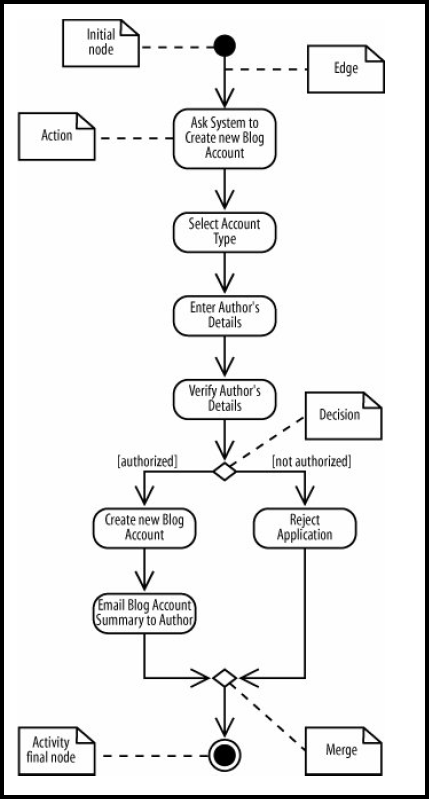
Activity Diagrams: Model complex flows (e.g., multi-step checkout).
-
Slice Maps: Visualize how slices fit into the larger use case.
🏢 Scaling for Large Projects
-
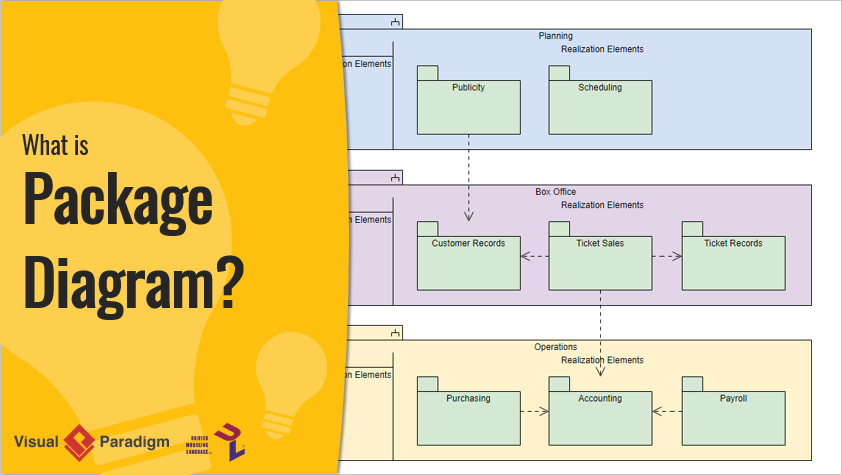
Group related use cases into Use-Case Packages (e.g., “Order Management”, “User Account”).
-
Use Business Use Cases for enterprise-level planning (e.g., “Onboard New Customer”).
-
Implement modular architecture to support vertical slicing.
🛠️ Recommended Tools
| Tool | Use Case |
|---|---|
| Visual Paradigm | Full UML modeling, use-case diagrams, traceability |
| Enterprise Architect | Advanced modeling, integration with ALM tools |
| Miro / FigJam | Collaborative whiteboarding, slice mapping |
| Jira / Azure DevOps | Backlog management, sprint tracking, state transitions |
| Cucumber / SpecFlow | BDD testing with Gherkin syntax |
✅ Pro Tip: Use Gherkin for acceptance criteria — it’s readable by both developers and non-technical stakeholders.
⚠️ Common Pitfalls to Avoid
-
Too many slices per use case → Death by detail.
→ Fix: Limit to 3–10 slices; focus on value, not granularity. -
Too few slices → Giant, untestable stories.
→ Fix: Break down large flows into thin vertical slices. -
Ignoring extensions and errors → Unreliable systems.
→ Fix: Include at least one error/alternative slice per use case. -
Treating use cases as final specs → Anti-agile.
→ Fix: Treat them as living artifacts — refine as you learn.
🔹 Conclusion: The Future of Requirements Is Here
Use-Case 2.0 is not just a methodology — it’s a mindset shift.
It answers the age-old tension between clarity and agility, between structure and speed. By combining:
-
The goal-oriented focus of use cases,
-
The lightweight, iterative nature of user stories,
-
The test-first, vertical slicing of modern agile practices,
…Use-Case 2.0 delivers a powerful, future-proof approach to software requirements.
✅ Why Teams Love It in 2026:
-
✅ Faster time to value – deliver working features early.
-
✅ Better collaboration – shared understanding across product, dev, QA.
-
✅ Fewer defects – tests are defined before code.
-
✅ Easier scaling – works for startups and global enterprises.
-
✅ Traceable delivery – every feature links back to a user goal.
📚 Further Reading:
Use-Case 2.0: The Guide to Succeeding with Use Cases by Ivar Jacobson, Ian Spence, Kurt Bittner
Free download: https://www.ivarjacobson.com
Explore the Ivar Jacobson International site for training, tools, and community.
📌 Final Thought
“Don’t write requirements — deliver value.”
Use-Case 2.0 turns abstract goals into tangible, tested, and valuable increments — one slice at a time.
Whether you’re building a fintech app, an e-commerce platform, or a mission-critical enterprise system, Use-Case 2.0 gives you the framework to build smarter, faster, and with greater confidence.
🚀 Happy Slicing!
Go forth and deliver value — one vertical slice at a time.
- AI Chatbot Feature – Intelligent Assistance for Visual Paradigm Users: This article introduces the core chatbot functionality designed to provide instant guidance and automate tasks within the modeling software.
- Visual Paradigm Chat – AI-Powered Interactive Design Assistant: An interactive interface that helps users generate diagrams, write code, and solve design challenges in real time through a conversational assistant.
- AI-Powered Use Case Diagram Refinement Tool – Smart Diagram Enhancement: This resource explains how to use AI to automatically optimize and refine existing use case diagrams for better clarity and completeness.
- Mastering AI-Driven Use Case Diagrams with Visual Paradigm: A comprehensive tutorial on leveraging specialized AI features to create intelligent and dynamic use case diagrams for modern systems.
- Visual Paradigm AI Chatbot: The World’s First Purpose-Built AI Assistant for Visual Modeling: This article highlights the launch of a groundbreaking AI assistant tailored specifically for visual modeling with intelligent guidance.
- AI-Powered Use Case Diagram Example for Smart Home System: A community-shared example of a professional use case diagram generated by AI, illustrating complex user-system interactions in an IoT environment.
- Master AI-Driven Use Case Diagrams: A Short Tutorial: A concise guide from Visual Paradigm on leveraging AI to create, refine, and automate use case diagram development for faster project delivery.
- Revolutionizing Use Case Elaboration with Visual Paradigm AI: This guide details how the AI engine automates documentation and enhances the modeling clarity of software requirements.
- How to Turn Requirements into Diagrams with an AI Chatbot: This article explores how project requirements can be evolved from simple text into full system designs through a conversational interface.
- AI-Powered Chatbot Development Using Visual Paradigm: A video tutorial demonstrating how to build an AI-driven chatbot using automated modeling techniques and assisted diagramming tools.
This post is also available in Deutsch, Español, فارسی, Français, English, Bahasa Indonesia, 日本語, Polski, Portuguese, Việt Nam, 简体中文 and 繁體中文.