In the development of large, complex IT systems, aligning business vision with technical execution is critical. One of the most powerful strategies to achieve this alignment is the integration of Business Process Model and Notation (BPMN) with Use Case modeling. This synergy bridges the gap between high-level business goals and the granular functional requirements developers need to implement — transforming abstract processes into actionable software.
Think of it this way:
-
BPMN tells the story of how the business works — the flow, timing, roles, and handoffs.
-
Use Cases define what the system must do — the user goals, system responses, and interactions.
Together, they form a cohesive, traceable, and scalable architecture that ensures every line of code serves a real business purpose.
1. Mapping the Hierarchy: From “Why” to “What”
Before writing a single line of code, teams must establish a clear hierarchy of abstraction. In large systems, this begins with aligning BPMN (process level) and Use Cases (functional level) through a structured workflow.
The Integration Framework
| Level | Artifact | Purpose |
|---|---|---|
| 1. Business Process (High-Level) | BPMN Diagram | Visualizes end-to-end workflows, participants, and task sequences. |
| 2. Functional Requirement (System-Level) | Use Case | Defines what the system must do to support a specific business task. |
Integration Workflow: Turning BPMN Tasks into Use Cases
-
Identify System-Dependent Tasks
Review your BPMN diagram and flag any manual or automated tasks that require interaction with the IT system. -
Define the Boundary
For each such task, define a corresponding Use Case. For example:-
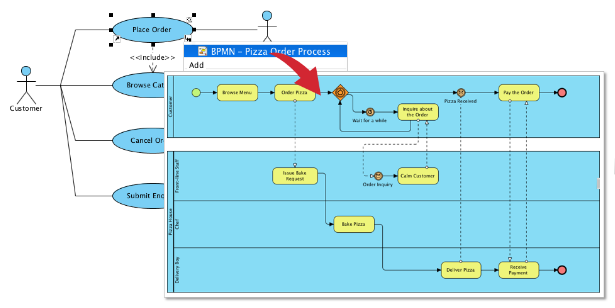
BPMN Task: “Order Pizza”
→ Use Case: “Place Order”
-
-
Establish Traceability
Use a Requirements Traceability Matrix (RTM) to ensure every BPMN task has at least one associated Use Case — and vice versa. This prevents feature creep and ensures completeness.
✅ Pro Tip: Use the “Sub-diagram” approach in BPMN: Draw a red arrow from a BPMN task (e.g., “Order Pizza”) to a Use Case diagram, indicating that the task is implemented via that Use Case.
2. Key Integration Touchpoints: BPMN vs. Use Case
Understanding the differences and synergies between BPMN and Use Cases is essential for effective integration.
| Feature | BPMN (Process Level) | Use Case (Functional Level) |
|---|---|---|
| Focus | Workflow, timing, handoffs, and coordination between roles. | User goals, system behavior, and interaction sequences. |
| Actors | Business roles (e.g., Clerk, Chef, Customer). | Users or external systems (e.g., Customer, Payment Gateway). |
| Triggers | Business events (e.g., “Customer is hungry,” “Order received”). | User actions (e.g., “Clicks ‘Submit Order’”). |
| Error Handling | Business exceptions (e.g., “Out of stock,” “Approval pending”). | System exceptions (e.g., “Invalid credit card,” “Timeout during payment”). |
This contrast highlights their complementary nature:
-
BPMN answers: Who does what, and in what order?
-
Use Case answers: What does the system do when a user performs an action?
3. Practical Steps to Implement the Integration
A. Use BPMN to Discover Use Cases
Every time a BPMN task involves a human or system interaction, it’s a candidate for a Use Case.
🔍 Example: In your pizza ordering process, the task “Order Pizza” is performed by a customer using a web app.
→ This triggers the Use Case: “Place Order”.
Use <> and <> relationships to break down complexity:
-
<<include>> Browse Catalog→ Ensures the customer can view available pizzas. -
<<extend>> Check Inventory→ Only triggered if an item is out of stock.
This modular approach makes development more manageable and testable.
B. Use Data Objects as Bridges Between Models
BPMN uses Data Objects (e.g., Order Form, Invoice, Payment Receipt) to represent information exchanged during a process.
These objects are critical links to Use Cases:
-
They define what data must be captured, stored, or displayed.
-
They ensure UI/UX design aligns with actual business data needs.
🔄 Example: The BPMN Data Object “Order Form” must be fully supported by the “Place Order” Use Case — including fields like
Delivery Address,Payment Method, andSpecial Instructions.
This ensures that no data is lost in translation between business and development.
C. Handling Long-Running Processes: The “Wait” State Challenge
Large systems often involve long delays — e.g., waiting 3 days for approval, or a kitchen preparing a pizza.
-
BPMN handles this using Intermediate Events (e.g., Timer Events, Message Events).
-
Example: A Timer Intermediate Event labeled “Wait 3 days for approval” pauses the process.
-
-
Use Cases handle this by defining pre-conditions and post-conditions:
-
Pre-condition: “User has submitted request and is awaiting approval.”
-
Post-condition: “System resumes workflow when approval is received.”
-
This ensures the system preserves state and resumes correctly, even after extended delays.
4. Why This Integration Works for Large Systems
The combination of BPMN and Use Cases isn’t just a best practice — it’s a strategic necessity for large-scale IT projects.
✅ Benefits of Integration
| Benefit | Explanation |
|---|---|
| Prevents Feature Creep | If a feature isn’t tied to a BPMN task, it likely doesn’t support a real business need. |
| Improves Cross-Team Communication | Business stakeholders understand BPMN; developers understand Use Cases. Common language reduces misalignment. |
| Enables Traceable Requirements | Every Use Case can be traced back to a process step — vital for compliance, audits, and testing. |
| Simplifies Testing | Test the “Happy Path” of the BPMN by verifying the successful execution of a sequence of Use Cases. |
| Supports Agile & Iterative Development | Use Cases can be prioritized and implemented in sprints, aligned with process milestones. |
5. Case Study: “Place Order” Use Case for a Pizza Ordering System
Let’s bring this to life with a real-world example based on your BPMN diagram.
📌 Use Case: Place Order
(Mapped from BPMN Task: “Order Pizza”)
| Use Case ID | UC-001 |
|---|---|
| Title | Place Order |
| Primary Actor | Customer (External User) |
| Secondary Actors | Payment Gateway, Inventory System, Order Management System |
| Pre-conditions | – Customer is logged in (or guest session active). – Catalog of available pizzas is loaded. – Valid payment method is on file (or ready to be entered). |
| Post-conditions | – Order is created in the system with status “Pending.” – Order ID is generated and returned to the customer. – Inventory is checked for availability (if applicable). |
| Trigger | Customer clicks “Submit Order” after selecting items and entering delivery details. |
📝 Main Success Scenario (Happy Path)
-
Customer selects pizza(s) from the online catalog.
-
Customer adds toppings and customizations (if applicable).
-
Customer enters delivery address and contact information.
-
System displays the order summary and total cost.
-
Customer selects payment method (e.g., credit card, digital wallet).
-
System validates payment details via Payment Gateway.
-
System checks inventory (via Inventory System) to confirm ingredients are available.
-
If all checks pass:
-
System creates a new order record with status “Pending.”
-
System generates an Order ID (e.g.,
ORD-2025-00123). -
System sends confirmation to the customer (email/SMS).
-
-
Order is routed to the kitchen (via Order Management System).
-
Use Case ends successfully.
⚠️ Alternative Flows (Extensions)
-
UC-001a: Payment Declined
-
If payment is rejected:
-
System displays: “Payment declined. Please try another card.”
-
Customer can edit payment details and retry.
-
If retry fails, system allows cancellation.
-
-
-
UC-001b: Out of Stock (Inventory Check Failed)
-
If any ingredient is unavailable:
-
System notifies: “One or more items are temporarily out of stock.”
-
System suggests substitutions or removes item(s).
-
Customer confirms changes before proceeding.
-
-
-
UC-001c: Invalid Address
-
If delivery address fails validation:
-
System prompts customer to correct the address.
-
If not corrected within 5 minutes, session times out.
-
-
🔗 Traceability & Relationships
-
<>
Browse Catalog -
<>
Validate Payment -
<>
Check Inventory -
Traced from BPMN:
Order Pizza(via red arrow) -
Linked Data Objects:
Order Form,Payment Details,Order Confirmation,Inventory Status
6. Final Thoughts: Building Systems That Matter
Integrating BPMN and Use Cases is not just about documentation — it’s about building systems that deliver real business value.
By:
-
Using BPMN to model how the business truly works,
-
And Use Cases to define what the system must do,
You create a single source of truth that unites stakeholders, guides developers, and ensures alignment from strategy to execution.
🎯 Remember: Every Use Case should be a direct response to a task in your BPMN. If it isn’t, ask: Does this feature serve the business?
✅ Next Steps: Let’s Build Your System Together
Would you like me to help you extend this framework?
-
📊 Generate a full Requirements Traceability Matrix (RTM) for your pizza ordering process.
-
🖼️ Create a text-based Use Case Diagram showing how “Place Order” relates to other Use Cases.
-
🍕 Draft the next Use Case (e.g., “Prepare Pizza” or “Deliver Order”) in the same format.
-
📂 Export this as a template for future projects.
Just say the word — and we’ll turn your business process into a fully traceable, testable, and developer-ready system.
🔗 Final Tip: Use tools like Visual Paradigm to model both BPMN and Use Cases in the same environment — enabling real-time traceability and collaboration.
Your business process is the story. Your Use Cases are the code. Together, they build the future. 🚀
Articles and guides
- Integrating BPMN and UML for Enhanced Modeling: This guide explains how to combine BPMN and UML (including Use Cases) for more effective business and system modeling.
- Comprehensive Guide to UML Use Case Modeling in Visual Paradigm: A detailed technical tutorial covering all aspects of Use Case modeling, from basic concepts to advanced real-world applications.
- BPMN Notation Overview – Visual Paradigm Guide: A comprehensive overview of BPMN elements, including events, activities, and gateways used for professional process modeling.
- Automating Use Case Development with AI in Visual Paradigm: This resource explores how AI-powered generators streamline the creation of detailed Use Case descriptions, reducing manual effort.
- Comprehensive Guide to Business Process Modeling with Visual Paradigm: A robust guide walking users through key BPMN 2.0 features and usage scenarios within the platform.
- What Is a Use Case Diagram? – A Complete Guide to UML Modeling: An in-depth explanation of the purpose and components of Use Case diagrams for effective software requirements analysis.
- Unlocking Efficiency: Performing Gap Analysis with BPMN: Learn how BPMN can be leveraged to visualize and analyze shortfalls in current business processes to design efficient future states.
- Step-by-Step Use Case Diagram Tutorial – From Beginner to Pro: A guided resource for creating effective Use Case diagrams, moving from basic concepts to advanced techniques.
- AI-Powered Use Case Diagram Refinement Tool – Smart Diagram Enhancement: Details how to leverage AI to automatically optimize existing Use Case diagrams for better clarity and completeness.
- From Business Processes to User Stories: A Mapping Tutorial: This tutorial demonstrates how to transform business processes (BPMN logic) into User Stories to align business goals with development.
This post is also available in Deutsch, Español, فارسی, Français, English, Bahasa Indonesia, 日本語, Polski, Portuguese, Ру́сский, Việt Nam, 简体中文 and 繁體中文.