


Introduction: The Future of Value Stream Mapping Is Here
Value Stream Mapping (VSM) has long been a cornerstone of Lean and continuous improvement methodologies. By visualizing the flow of materials and information across a process, organizations can identify waste, reduce lead times, and enhance customer value. But traditional VSM creation is often slow, manual, and reliant on expert interpretation—limiting its adoption and impact.
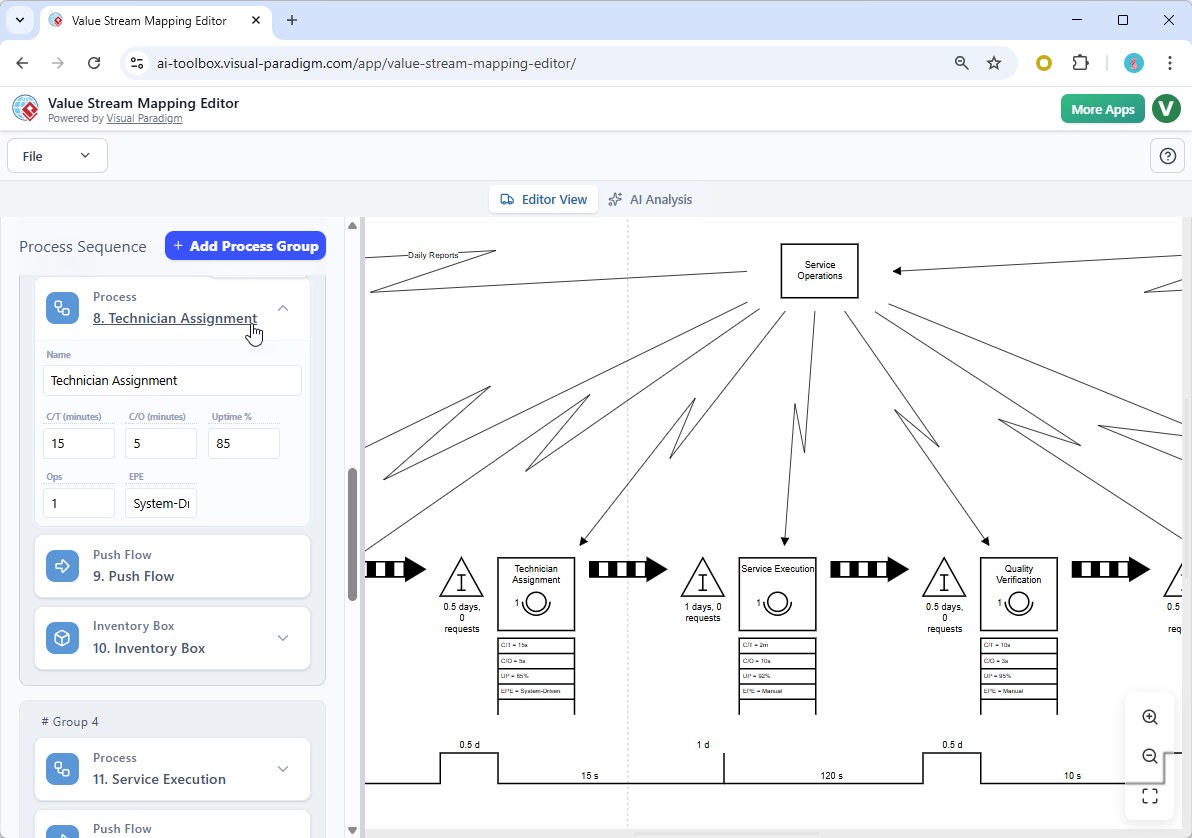
Enter Visual Paradigm’s AI-Powered Value Stream Mapping Editor—a revolutionary tool that redefines how teams create, analyze, and optimize workflows. Launched on January 16, 2026, this intelligent platform enables users to generate complete, data-rich, and actionable Value Stream Maps from plain-text descriptions, all within minutes.
This comprehensive guide walks you through every aspect of the AI VSM Editor—from setup and usage to advanced analysis and real-world applications—so you can unlock its full potential.
What Is the AI Value Stream Mapping Editor?
The AI Value Stream Mapping Editor is a next-generation software application that combines natural language processing (NLP), diagramming intelligence, and AI-driven analytics to automate and enhance the entire VSM lifecycle.
Unlike conventional diagramming tools that require manual input and design, this platform lets you:
- Describe your process in simple English.
- Automatically generate a professional-grade VSM.
- Interactively edit and refine the map.
- Receive real-time performance metrics and AI-generated insights.
- Export high-quality visuals for reporting and collaboration.
✅ Key Innovation: The AI doesn’t just draw—it understands. It interprets context, infers relationships between steps, identifies potential bottlenecks, and delivers strategic recommendations—making it the most intelligent value stream mapping tool on the market.
Core Features & How to Use Them
Below is a detailed walkthrough of each feature, including step-by-step instructions and best practices.
1. Generate VSM from Text (The AI VSM Generator)
🔹 How It Works:
Enter a natural language description of your process (e.g., “A customer places an order online, which is validated by the system, then routed to warehouse for picking, packing, and shipping via FedEx”).
The AI parses your input, identifies:
- Process steps
- Input/output flows
- Inventory points
- Decision gates
- Lead time estimates (based on inferred durations)
Then, it generates a fully structured VSM with:
- Process boxes with names and durations
- Inventory buffers (e.g., “Order Queue,” “Packed Goods”)
- Material and information flows
- Timeline bar charts
📝 Example Input:
“A customer submits a support ticket through our web portal. The ticket is automatically categorized by type (billing, technical, account). If it’s technical, it goes to Tier 1 support. If unresolved after 2 hours, it escalates to Tier 2. After resolution, the customer receives an email notification.”
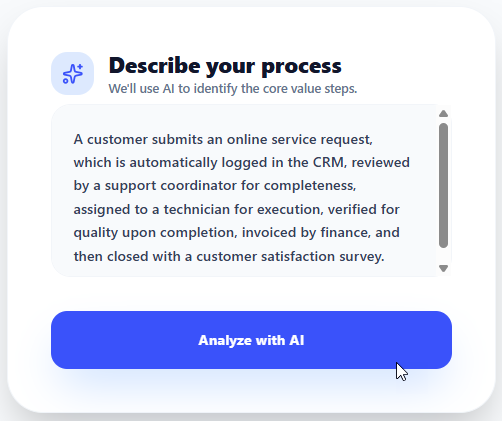
📊 Output:
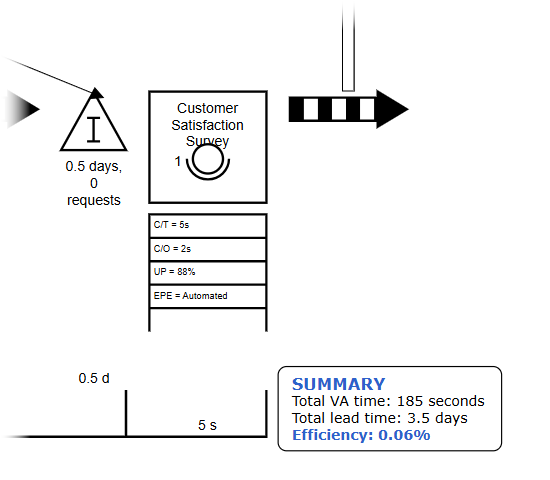
- A dynamic VSM showing:
- Ticket intake → Categorization → Tier 1 → Escalation → Tier 2 → Resolution → Email
- Average time per step
- Decision diamonds for escalation logic
- Lead time summary
✅ Best Practices:
- Be specific: Include names of departments, systems, and key decision points.
- Use active voice: “The system sends the order to warehouse” is better than “The order is sent.”
- Mention delays or handoffs: e.g., “After approval, the document waits 1 business day for review.”
💡 Pro Tip: Start with a 2–3 sentence description. You can always expand later in the editor.
2. Full-Featured Interactive Editor
Once your map is generated, the Interactive Editor gives you full control to customize and refine your VSM.
🔹 Key Capabilities:
- Drag-and-Drop Reordering: Rearrange process steps or lanes for better flow.
- Edit Process Details: Update step names, durations, cycle times, or resource assignments.
- Add/Remove Inventory Buffers: Insert waiting times, queues, or buffer zones.
- Customize Flow Lines: Adjust direction, color, and labeling of material/information flows.
- Add Metrics Manually: Override AI estimates with actual data from your operations.
🎯 Use Case:
You notice the AI estimated “30 minutes” for “Order Validation,” but your team says it’s usually 5 minutes. Simply edit the value, and all downstream metrics (total lead time, efficiency %) update automatically.
✅ Best Practices:
- Use consistent naming conventions (e.g., “Customer Order Entry,” “Payment Processing”).
- Label all decision points clearly (e.g., “Approval Required?”).
- Use color coding for different process types (e.g., red = delay, green = value-added).
3. Automated Timeline & Real-Time Metrics
The AI VSM Editor continuously calculates and displays key performance indicators (KPIs):
📈 These values update in real time as you modify steps or durations.
📊 Example:
After adding a “Wait for Approval” step that takes 2 days, the tool shows:
- Total Lead Time: 5.2 days
- Value-Added Time: 0.5 days
- Process Efficiency: 9.6%
This immediately signals a major bottleneck.
4. AI-Powered Analysis & Insight Reports
This is where the tool transcends visualization—it becomes a digital Lean consultant.
🔹 How to Use the AI Analyst:
- Click the “Analyze” button in the toolbar.
- Choose from pre-defined report types:
- Bottleneck Identification
- Waste Analysis (Muda)
- Opportunity for Automation
- Customer Journey Impact
- Cost of Delay
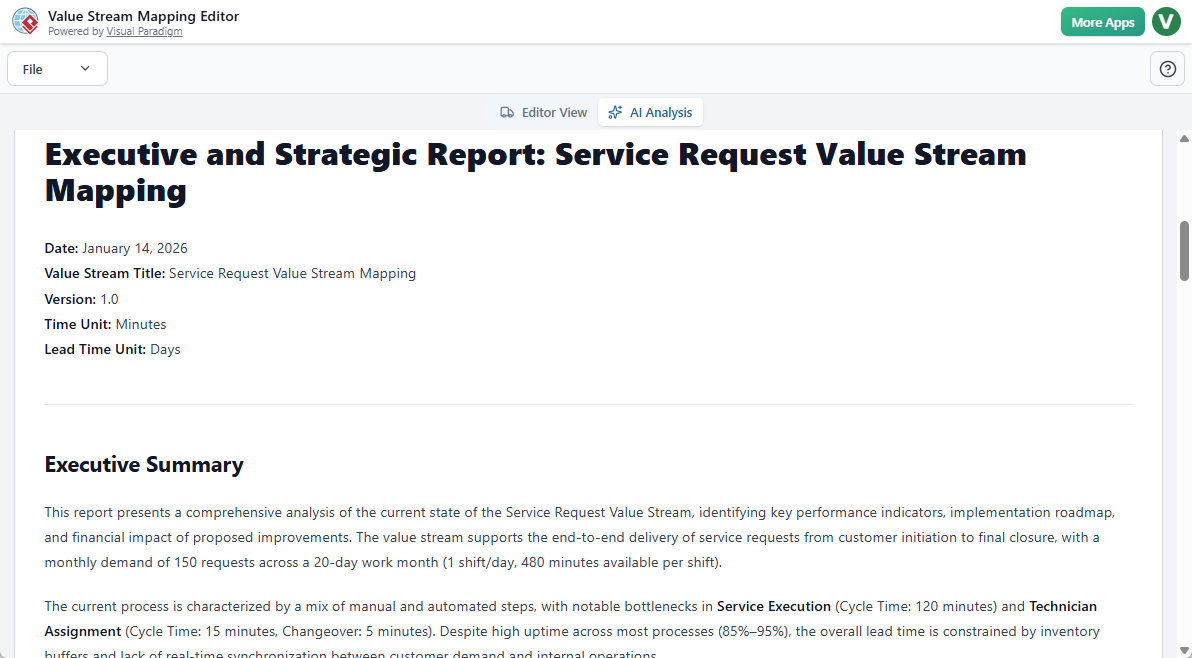
📄 Sample AI-Generated Report (Excerpt):
Insight Summary:
- Top Bottleneck: “Tier 2 Support Escalation” (Average 48-hour delay due to limited staffing).
- Waste Type: Waiting (32% of total lead time).
- Recommendation: Implement automated ticket triage and assign dedicated Tier 2 resources during peak hours.
- Potential Improvement: Reduce total lead time by 31% if escalation delay is reduced to 8 hours.
✅ Best Practices:
- Use AI reports to spark team discussions.
- Share findings with stakeholders using the export feature.
- Re-run analysis after implementing changes to measure impact.
💡 Pro Tip: Use the “Compare Versions” feature to track improvements over time.
5. High-Quality PNG Export & Sharing
Once your VSM is complete and approved, export it in professional format:
- Resolution: 300 DPI (ideal for print and presentations)
- File Format: PNG (transparent background, clean lines)
- Customization Options: Add logos, titles, or annotations before export
📤 Export Workflow:
- Click “Export” → Select “PNG”
- Choose resolution and size (Standard, Large, Poster)
- Add title and footer (optional)
- Download and share with your team, clients, or leadership
🎯 Use Case: Include the exported VSM in a quarterly improvement report or Agile retrospective.
Who Should Use the AI VSM Editor?
This tool is designed for anyone involved in process optimization, regardless of industry or role.
✅ Bonus: The tool supports multi-team collaboration via cloud sync—teams can co-edit maps in real time.
Getting Started: Step-by-Step Setup Guide
Step 1: Access the Tool
- Go to https://www.visual-paradigm.com/ai-vsm-editor
- Sign in with your Visual Paradigm account (Free trial available; VP Online Deluxe required for full features)
Step 2: Create Your First VSM
- Click “New VSM”
- Enter your process description in the prompt box
- Press “Generate”
🚀 Within 15 seconds, your AI-generated VSM appears.
Step 3: Refine the Map
- Use the Interactive Editor to adjust steps, durations, and flows
- Add missing inventory points or decision logic
Step 4: Run AI Analysis
- Click “Analyze” → Select “Bottlenecks & Waste”
- Review the AI-generated report
Step 5: Export & Share
- Click “Export” → Choose PNG
- Download and share with your team
Advanced Tips & Pro Strategies
Why This Changes Everything
The AI-Powered Value Stream Mapping Editor isn’t just a tool—it’s a paradigm shift in process improvement:
- From hours to minutes: Generate a VSM in under a minute.
- From guesswork to data: AI analyzes patterns and predicts risks.
- From passive diagrams to actionable intelligence: Every map comes with strategic recommendations.
- From siloed insights to collaborative innovation: Teams can co-create and share maps in real time.
🌟 Bottom Line: You’re no longer just mapping processes—you’re optimizing value delivery at scale, powered by artificial intelligence.
Conclusion: Start Optimizing Today
The future of Lean and process excellence is intelligent, fast, and accessible. With the AI Value Stream Mapping Editor, you can:
- Visualize your workflows instantly.
- Analyze them with AI-powered precision.
- Act on insights with confidence.
🚀 Don’t wait. Don’t draw. Start optimizing.
👉 Create Your AI-Generated VSM Now
https://www.visual-paradigm.com/ai-vsm-editor
FAQs
Q: Is this tool only for manufacturing?
A: No! While VSM originated in manufacturing, this tool supports any process—from software delivery to customer service to healthcare.
Q: Can I use real data from my systems?
A: Yes. The editor supports integration with Jira, Salesforce, ERP, and other platforms (via API or CSV import).
Q: Do I need AI expertise to use it?
A: Absolutely not. The tool is designed for non-technical users—just describe your process in plain English.
Q: Is there a mobile version?
A: The full editor is available on desktop (Windows, macOS) and web browser. Mobile editing is in development for Q3 2026.
Q: How much does it cost?
A: Free trial available. Full access requires VP Online Deluxe subscription ($99/month or $999/year).
Final Thought
In a world where speed, accuracy, and agility define competitive advantage, the AI-Powered Value Stream Mapping Editor gives you the edge. It turns abstract ideas into visual clarity, manual effort into intelligent automation, and data into decisions.
From text to insight—fast, smart, and powerful.
📣 Your process is ready for transformation. The AI is ready to help.
Start your journey today.
VSM & AI Resources
- Value Stream Mapping (VSM) and Visual Paradigm’s AI capabilities for process optimization and diagramming:
- Value Stream Mapping Software – Visual Paradigm Online: This cloud-based software enables teams to visualize, analyze, and optimize workflows for lean manufacturing and process improvement.
- Value Stream Mapping Tool – Visual Paradigm: A comprehensive tool designed to help organizations identify waste and enhance operational efficiency through visual workflow analysis.
- AI Chatbot – Visual Paradigm AI: This assistant allows users to go from a simple text prompt to a complete diagram in seconds, handling complex drawing tasks for various modeling needs.
- Comprehensive Guide to Value Stream Mapping: An in-depth guide explaining the fundamentals and benefits of VSM for continuous improvement in business operations.
- AI Powered Chart Generator: This AI-driven tool helps users visualize ideas and improve workflow efficiency by generating various breakdown structures and charts.
- What is Value Stream Mapping?: An educational overview explaining the concept and strategic importance of VSM in business process analysis.
- Value Stream Mapping as an Artifact of the Vision Phase: This resource explains how VSM serves as a critical artifact to align teams and define strategic direction during product development.
- AI-Powered Visual Modeling and Design Solutions: A platform for exploring cutting-edge AI-driven tools for visual modeling and diagramming to enable smarter development workflows.
- Eliminate Waste with Value Stream Mapping: A practical approach to using VSM to detect and eliminate eight types of waste in manufacturing and service processes.
- How to Use Value Stream Mapping in Six Sigma Projects: This article demonstrates how VSM enhances Six Sigma initiatives by identifying bottlenecks and supporting data-driven improvement strategies.
This post is also available in Deutsch, Español, فارسی, Français, English, Bahasa Indonesia, 日本語, Polski, Portuguese, Ру́сский, Việt Nam, 简体中文 and 繁體中文.