


Creating a social platform for users to share, discover, and rate cooking recipes is a complex project that requires meticulous planning. Visual Paradigm’s Agilien, an AI-powered project planning and software design assistant, simplifies this process by transforming high-level project ideas into a detailed, actionable backlog in seconds. The tool leverages artificial intelligence to generate a comprehensive agile framework, complete with epics, user stories, and sub-tasks, while seamlessly bridging the gap between planning and design. This article explores how Agilien can be used to efficiently plan and visualize a recipe sharing social network, demonstrating its powerful capabilities for software development teams.
Key Takeaways
-
Agilien uses AI to generate a complete project backlog from a simple project description, accelerating the planning process.
-
It provides a clear, hierarchical structure of epics, user stories, and sub-tasks, ensuring project clarity and alignment.
-
Agilien automatically generates software architecture diagrams, such as sequence and class diagrams, directly from user stories to visualize the technical implementation.
-
Users can refine AI-generated plans and diagrams using a live PlantUML editor for full control over the final design.
-
Agilien integrates with Jira, allowing for seamless import and sync of projects, ensuring a single source of truth.
From Concept to Backlog: The Power of AI-Driven Planning
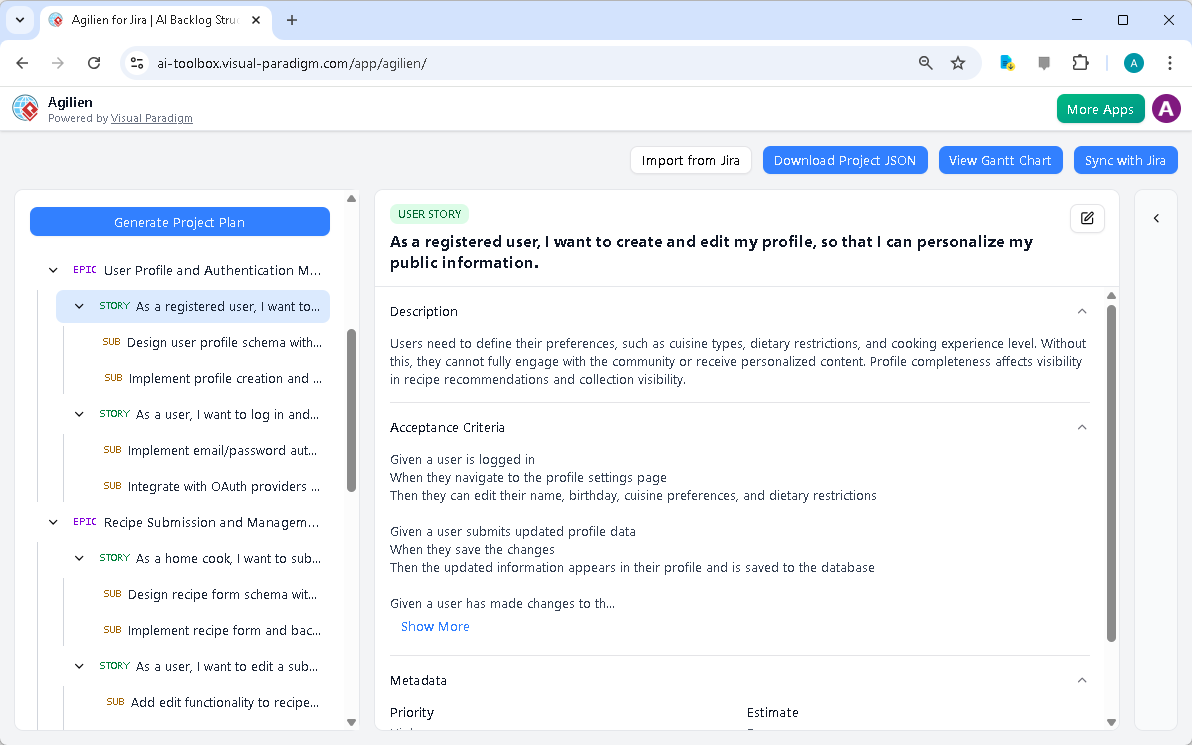
Agilien’s primary strength lies in its ability to turn a vague idea into a structured project plan almost instantly. In the provided screenshot, the user has input a description for a recipe sharing social platform: “A social network for users to share, discover, and rate cooking recipes.” The system context further specifies core features like user profiles, recipe submission, a recommendation engine, and responsive design. By clicking the “Generate Project Plan” button, Agilien’s AI engine processes this information and creates a fully formed project backlog.
The result, as seen in the left-hand panel, is a hierarchical structure that organizes the project into manageable components. The top-level items are Epics, which represent major, high-level goals. In this case, the epics are “User Profile and Authentication Management” and “Recipe Submission and Management.” Each epic is then broken down into User Stories, which are specific, actionable tasks from the user’s perspective. For example, a user story under the profile epic is “As a registered user, I want to create and edit my profile, so that I can personalize my public information.” Finally, each user story is further decomposed into Sub-tasks, which are the individual, technical steps required to complete the story. This clear, logical hierarchy provides a structured roadmap for the development team.
Visualizing the Architecture: AI-Powered Diagram Generation
One of Agilien’s most innovative features is its ability to generate software architecture diagrams directly from the project’s work items. This bridges the critical gap between the business requirements and the technical implementation, ensuring that everyone on the team is aligned. In the screenshot, the user is viewing the details of a specific user story, which is a perfect candidate for diagram generation.
By selecting a user story, such as the one about creating and editing a profile, the user can access the “Diagram Workbench” on the right. This panel allows them to choose a diagram type—such as a Sequence Diagram to show the flow of interactions, or a Class Diagram to model the data structures—and click “Generate Diagram.” The AI will then analyze the user story’s content and automatically create a visual representation of the system’s architecture. This instant visualization helps the team understand the complexity of the task, identify potential issues, and plan the development process more effectively.
Refining the Plan and Diagrams with Live Editing
While the AI-generated plans and diagrams are a powerful starting point, they are not always perfect. Agilien empowers users to refine and customize the output to meet their specific needs. The tool provides a live, code-based editor for diagrams, using the PlantUML language. This means that if the AI-generated Class Diagram for the profile feature is missing a crucial attribute, a developer can switch to the “Code” tab in the Diagram Workbench, make the necessary changes to the PlantUML code, and see the updated diagram in real-time.
Similarly, the “Detail Panel” allows for in-depth editing of any work item. Users can click the “Edit” button to modify the description, acceptance criteria, priority, or estimates for a user story. This level of control ensures that the final plan is accurate, detailed, and reflects the team’s understanding of the project. The ability to attach the finalized diagrams directly to the relevant user stories creates a living, evolving documentation system that is always up-to-date.
Conclusion
Agilien is a powerful, AI-powered tool that revolutionizes the way software projects are planned and designed. By automating the creation of a structured backlog and generating visual architecture diagrams from user stories, it dramatically accelerates the project kickoff process. The tool’s intuitive interface, combined with its powerful AI and live editing capabilities, makes it an invaluable asset for product managers, software architects, and development teams alike. For a complex project like a recipe sharing social network, Agilien provides the clarity and structure needed to ensure successful execution.
Ready to transform your project ideas into a clear, actionable plan? Try Agilien today and experience the power of AI-driven project planning.
Related Links
Visual Paradigm provides a comprehensive set of agile tools designed to improve backlog management, sprint planning, and team collaboration through visual modeling and AI-driven automation,,.
-
Agile User Story Mapping Tool – Prioritize Features Effectively: This tool allows agile teams to visualize product backlogs, prioritize features, and plan sprints effectively within a collaborative environment.
-
A Comprehensive Guide to User Story Mapping: This resource explains how to use story maps to align teams and prioritize development tasks to ensure overall project success.
-
Sprint Planning in Agile: Step-by-Step Guide: A detailed guide covering backlog prioritization, task breakdown, and team alignment for more effective agile project management.
-
Visual Paradigm Jira Integration – Seamless Diagramming & Workflow: This feature enables users to synchronize diagrams, models, and agile workflows directly within Jira to enhance project visibility and collaboration.
-
Agilien AI-Powered Jira Backlog Planner: This tool leverages AI to intelligently structure user stories and epics, facilitating more efficient sprint cycles for product management.
-
Adopting UML in Agile Projects – Comprehensive Tutorial: This tutorial explores the integration of UML into Agile workflows to improve planning, communication, and project clarity.
-
Unleash the Power of Agile and Scrum with Visual Paradigm: A guide demonstrating how specialized visual tools enhance planning, collaboration, and value delivery in Scrum practices.
-
Agile Methodology Tutorial – Principles and Practices Explained: A comprehensive resource covering Agile principles, frameworks, and practical applications within the software development lifecycle.
-
User Story Guide in the Agile Handbook: This resource details the full lifecycle of user stories, from initial concept to acceptance criteria and sprint implementation.
-
Enhancing Visual Modeling and Backlog Planning with Agilian: A tutorial showcasing how the integration of visual modeling enhances backlog planning and streamlines agile workflows.
This post is also available in Deutsch, Español, فارسی, Français, English, Bahasa Indonesia, 日本語, Polski, Portuguese, Ру́сский, Việt Nam, 简体中文 and 繁體中文.