


Introduction to Visual Paradigm’s AI Ecosystem
Visual Paradigm has introduced a robust suite of artificial intelligence tools designed to streamline the database development and modeling process. Within this ecosystem, two distinct but interconnected tools stand out: the DB Modeler AI and the AI Chatbot. While both leverage core generative capabilities, they serve fundamentally different functions within the design lifecycle. This guide explores the nuances of each tool, ranging from structured end-to-end engineering to flexible, conversational refinement.
DB Modeler AI: The End-to-End Specialist
The DB Modeler AI is a specialized, browser-based application engineered to transform natural language inputs into production-ready SQL database schemas. It acts as an architectural engine, guiding users through a strict 7-step workflow that evolves a high-level concept into a tested implementation.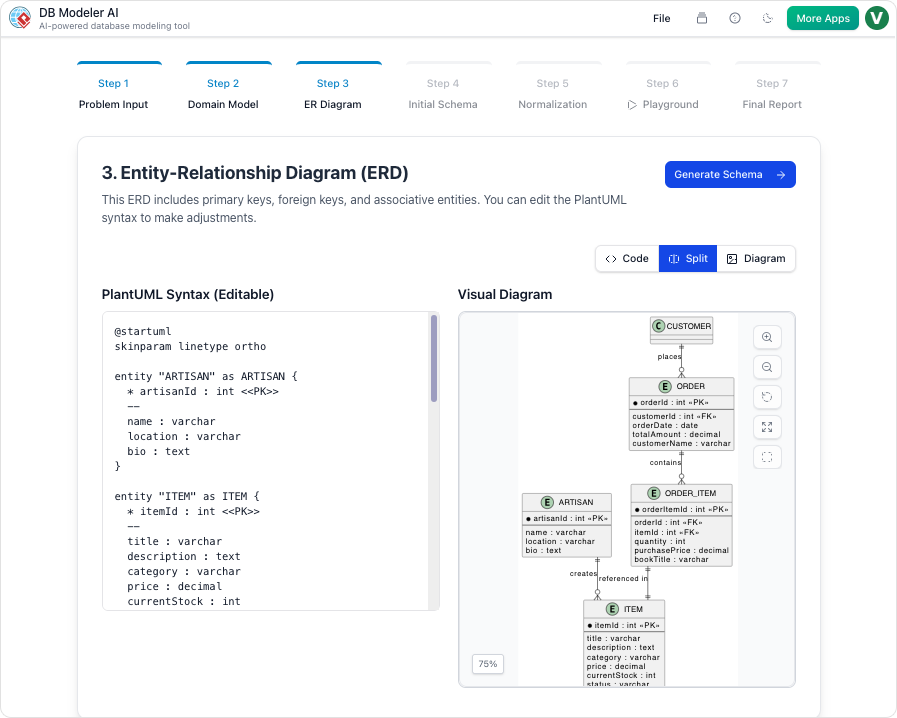
The 7-Step Guided Workflow
Unlike general-purpose diagramming tools, DB Modeler AI follows a rigid professional sequence to ensure structural integrity:
- Problem Input: The user defines the scope and requirements in natural language.
- Domain Class Diagram & ER Diagram: The AI generates conceptual and logical models.
- Schema Generation: The visual models are converted into database schemas.
- Intelligent Normalization: A standout feature where the AI automatically normalizes data from 1NF to 3NF, providing educational rationales for every change.
- Interactive Playground & Final Export: The workflow concludes with testing and DDL generation.
Key Feature: The Interactive SQL Playground
One of the most powerful features of the DB Modeler AI is its ability to facilitate testing before deployment. It includes an Interactive SQL Playground where users can execute queries against an in-browser database. This database is automatically seeded with realistic, AI-generated sample data, allowing developers to validate the logic of their schema instantly.
AI Chatbot: The Conversational Co-Pilot
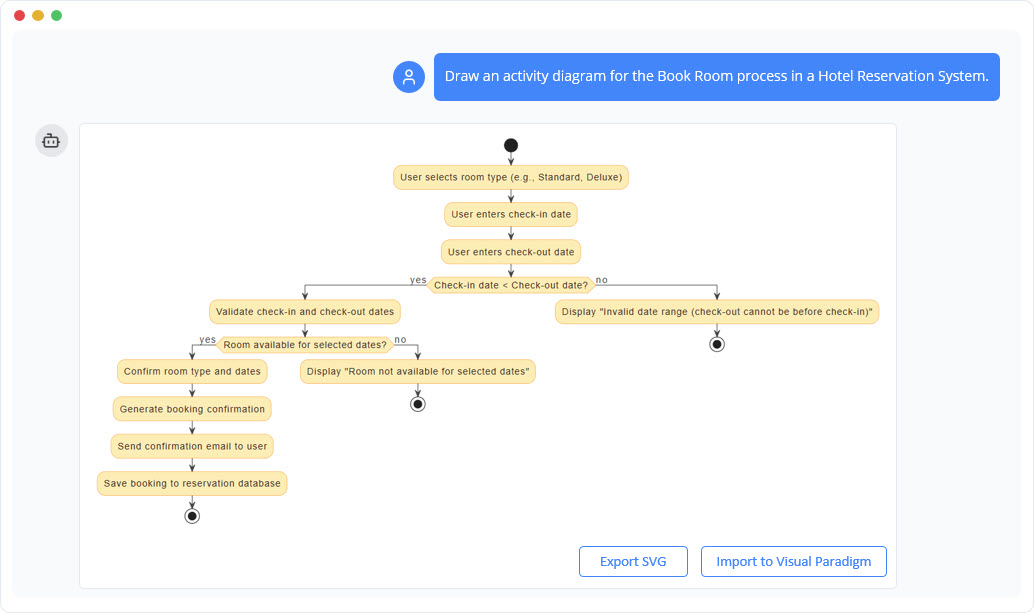
In contrast to the structural rigidity of the DB Modeler, the AI Chatbot serves as a broad, cloud-based assistant available in Visual Paradigm Online and the Desktop version. It functions as a versatile conversational interface designed for general visual modeling and rapid iteration.
Conversational Editing and Refinement
The primary strength of the AI Chatbot is its ability to interpret commands for interactive refinement. Users can simply “talk” to their diagrams to make adjustments. For example, a user might issue a command like “Rename Customer to Buyer” or ask the bot to refactor relationships, eliminating the need for manual dragging and dropping of elements.
Versatility and Analysis
While the DB Modeler is strictly focused on databases, the AI Chatbot supports a vast universe of diagrams. It can generate and modify UML, SysML, ArchiMate, C4 models, and strategic matrices like SWOT or PEST. Furthermore, it offers analytical insights, allowing users to ask questions such as “What are the main use cases?” or request professional project documentation on demand.
Comparative Analysis
To understand where each tool fits in your development stack, consider the following comparison of their core capabilities:
| Feature | DB Modeler AI | AI Chatbot |
|---|---|---|
| Primary Goal | Creating fully normalized, production SQL schemas. | Rapid diagram generation and conversational editing. |
| Structure | A guided 7-step journey. | Open-ended natural language conversation. |
| Normalization | Automatic 1NF to 3NF with educational rationales. | Not a primary feature; focuses on visual structure. |
| Output | SQL DDL (PostgreSQL-compatible), ERDs, and PDF/JSON reports. | Wide range of UML/Business diagrams and documentation. |
| Testing | Live SQL Playground with sample data. | None; focuses on visual modeling and analysis. |
Strategic Selection: Which Tool to Use?
Choosing the right tool depends on the stage of your project and your specific goals.
When to Use DB Modeler AI
You should utilize the DB Modeler AI when starting a new database project. It is the superior choice for architects and developers who need to ensure their schema is technically sound, fully normalized, and validated before writing code. Its focus on architectural maturity makes it indispensable for handling the complex transition from conceptual classes to optimized tables.
When to Use the AI Chatbot
The AI Chatbot is best employed when you need to quickly prototype system views, such as Sequence or Use Case diagrams. It is also the ideal tool for refining existing diagrams through simple commands without navigating complex menus.
Integration and Conceptual Analogy
In practice, these tools are not mutually exclusive; they are often integrated. Within the DB Modeler’s specific workflow, the AI Chatbot is frequently available to help users refine specific diagram elements or answer design questions, providing a “best of both worlds” experience.
To visualize the difference, consider this analogy: The DB Modeler AI is like sophisticated architectural software that calculates stress loads and blueprints every pipe to ensure a building meets safety codes. The AI Chatbot is like an expert consultant standing next to you. You can ask the consultant to “move that wall” or “sketch the lobby,” and they will do it instantly, but they are not necessarily performing the deep structural engineering simulations required for construction.
This post is also available in Deutsch, Español, فارسی, Français, English, Bahasa Indonesia, 日本語, Polski, Portuguese, Ру́сский, Việt Nam, 简体中文 and 繁體中文.