Creating, formatting, and converting tabular data has historically been a tedious task for technical writers, developers, and data analysts. Whether it is wrestling with pipe characters to align a Markdown table or manually writing INSERT statements for a SQL database, structured data entry often consumes disproportionate amounts of time. The AI Table Generator aims to solve these friction points by combining artificial intelligence with a spreadsheet-like interface. In this review, we explore the features, workflows, and practical applications of this tool to see how it modernizes data management.
What is the AI Table Generator?
The AI Table Generator is a web-based utility designed to create, edit, and export structured data. Unlike traditional spreadsheet software which focuses on calculation and formulas, this tool focuses on generation and formatting. It allows users to create tables from scratch, manual entry, or plain English text descriptions via an AI engine.
The core philosophy of the tool is versatility. Users can input data in one format and instantly export it in another, supporting widely used standards such as Markdown, HTML, CSV, JSON, and SQL. It serves as a bridge between raw ideas and technical implementation, removing the manual labor typically associated with coding tables.
Key Features and Capabilities
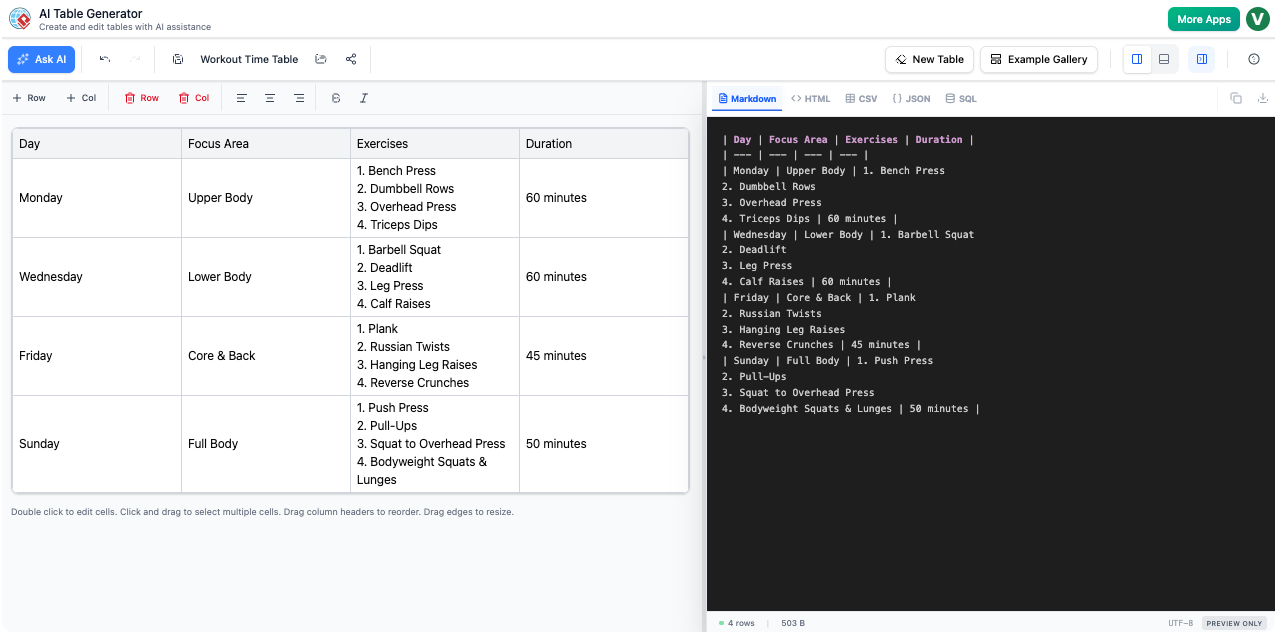
The application is built around three distinct components that work in tandem: the AI engine, the visual editor, and the live previewer.
1. AI-Powered Data Generation
The standout feature is the ability to generate complex tables from simple text prompts. Instead of manually populating cells row by row, users can click “Generate with AI” and describe the desired output. For example, a user can request “A table of the 5 largest oceans, including their area, average depth, and deepest point.” The AI interprets this request and automatically constructs the grid, populating the headers and data rows with relevant information. This feature acts effectively as a research assistant and data entry clerk rolled into one.
2. Interactive Grid Editor
While AI is excellent for starting a project, precision often requires human intervention. The tool includes a visual, spreadsheet-style grid editor. This interface will be immediately familiar to anyone who has used Microsoft Excel or Google Sheets. Users can:
- Click into cells to edit text directly.
- Add or remove rows and columns with a single click.
- Format text using bold, italics, and alignment tools.
This visual layer is crucial because it allows for rapid corrections without needing to manipulate complex code syntax.
3. Multi-Format Live Preview
For technical users, the Live Preview panel is likely the most valuable component. As data is manipulated in the grid, the preview panel updates in real-time to show the underlying code. The tool supports instant conversion between the following formats:
- Markdown: Ideal for README files and technical documentation.
- HTML: Generates clean
<table>tags for web development. - SQL: automatically generates
INSERTstatements for database population. - JSON & CSV: Standard formats for data interchange and analysis.
Who Is This Tool For?
The versatility of the export options makes the AI Table Generator useful for a broad spectrum of professionals.
Software Developers
Developers frequently need dummy data to test applications or databases. Using the AI generation feature, a developer can create a dataset (e.g., “List of 20 sample users with first name, last name, and email”) and immediately switch the preview to SQL to get the necessary query code. This eliminates the need to write repetitive INSERT INTO commands manually.
Technical Writers and Documentarians
Markdown tables are notoriously difficult to maintain; a single extra character can break the alignment. This tool allows writers to edit data visually and simply copy the perfectly formatted Markdown code into their documentation, ensuring error-free presentation.
Product Managers and Analysts
For those needing to present feature comparisons or research data, the tool offers a way to structure information quickly. The “Save” and “Share” features allow users to store tables in the cloud and generate read-only links for stakeholders, facilitating easy collaboration without sending file attachments.
Workflows and Usability
The user experience is designed to be linear and intuitive. A typical workflow involves three steps: Generation, Refinement, and Export.
Step 1: Generation
Users launch the tool and typically start by asking the AI to build the skeleton of the table. Best practices suggest being specific with prompts, defining exactly which columns are needed to get the most accurate result.
Step 2: Refinement
Once the data is in the grid, the user refines it. This might involve correcting a specific data point, bolding header text, or aligning numerical columns to the right. The “Undo/Redo” support ensures that experimentation with the structure is risk-free.
Step 3: Export
Finally, the user selects the target format. If the table is destined for a website, HTML is selected; if it is for a GitHub repository, Markdown is chosen. The code is then copied to the clipboard or downloaded as a file.
Limitations and Considerations
While the tool is powerful, potential users should be aware of its specific scope to set the right expectations:
- No Direct File Import: Currently, the tool does not support importing Excel or CSV files directly via an upload button. Users must copy and paste data from their spreadsheets into the grid editor.
- Not a Calculation Engine: Unlike Excel, this tool does not support formulas. It is strictly for static data structuring and formatting.
- Formatting Constraints: The output code (specifically for HTML and Markdown) is designed to be clean and semantic. Visual styling, such as specific border colors or background shades, is generally handled by the destination platform’s CSS rather than the tool itself.
Conclusion
The AI Table Generator is a highly specialized tool that addresses the specific pain points of modern documentation and data handling. By offloading the tedious work of formatting syntax to software and leveraging AI for data population, it saves significant time for developers and writers. While it replaces neither a full-featured spreadsheet application nor a database management system, it serves as an essential utility for bridging the gap between raw information and structured, deployable code.
For those interested in optimizing their documentation or data entry workflows, the tool is available to try at Visual Paradigm AI Table Generator.
This post is also available in Deutsch, Español, فارسی, Français, English, Bahasa Indonesia, 日本語, Polski, Portuguese, Ру́сский, Việt Nam, 简体中文 and 繁體中文.