Comprehensive Guide: AI Animated Banner Generator
Create, Customize, and Launch Eye-Catching Animated Banners in Seconds
Introduction
In today’s fast-paced digital world, . Animated banners are . However, designing professional animations .
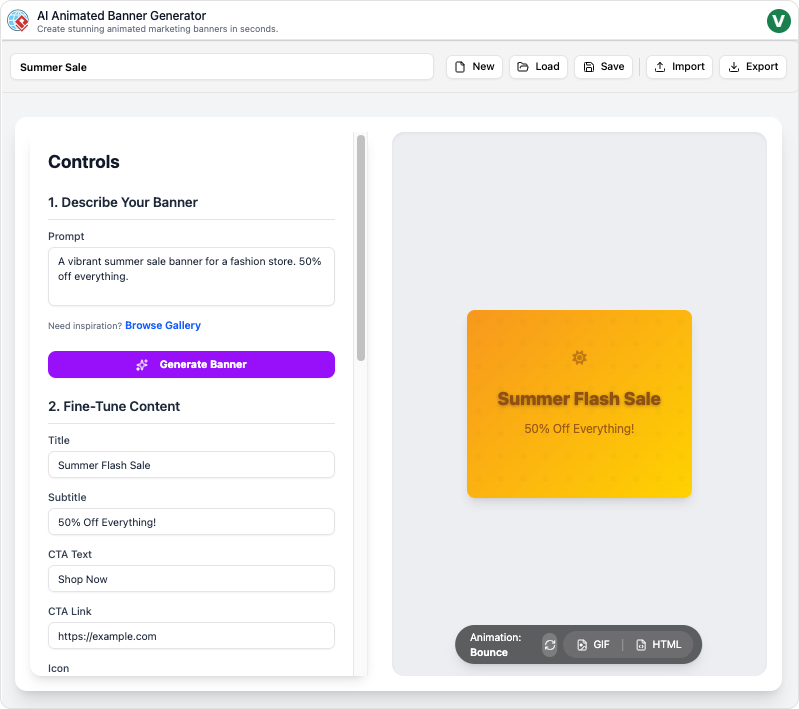
The AI Animated Banner Generator changes the game. This user-friendly web app empowers marketers, business owners, designers, and content creators to produce stunning, animated banners in seconds—no design experience needed. Whether you’re launching a new product, promoting a sale, or building brand awareness, this tool streamlines the process from concept to export.
Why Use an AI Animated Banner Generator?
Key Benefits
- Speed: Go from idea to ready-to-use banner in minutes.
- Ease of Use: Intuitive interface with guided steps—no technical skills required.
- Professional Quality: .
- Versatility: .
- Cost-Effective: Eliminate the need for expensive designers or complex software.
Who Can Benefit?
- Marketers: .
- Small Business Owners: .
- Content Creators: .
- Agencies: Scale banner production for multiple clients efficiently.
How It Works: Step-by-Step Guide
Step 1: Generate a Banner Concept
Prompt Input:
- Describe your brand, product, or campaign theme in a few words (e.g., “Summer sale for eco-friendly water bottles”).
- The .
Instant Preview:
- Review multiple design options and select the one that best fits your vision.
Step 2: Customize Design and Animation
Edit Text and Visuals:
- Swap out placeholder text with your messaging.
- Upload your logo, product images, or brand assets.
- Adjust colors, fonts, and layouts to match your brand identity.
Choose Animations:
- .
- Customize animation speed and timing for optimal impact.
Step 3: Preview in Real Time
Interactive Controls:
- .
- Adjust timing, effects, and layout to ensure it aligns with your campaign goals.
Optimization Tips:
- Ensure text is readable on all devices.
- Keep animations subtle yet engaging to avoid overwhelming viewers.
Step 4: Download and Share
Export Options:
- Download your banner in HTML5, GIF, MP4, PNG, or SVG formats.
- Choose the format that best suits your platform (e.g., HTML5 for web ads, GIF for social media).
One-Click Sharing:
- .
Best Practices for Maximum Impact
1. Craft a Strong Call-to-Action (CTA)
- Use bold, concise text (e.g., “Shop Now,” “Limited Time Offer,” “Learn More”).
- Place your CTA in a prominent location, such as the center or bottom of the banner.
2. Optimize for All Devices
- Preview your banner on both mobile and desktop to ensure compatibility.
- Avoid clutter—keep designs clean and focused.
3. Refresh Regularly
- Update banner styles and messaging to maintain audience interest.
- A/B test different designs to identify what performs best.
4. Align with Branding
- Use consistent colors, fonts, and logos to reinforce brand identity.
- Ensure animations complement your brand’s tone (e.g., playful for youthful brands, sleek for luxury products).
Marketing and Promotion Strategies
1. Social Media Campaigns
- Use animated banners in Facebook, Instagram, and LinkedIn ads to stand out in crowded feeds.
- Share banners in Stories and Reels for higher engagement.
2. Email Marketing
- Embed animated banners in newsletters and promotional emails to increase click-through rates.
3. Website and Landing Pages
- Place banners on homepages, product pages, or pop-ups to highlight promotions.
4. Paid Advertising
- Use HTML5 banners for Google Display Ads or programmatic ad networks for better performance.
5. Event Promotions
- Create eye-catching banners for webinars, launches, or seasonal sales.
Call-to-Action (CTA)
Ready to elevate your marketing with stunning animated banners?
🚀 Launch the AI Animated Banner Generator Now Create your first banner in seconds—no design skills required!
Final Tips
- Keep it simple: Focus on one key message per banner.
- Test and iterate: .
- Stay on-brand: .
Transform your campaigns with the AI Animated Banner Generator—where creativity meets convenience! 🎨✨
This post is also available in Deutsch, Español, فارسی, Français, English, Bahasa Indonesia, 日本語, Polski, Portuguese, Ру́сский, Việt Nam, 简体中文 and 繁體中文.