


Both the UML Class Diagram and the UML Object Diagram belong to the family of Structural Diagrams, meaning they model the structure of a system. However, they serve fundamentally different purposes: the Class Diagram defines the abstract blueprint, while the Object Diagram captures a concrete reality at a single moment in time.
Understanding when to use each is crucial for effective object-oriented analysis and communication.
Relationship and Rationale for Comparison
The Instantiation Relationship: Specification to Realization
The Class Diagram and Object Diagram maintain a critical instantiation relationship. The Class Diagram serves as the abstract specification, defining the permissible structure, while the Object Diagram provides a concrete realization that conforms to those definitions.
- Class Diagram (Specification): Establishes the structure, attribute types, operations, and the multiplicity rules for all potential associations.
- Object Diagram (Realization): Illustrates specific objects that must adhere to the rules set by their corresponding classes, demonstrating actual attribute values and specific links (instances of associations) formed at a particular point in execution.
Therefore, the Object Diagram functions as a model conformity verification tool, validating the abstract structure against a specific, tangible scenario.
The Rationale for Comparison
The need to compare these two structural diagrams stems from the inherent challenge of distinguishing between abstract model definition and concrete instance state:
- Semantic Ambiguity in Notation: Both diagrams employ similar graphical elements (rectangles and lines), creating a superficial visual similarity that can obscure the fundamental difference in their semantic purpose (type definition vs. instance data).
- Misapplication of Scope: Modelers frequently conflate the purpose of system definition (Class Diagram) with design validation (Object Diagram), leading to inefficient or incorrect documentation choices.
- Complex Design Verification: The comparison highlights the Object Diagram’s specialized role in verifying the complexity of the Class Diagram, specifically in demonstrating the feasibility and implications of intricate relationships like aggregation, composition, and multiplicity constraints.
1. The Class Diagram: The Abstract Blueprint
The Class Diagram is the most important structural diagram in UML. It represents the definition of the system—the classes, their attributes, methods, and the static relationships between them.
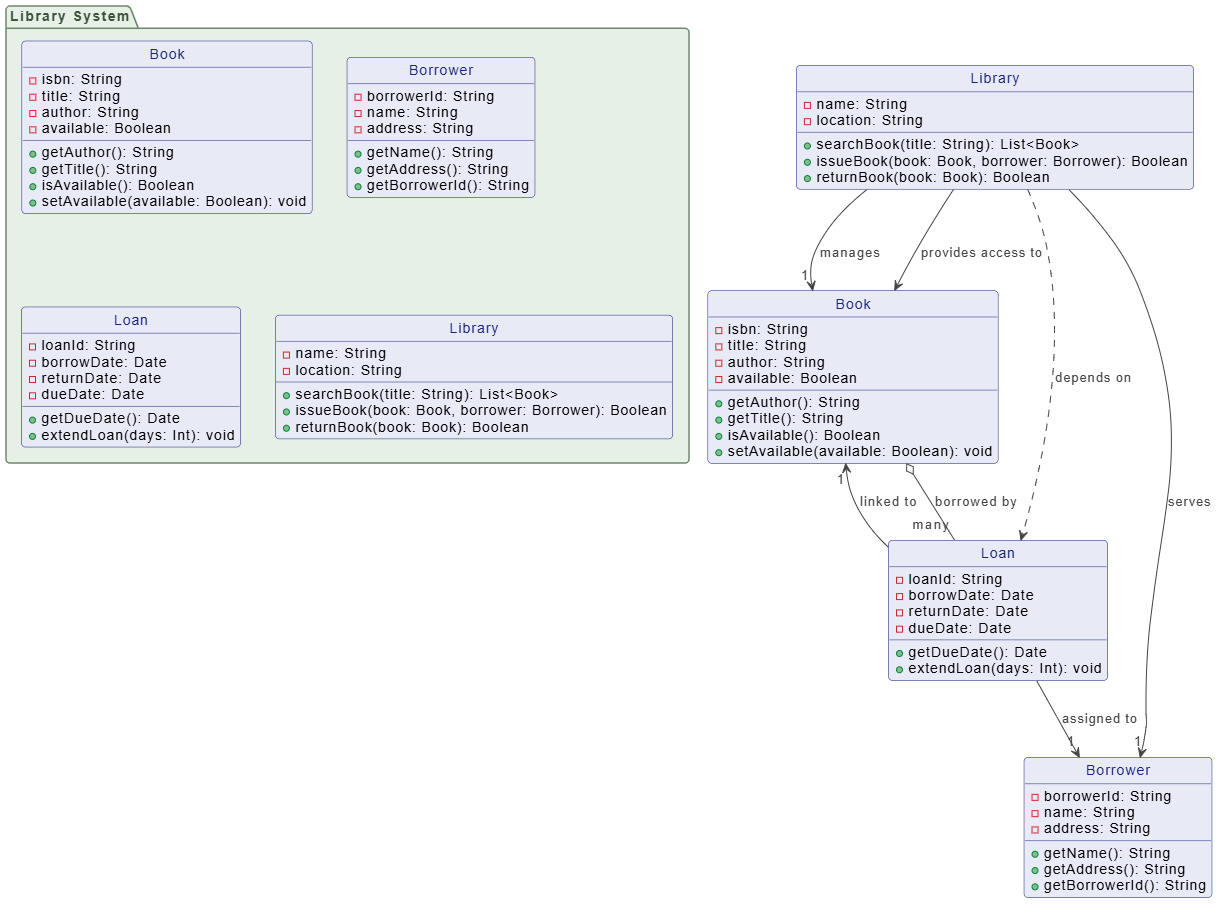
What it Models:
- Classes: The abstract types, showing their attributes (data) and operations (methods).
- Relationships: Defines the potential connections, such as Associations (general link), Generalization (inheritance), Aggregation (has-a relationship), and Composition (strong ownership).
- Multiplicity: Specifies how many instances of one class can be related to instances of another (e.g., $1..*$ means one-to-many).
When to Use the Class Diagram:
The Class Diagram is used during design and implementation to:
- Define System Structure: Establish the vocabulary of the system (i.e., the classes).
- Plan Implementation: Serve as the direct input for writing code in object-oriented languages (Java, C++, Python, etc.).
- Model Business Domain: Create a conceptual map of real-world entities and their relationships (Domain Model).
Analogy: A Class Diagram is like the architectural blueprint for a house. It defines the number of rooms, the dimensions, and the materials, but the house itself hasn’t been built yet.
2. The Object Diagram: The Concrete Snapshot
The Object Diagram is a special case of the Class Diagram. It focuses on instances (objects) and their concrete links at a specific moment in the system’s execution.
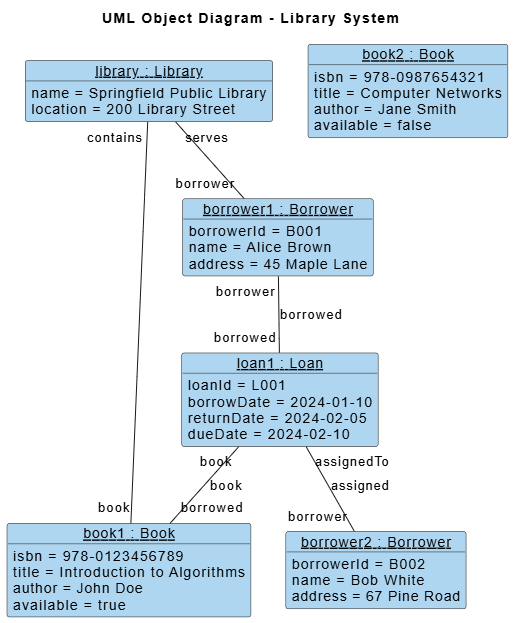
What it Models:
- Objects: Named instances of a class, shown with their attributes possessing actual, real-world values.
- Notation: The name is underlined and follows the format:
objectName : ClassName(e.g.,order123 : Order).
- Notation: The name is underlined and follows the format:
- Links: Concrete instances of associations, showing which specific object is connected to another specific object.
- State: Illustrates the actual data state of the system at the time the snapshot was taken.
When to Use the Object Diagram:
The Object Diagram is used for testing, validation, and illustrating complex scenarios:
- Illustrating Complex Multiplicity: Proving that a many-to-many relationship (defined in the Class Diagram) can be instantiated correctly.
- Verifying Test Cases: Showing the exact state of objects before or after a critical operation (e.g., proving the cart is empty after checkout).
- Explaining Edge Cases: Visually demonstrating a problematic configuration of objects (e.g., an order with a null customer object).
Analogy: An Object Diagram is like a photograph of the actual house after it has been furnished and occupied. It shows that this specific house has blue paint, this specific roof, and this specific furniture arrangement.
3. Class vs. Object: A Quick Comparison
| Feature | Class Diagram | Object Diagram |
|---|---|---|
| Focus | Abstract Structure, Definition | Concrete Instances, Snapshot |
| Elements | Classes, Associations, Multiplicities | Objects, Links, Attribute Values |
| Purpose | Design, Code Generation, Domain Modeling | Testing, Validation, Scenario Illustration |
| Time | Static (Applies at all times) | Dynamic (Applies at one moment in time) |
| Notation | Class name and attributes/operations | Underlined instance name and attribute values |
Summary: Choosing the Right Tool
- Start with the Class Diagram: Use it to define the entire structure of your software system. This is your primary blueprint.
- Validate with the Object Diagram: Use it sparingly to illustrate specific, crucial scenarios, test cases, or complex data configurations that cannot be easily grasped by looking at the abstract Class Diagram alone.
By using both diagrams judiciously, you can communicate both the potential and the reality of your system’s static structure effectively.
For additional insights into UML and AI-based visualization, take a look at our UML resource hub.
This post is also available in Deutsch, Español, فارسی, Français, English, Bahasa Indonesia, 日本語, Polski, Portuguese, Ру́сский, Việt Nam, 简体中文 and 繁體中文.