


The Use Case Diagram is the perfect tool for the early stages of system design, serving as the blueprint for defining scope and functional requirements from the user’s perspective. It answers the fundamental question: What must the system do for its users?
1. The Goal: Defining Kiosk Scope and Requirements
The challenge of designing a self-service retail kiosk is clearly defining the system’s boundary—what functions the kiosk itself handles versus what external systems (like the Inventory or Payment Gateway) handle.
Target for the Diagram: To visually identify all primary and secondary Actors and define the high-level functional requirements (Use Cases) that must be implemented within the Kiosk System Boundary. This ensures development efforts are focused and scope creep is minimized.
| Key Actors | Primary Use Cases |
|---|---|
| Customer (Primary) | Browse Products, Checkout, Process Payment |
| Store Manager (Primary) | Replenish Supplies, View Logs |
| Inventory System (Secondary) | Check Stock Availability |
| Payment Gateway (Secondary) | Authorize Transaction |
2. Generating and Iterating the Diagram with the AI Chatbot
The primary advantage of using an AI Chatbot is its ability to instantly create the initial visual model based on simple functional requirements, and then quickly iterate on the design conversationally.
Initial AI Generation Prompt (Simple Requirements)
We start with a minimal description of the main system components and the required functions. We rely on the AI’s understanding of UML best practices to define the system boundary and relationships.
The Prompt:
“Generate a UML Use Case Diagram for a ‘Retail Kiosk System’. The primary users are the Customer and the Store Manager. The main functions are Browse Products, Checkout, and Replenish Supplies. The system relies on an Inventory System and a Payment Gateway.”
Generated Result
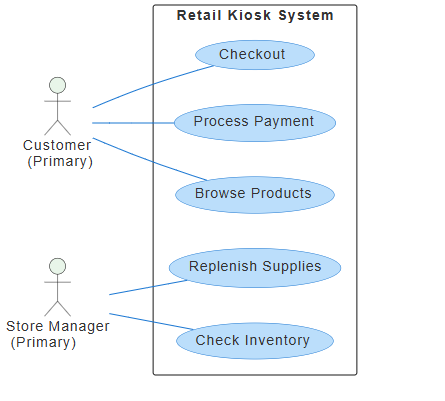
Iterative Update: Refining the Model
After reviewing the initial diagram, we realize a crucial common function—authentication—was missed, and we need a new role for support. Instead of manually editing the diagram, we instruct the AI to make the changes conversationally.
The Iterative Prompt:
“Please update the current diagram:
- Add the use case ‘Authenticate User’ and make it a mandatory inclusion for both ‘Checkout’ and ‘Replenish Supplies’.
- Add a new actor, ‘Help Desk Agent’, who initiates a new use case: ‘Provide Remote Assistance’.”
Final Diagram Result
The AI quickly updates the diagram code, correctly adding the <<include>> relationships for ‘Authenticate User’ and placing the new external actor ‘Help Desk Agent’ outside the system boundary, demonstrating how easily the model can be refined conversationally.

3. Advanced Analysis Based on the Generated Diagram
Once the visual model is generated, the AI Chatbot can be used as an analytical tool to derive textual documentation and perform structural validation based on the diagram code.
A. Formal Requirements List Document
Ask the AI to convert the visual elements and their relationships into a structured text document suitable for formal project specifications.
The Analysis Prompt:
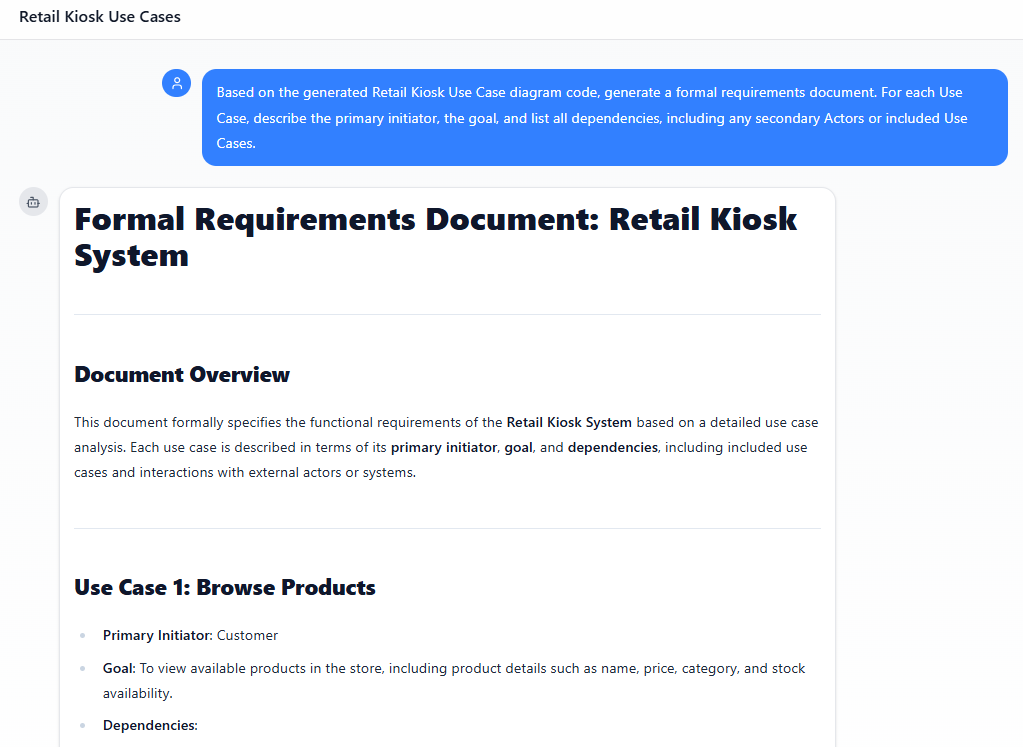
“Based on the generated Retail Kiosk Use Case diagram code, generate a formal requirements document. For each Use Case, describe the primary initiator, the goal, and list all dependencies, including any secondary Actors or included Use Cases.”
- Benefit: This immediately converts the visual model into a formal textual requirements list, which is essential for project scoping and sign-off. The AI ensures the description of flow and dependencies is accurate to the diagram.
B. Dependencies and Integration Document
The diagram visually separates internal scope from external dependencies (secondary Actors). We can ask the AI to formalize this list for integration planning.
The Analysis Prompt:
“Draft an Integration Planning Document section based on the diagram. Identify all external systems (non-human Actors) the Kiosk relies upon and detail the specific Use Case interactions required for each one, defining the integration points.”
- Benefit: This task uses the diagram to generate documentation for the integration team, defining the required external APIs and contractual interactions necessary for the Kiosk to function, ensuring no integration point is missed.

By using the AI Chatbot in this three-step cycle—Goal setting, Instant Generation, and Structured Analysis—the project team can ensure the Use Case Diagram serves not just as a visual aid, but as the validated foundation for all subsequent design and development work.
For comprehensive information on UML and AI-powered visualization, visit our UML resource hub.
This post is also available in Deutsch, Español, فارسی, Français, English, Bahasa Indonesia, 日本語, Polski, Portuguese, Ру́сский, Việt Nam, 简体中文 and 繁體中文.