


🌟 Introduction: Why Use Case Driven Development Matters
In software and product development, clarity is currency. Yet teams routinely spend days—sometimes weeks—translating vague ideas into structured requirements:
- Who are the actors?
- What goals do they want to achieve?
- How do system interactions unfold?
- How do we test those interactions?
The traditional process—manual use case writing, hand-drawn UML diagrams, fragmented documentation—introduces friction, inconsistency, and delays. Misalignment between PMs, engineers, and QA is common. Requirements drift. Scope creeps.
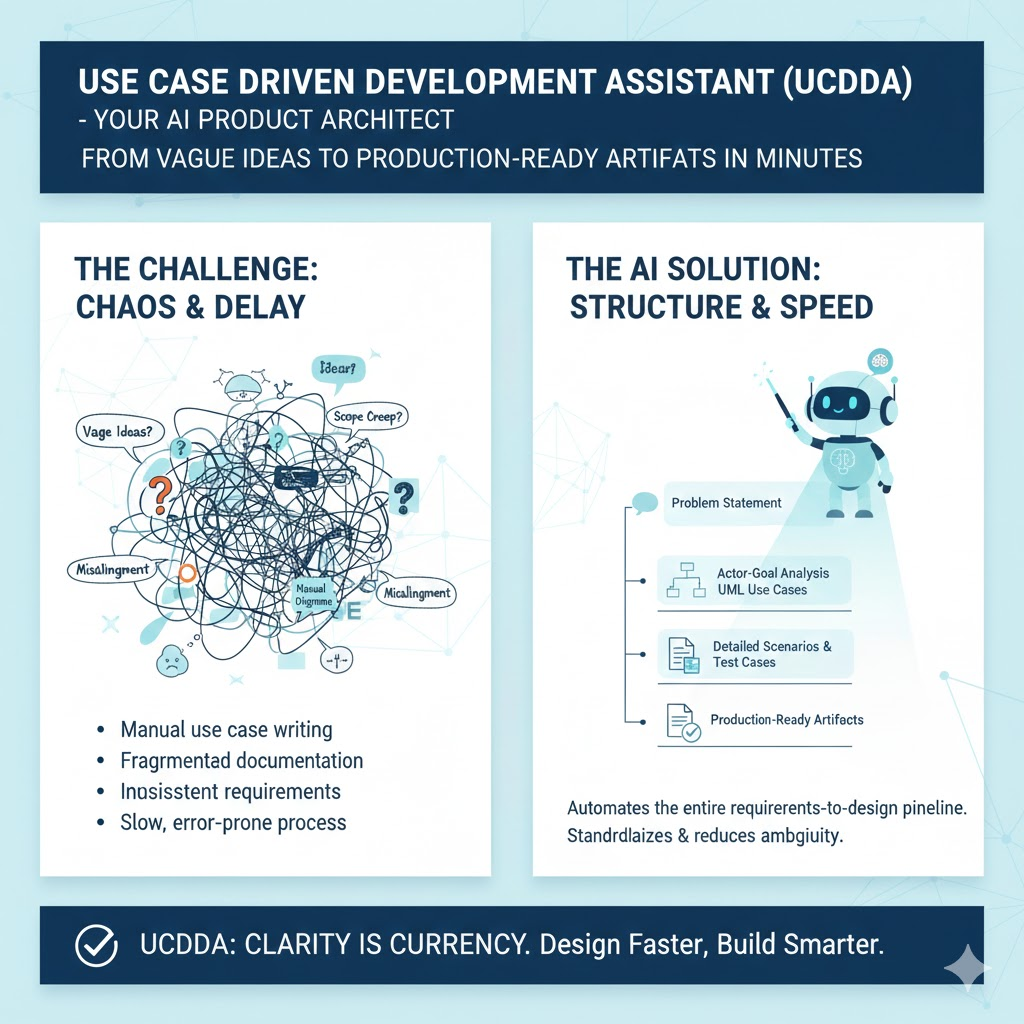
Enter the Use Case Driven Development Assistant (UCDDA)—an AI-powered tool that automates the entire requirements-to-design pipeline. It doesn’t just speed up the process—it standardizes it, reduces ambiguity, and produces production-ready artifacts.
Think of UCDDA as your AI-powered Product Architect, co-piloting you from problem statement → validated use cases → executable test scenarios → shareable report.
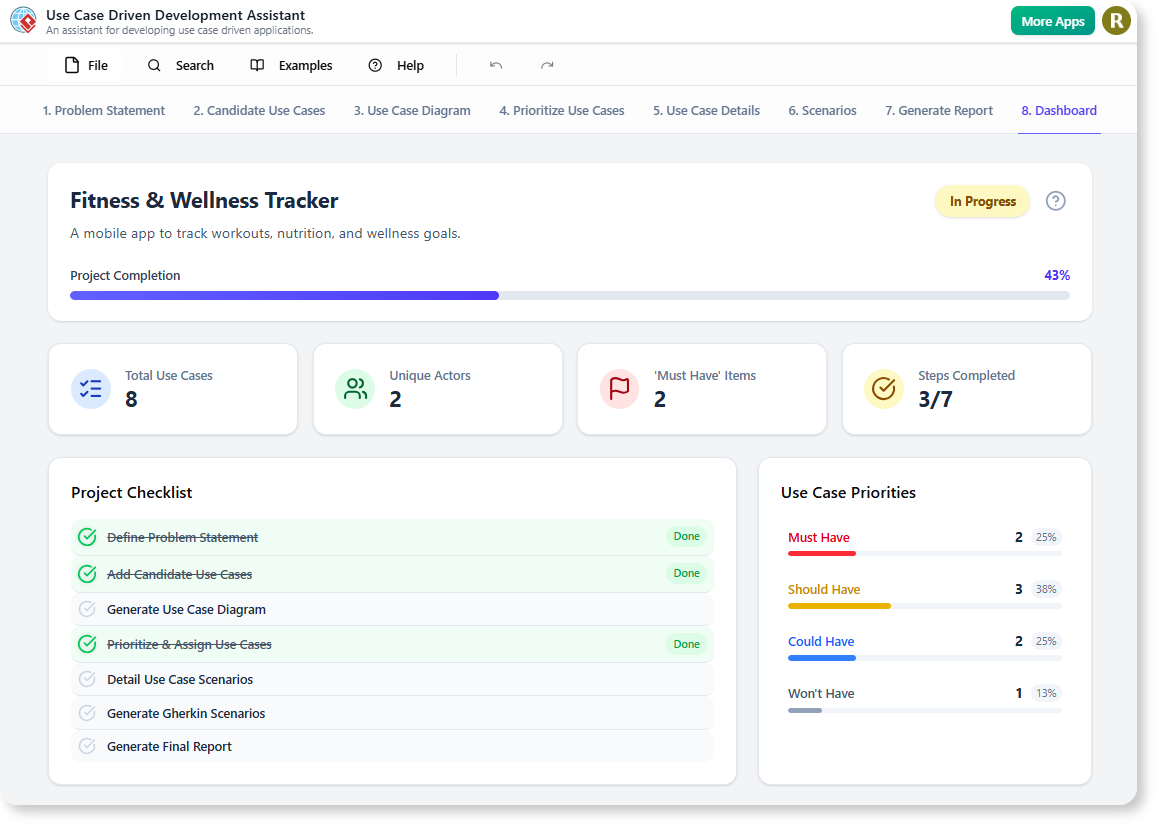
👥 Who Is This Tool For? (Audience & Use Cases)
| Role | Why UCDDA Helps | Real-World Fit |
|---|---|---|
| Product Managers | Rapidly translate customer pain points into structured requirements; align stakeholders early. | Pre-kickoff discovery, backlog refinement, roadmap validation. |
| UX/Product Designers | Generate system boundaries & actor flows to inform wireframing and user journey mapping. | Ideation sprints, service blueprinting. |
| Software Engineers | Get clear, diagram-backed use cases + Gherkin specs to reduce ambiguity during implementation. | Sprint planning, technical grooming. |
| QA/Test Engineers | Auto-generate Gherkin (Given-When-Then) scenarios for BDD testing. | Shift-left testing, test automation planning. |
| Tech Leads & Architects | Ensure traceability from business goals → system behavior → code contracts. | System decomposition, API design scoping. |
| Startup Founders & Solo Builders | Go from idea → investor-ready spec in <1 hour—no UML expertise needed. | MVP scoping, pitch deck prep, dev handoff. |
💡 Ideal for: Agile/Scrum teams using user stories and formal modeling, regulated domains (healthtech, fintech) where traceability matters, and distributed teams requiring documentation rigor.
📚 Key Concepts Explained
| Term | Definition | Why It Matters |
|---|---|---|
| Problem Statement | A concise description of a user/business problem (e.g., “Clinicians struggle to quickly access patient vitals during emergencies”). | Starting point. Sets scope and success criteria. |
| Actors | Roles or systems that interact with your software (e.g., Doctor, Nurse, EMR System). | Identify who benefits or triggers behavior. |
| Use Case | A goal-oriented interaction between actor(s) and system (e.g., “View Real-Time Patient Vitals”). Not a user story—more formal, with pre/post conditions, flows. | Drives system behavior. Foundation for design & testing. |
| Use Case Diagram | UML diagram showing actors and their relationships to use cases (system boundary = scope). | Visual scope alignment—great for stakeholder reviews. |
| Activity Diagram | Step-by-step flow of actions within a use case (like a smart flowchart). | Clarifies complex logic, branches, and concurrency. |
| Sequence Diagram | Time-ordered interactions between objects/components (e.g., frontend → API → DB → notification service). | Guides API design and microservice choreography. |
| Gherkin Scenarios | Behavior-Driven Development (BDD) syntax: Given… When… Then… (e.g., Given a critical alert, When nurse opens dashboard, Then vitals flash red). |
Bridges requirements → automated tests. |
| AI-Assisted Refinement | AI suggests improvements (e.g., missing alt flows, edge cases, actor overlaps). | Prevents oversight early—when fixes are cheap. |
✅ Note: UCDDA doesn’t replace human judgment—it augments it. You validate, refine, and own the output.
🛠️ Step-by-Step Workflow Tutorial with Real Examples
Let’s walk through building a Telehealth Appointment Scheduling System—a real-world example.
✅ Step 1: Define the Problem Statement
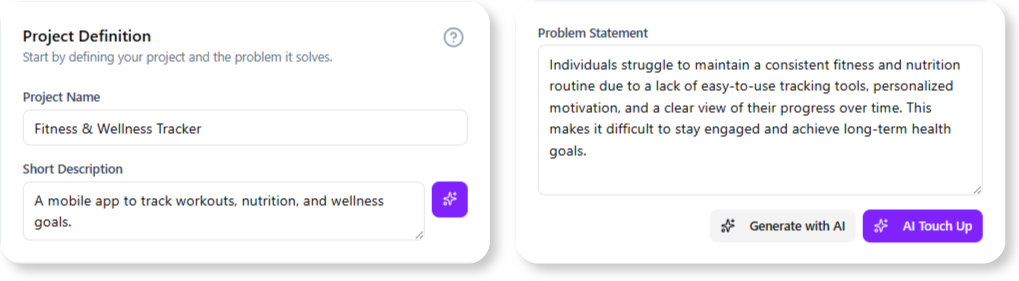
📍 Tab: Problem Statement
Input:
Project Name: TeleHealth Scheduler
Description: Patients often miss appointments due to poor reminders and rigid scheduling. We need a system that supports flexible booking, automated reminders (SMS/email), and last-minute cancellations with waitlist automation.
🤖 AI instantly suggests:
- Actors: Patient, Provider, Admin Staff, Calendar Service, SMS Gateway
- Candidate Use Cases:
- Book Appointment
- Reschedule Appointment
- Cancel Appointment & Trigger Waitlist
- Receive Reminder Notification
- Join Virtual Waiting Room
✅ Pro Tip: Edit suggestions. Add “Insurance Verifier” as actor—AI updates candidate use cases.
✅ Step 2: Generate & Refine Use Cases
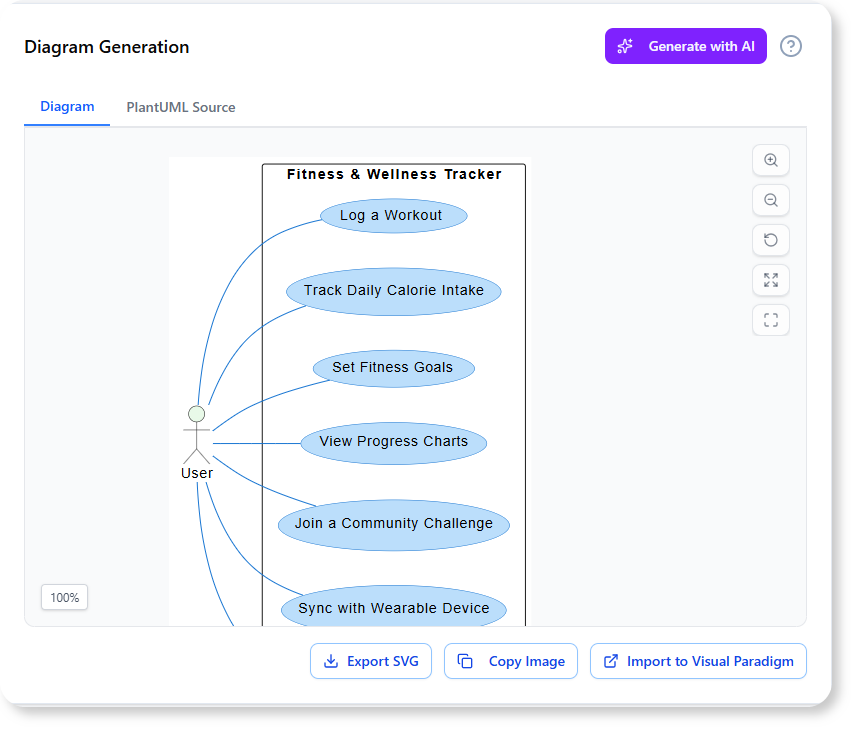
📍 Tab: Candidate Use Cases
Select “Book Appointment” → AI generates a full template:
| Field | AI-Generated Content |
|---|---|
| Primary Actor | Patient |
| Goal | Schedule a virtual consultation within 7 days |
| Preconditions | Patient is registered; provider availability loaded |
| Main Success Flow | 1. Patient selects provider & date/time 2. System checks insurance eligibility 3. Patient confirms & pays copay 4. System books slot & sends confirmation |
| Alternate Flows | A1. Insurance denied → suggest self-pay A2. Slot taken → recommend nearest alternatives |
| Postconditions | Appointment recorded; calendar updated; reminders queued |
🔁 You tweak: “Add video consent step before payment” → AI updates flows.
✅ Step 3: Generate UML Diagrams
📍 Tab: Diagrams
Click “Generate Use Case Diagram” → AI draws:
![Use Case Diagram: Patient ↔ Book/Reschedule/Cancel; Provider ↔ View Schedule; Admin ↔ Manage Waitlist]
Then click “Generate Activity Diagram for ‘Book Appointment’” → AI creates a flowchart with decisions, parallel actions (e.g., check insurance + load availability), and error paths.
![Activity Diagram showing swimlanes: Patient → System → Insurance API]
Then “Generate Sequence Diagram” → See how frontend, auth service, scheduling microservice, and SMS service interact.
🎯 Diagrams are fully editable. Drag to reposition. Export as PNG/SVG.
✅ Step 4: Create Testable Gherkin Scenarios
📍 Tab: Test Scenarios
For “Cancel Appointment & Trigger Waitlist”, AI produces:
Feature: Waitlist Automation on Cancellation

  Scenario: Patient cancels 24h+ before appointment
    Given a booked appointment for Dr. Lee at 2025-12-10 10:00
    And a waitlist with 3 patients (priority order: P1, P2, P3)
    When the patient cancels the appointment
    Then the appointment status is set to "Cancelled"
    And P1 receives an SMS: "A slot opened! Confirm in 15 min."
    And system reserves slot for P1 for 15 minutes

  Scenario: No one on waitlist
    Given no patients on waitlist
    When appointment is cancelled
    Then slot is marked "Available"
    And no notifications are sent
💡 QA engineers can copy-paste into Cucumber, SpecFlow, or Playwright.
✅ Step 5: Generate Final Report
📍 Tab: Generate Report
Click “Export Report” → AI compiles:
- Executive summary (problem + goals)
- Full use case catalog (12 use cases)
- All diagrams (embedded, high-res)
- Gherkin test scenarios
- Traceability matrix (Actor → Use Case → Scenario)
Formats: PDF, Word, Confluence-ready HTML.
📤 One-click share with engineering lead or investor.
📊 Feature Summary Table
| Feature | Input | Output | Time Saved | Best For |
|---|---|---|---|---|
| Idea → Actors & Use Cases | 1-sentence problem | 5–15 candidate use cases + actors | 4–8 hrs | Kickoffs, ideation |
| Use Case Template Gen | Use case title | Full spec (flows, conditions, exceptions) | 1–2 hrs/use case | Backlog grooming |
| UML Diagramming | Selected use cases | Use Case, Activity, Sequence diagrams | 3–6 hrs/diagram set | Architecture reviews |
| Gherkin Scenario Gen | Use case details | Executable Given-When-Then tests | 2+ hrs/use case | QA automation |
| Report Generation | Entire project | Professional PDF/HTML report | 4–10 hrs | Stakeholder sign-off, audits |
⏱️ Total time for mid-sized feature (e.g., “Appointment Rescheduling”): ~15 minutes vs. 2–3 days manually.
🔍 Real-World Examples & Scenarios
🏥 Example 1: Hospital Patient Portal (Healthcare)
- Problem: Patients can’t access lab results securely or ask follow-ups.
- AI Output:
- Use Cases: View Lab Report, Ask Clinician Question, Consent to Data Share
- Diagrams: Show HL7/FHIR integration points
- Gherkin: HIPAA-compliant access rules (e.g., Given unverified email, Then block report download)
✅ Outcome: Reduced compliance review cycles by 60%.
🏦 Example 2: Fintech Loan Application (Regulated Domain)
- Problem: Loan approvals take 5+ days due to manual doc checks.
- AI Output:
- Use Case: Upload & Verify ID Documents
→ Alt flow: ID expired → request renewal - Sequence Diagram: Frontend → OCR service → KYC API → Risk Engine
- Gherkin: Then system flags mismatched name/address in <2 sec
- Use Case: Upload & Verify ID Documents
✅ Outcome: Cut approval time to <4 hours; passed SOC 2 audit with traceable requirements.
🛒 Example 3: E-Commerce “Buy Now, Pay Later” (Startup MVP)
- Problem: Cart abandonment spikes at checkout due to BNPL confusion.
- AI Output:
- Use Case: Explain BNPL Terms Inline
- Activity Diagram: Show tooltip triggers (hover vs. tap) + microcopy variants
- Report: Shared with legal—approved wording in 1 day (vs. 1 week)
✅ Outcome: 22% increase in BNPL adoption.
🚀 Why This Changes the Game: Benefits & ROI
| Benefit | Impact |
|---|---|
| ⏱️ 90% faster requirements phase | Go from workshop to dev-ready spec same day. |
| 🎯 Reduced rework | Catch missing actors/flows before coding starts. |
| 🔗 Traceability | Every line of code → use case → business goal. Critical for audits. |
| 🤝 Cross-functional alignment | Shared visual language (diagrams) bridges PM ↔ Eng ↔ QA. |
| 💡 Democratizes modeling | No UML mastery needed—AI does heavy lifting. |
| 📈 Scalable rigor | Apply enterprise-grade process to MVPs and moonshots alike. |
📈 ROI Example: A 10-person product team saves ~120 hrs/month → $15K–$30K/month in opportunity cost (based on blended $125–$250/hr labor).
🚪 Getting Started: Access & Setup Guide
🔹 For Visual Paradigm Online (Cloud)
- Log in at app.visual-paradigm.com
- Ensure Combo Edition or higher
- Go directly to:
👉 https://ai-toolbox.visual-paradigm.com/app/use-case-driven-development-assistant/ - Click “New Project” → Start!
🔹 For Desktop App (Windows/macOS)
- Open Visual Paradigm (v2025.1+ required)
- Must have Professional Edition + active maintenance
- Menu: Tools > App > Use Case Driven Development Assistant
- Works offline after initial sync.
🆓 Free Trial? Yes—14-day trial includes full UCDDA access.
📚 Full Guide: https://ai.visual-paradigm.com/tool/use-case-driven-development-assistant/
✅ Best Practices for Product & Engineering Teams
| Practice | Why It Works |
|---|---|
| Start with problem statements—not solutions | Avoids bias. Lets AI suggest unexpected actors (e.g., “Fraud Detection System” in payments). |
| Co-create with engineers in real time | Run UCDDA in sprint planning—engineers validate feasibility as use cases generate. |
| Use reports for sprint retrospectives | Compare planned vs. actual use cases—spot scope creep. |
| Version-control your UCDDA projects | Export .vpp files to Git. Track requirement evolution. |
| Integrate with Jira/Confluence | Embed diagrams + Gherkin in epics. Link use cases → user stories. |
🛠️ Pro Tip: Use Gherkin → TestRail/Jira Xray plugins to auto-create test cases.
🏁 Conclusion: From Ambiguity to Alignment—At Scale
The Use Case Driven Development Assistant isn’t just another diagramming tool. It’s a requirements co-pilot that transforms how teams capture, communicate, and commit to what they’re building.
For product leaders like you—especially those with HCI/CS backgrounds and Scrum/Pragmatic training—this tool resonates deeply:
- It merges user-centered thinking (actors, goals) with engineering rigor (diagrams, testability).
- It turns documentation from a cost center into a strategic accelerator.
- And in hybrid/SF Bay Area teams where async clarity is key, it ensures everyone—PM, dev, QA, exec—reads from the same playbook.
🔮 The future of product development isn’t just agile—it’s AI-augmented, model-driven, and traceable.
With UCDDA, you don’t just build faster. You build right—the first time.
📘 Ready to try it?
→ Start Designing with AI Now
→ Read the Full Guide
Let me know if you’d like a customized walkthrough for your domain (e.g., SaaS, IoT, internal tools)—happy to tailor examples! 🚀
This post is also available in Deutsch, Español, فارسی, Français, English, Bahasa Indonesia, 日本語, Polski, Portuguese, Ру́сский, Việt Nam, 简体中文 and 繁體中文.