


Demystifying AI-Assisted Architecture Diagramming — Why It’s More Than Just a Chatbot
🔍 Introduction: The Architecture Documentation Bottleneck
Software architecture is the blueprint of your system. Without clear, consistent, and up-to-date diagrams, technical alignment crumbles—especially in agile teams where architecture evolves rapidly.
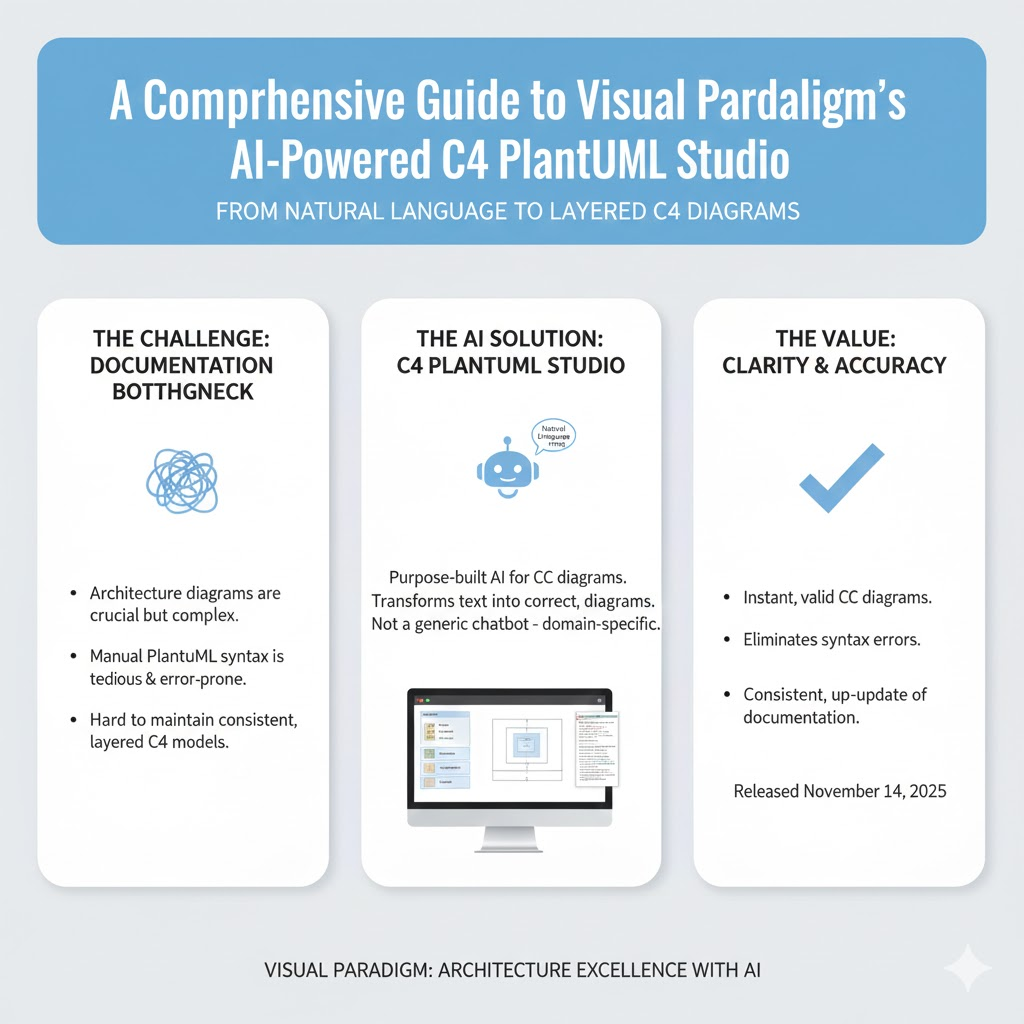
The C4 model (Context, Containers, Components, Code) has emerged as the gold standard for structured, layered architecture visualization. But its adoption has been hindered by one pain point:
Writing and maintaining PlantUML syntax — especially for multi-level C4 diagrams — is tedious, error-prone, and time-consuming.
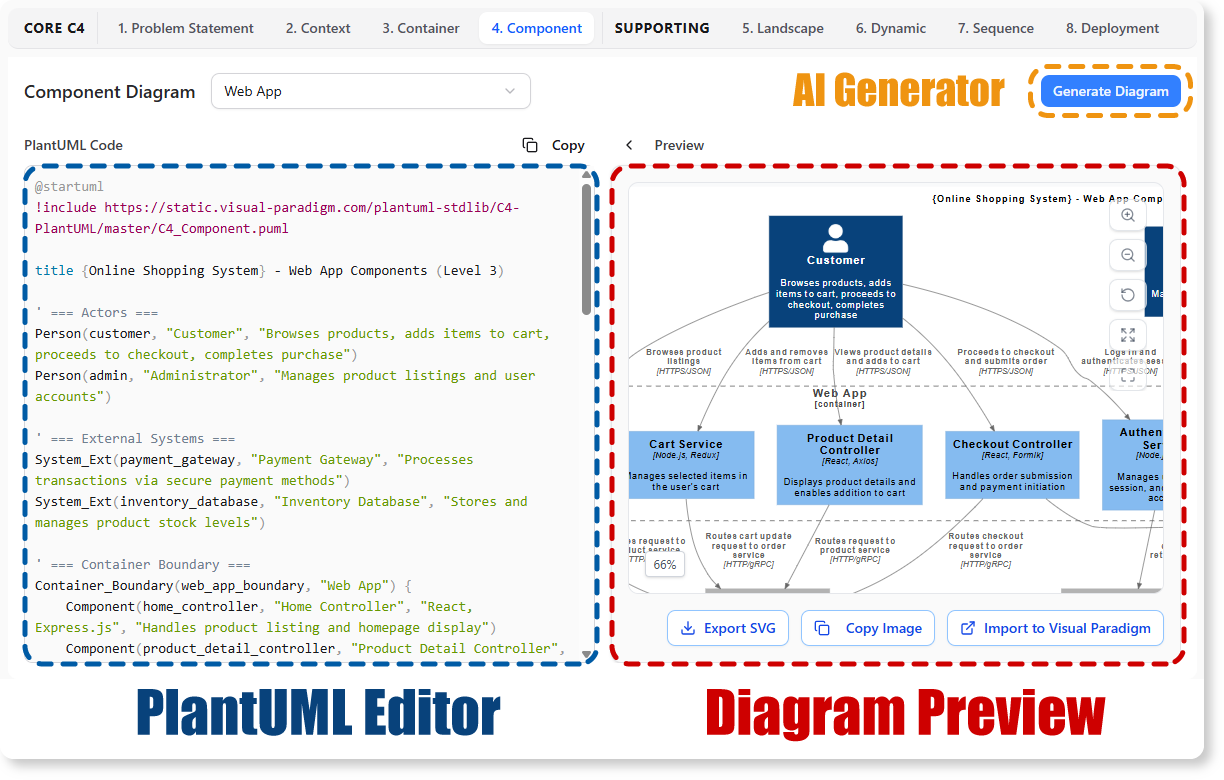
Enter Visual Paradigm’s AI-Powered C4 PlantUML Studio, released November 14, 2025 — a purpose-built tool that transforms natural language into correct, layered C4 diagrams. But how is it different from just asking ChatGPT or Claude to “draw a system diagram”? And can it really generate valid C4?
Let’s unpack it all.
🌐 Why Visual Paradigm’s AI C4 Studio? (And Not Just a Free Chat Assistant?)
| Feature | Visual Paradigm AI C4 Studio ✅ | Generic AI Chat (e.g., ChatGPT, Claude) ❌ |
|---|---|---|
| C4 Model Compliance | ✅ Built-in validation against C4 structural rules (e.g., Person → System in Context; System → Container in Container diagram). | ❌ Often produces hybrid/incorrect levels (e.g., mixes components into Context) — violates C4 abstraction layers. |
| PlantUML Syntax Correctness | ✅ Auto-generates valid, runnable PlantUML code — no syntax debugging. | ❌ Frequently emits invalid/malformed PlantUML (missing braces, typos, unsupported keywords). |
| Interactive Editor & Navigator | ✅ Real-time preview + collapsible tree navigation across all 4 C4 levels. Side-by-side markdown-style editor. | ❌ Text-only. To render, you must copy-paste into external tools (risking errors). |
| Consistency Enforcement | ✅ Relationships are tracked across levels: e.g., Container A in Context = same Container A in Container diagram. | ❌ No cross-diagram coherence—each prompt is stateless → inconsistency across diagrams. |
| Problem Statement Builder | ✅ Turns high-level project name + description into structured problem context before diagramming. Drives diagram scope. | ❌ No scaffolding — you must manually define scope, actors, goals. |
| Refinement Workflow | ✅ Edit PlantUML directly; diagram updates live. AI assists incrementally (e.g., “add a Kafka queue between Auth and User Service”). | ❌ Regeneration often overwrites prior work → no iterative co-editing. |
💡 Key Insight: VP’s tool isn’t just an AI model wrapped in UI — it’s a domain-specific co-pilot with deep C4 semantics baked in. Generic LLMs approximate diagrams; VP enforces architectural rigor.
🔑 Core Concepts of the C4 Model (Simon Brown’s Framework)
The C4 model is a structural, hierarchical, and audience-focused approach to software architecture documentation.
| Level | Purpose | Audience | Notation Example |
|---|---|---|---|
| 1. System Context (C1) | Show the system in scope as a black box, with external users & systems it interacts with. | Executives, clients, non-tech stakeholders | Person(customer), System(eCommerce) |
| 2. Containers (C2) | Decompose one system into containers (e.g., web app, DB, API, queue). Highlights tech stacks & protocols. | Dev leads, architects, ops | Container(web, "Web App", "React"), --> "HTTPS" |
| 3. Components (C3) | Break down a container into components (e.g., modules, services, classes), with interfaces & dependencies. | Developers, reviewers | Component(orderSvc, "OrderService", "Spring Boot") |
| 4. Code (C4) (Optional) | Detailed class/method-level UML (e.g., sequence, class diagrams). Rarely used in practice. | Senior devs, code reviewers | PlantUML class/sequence syntax |
✅ Golden Rule: Each diagram level zooms into exactly one element from the level above — preserving scope and clarity.
🧩 Diagram Types & When to Use Them (With Real Examples)
🧭 1. System Context Diagram (C1)
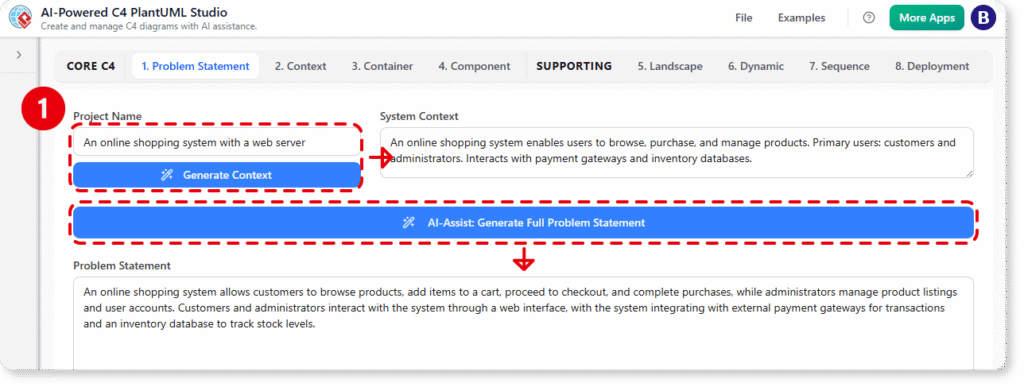
When? At project kickoff, for stakeholder alignment, or when scoping MVP.
❌ Bad: Including internal microservices or databases
✅ Good: Only external entities + your system as one box
@startuml
!include https://raw.githubusercontent.com/plantuml-stdlib/C4-PlantUML/master/C4_Context.puml

Person(customer, "Customer", "Wants to buy products")
System(eCommerce, "eCommerce System", "Online store platform")
System(email, "Email Service", "Sends receipts")

Rel(customer, eCommerce, "Uses", "HTTPS")
Rel(eCommerce, email, "Sends", "SMTP")
@enduml
➡️ AI Prompt for VP Studio:
“An online bookstore where customers browse, purchase, and get email receipts. Integrates with a third-party email service.”
📦 2. Container Diagram (C2)
When? During technical design, sprint planning, or onboarding — shows how the system is built.
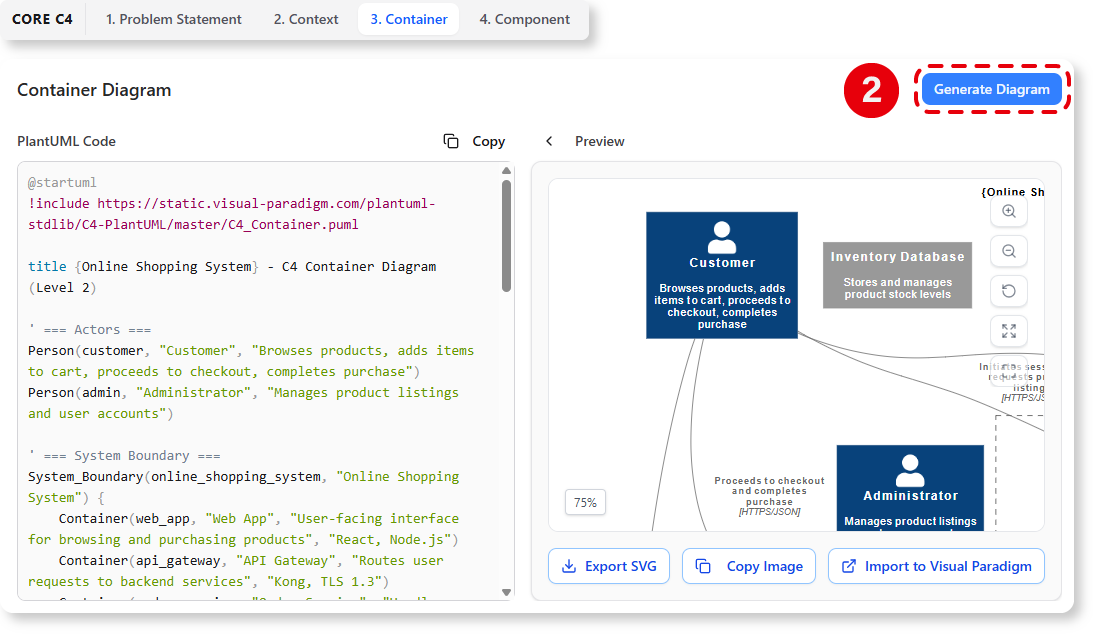
❌ Bad: Mixing frontend components (React hooks) or DB tables
✅ Good: Only executables/deployables: apps, DBs, queues, APIs
@startuml
!include https://raw.githubusercontent.com/plantuml-stdlib/C4-PlantUML/master/C4_Container.puml

Person(customer, "Customer")
System_Boundary(c1, "eCommerce System") {
  Container(web, "Web App", "React", "Handles UI")
  Container(api, "API Gateway", "Node.js", "Routes requests")
  Container(orderSvc, "Order Service", "Java", "Processes orders")
  Container(db, "Orders DB", "PostgreSQL", "Stores orders")
  Container_Ext(email, "Email Service", "SMTP API")
}

Rel(customer, web, "Uses", "HTTPS")
Rel(web, api, "Calls", "HTTPS")
Rel(api, orderSvc, "Forwards", "REST")
Rel(orderSvc, db, "Reads/Writes", "JDBC")
Rel(orderSvc, email, "Sends receipt", "SMTP")
@enduml
➡️ AI Prompt:
“The web app talks to an API gateway, which routes to a Java order service. Orders are stored in PostgreSQL. The order service also calls an external email API.”
⚙️ 3. Component Diagram (C3)
When? During detailed design, code review prep, or refactoring — for a specific container.
❌ Bad: Showing UI screens or infrastructure details (load balancers)
✅ Good: Key classes/modules with interfaces (e.g., REST endpoints, pub/sub topics)
@startuml
!include https://raw.githubusercontent.com/plantuml-stdlib/C4-PlantUML/master/C4_Component.puml

Container_Boundary(orderSvc, "Order Service") {
  Component(orderController, "OrderController", "REST", "Accepts /orders POST")
  Component(orderValidator, "OrderValidator", "Spring", "Validates input")
  Component(paymentClient, "PaymentClient", "Feign", "Calls Payment API")
  Component(orderRepo, "OrderRepository", "JPA", "DB access")
}

Rel(orderController, orderValidator, "Validates")
Rel(orderController, paymentClient, "Requests auth")
Rel(orderController, orderRepo, "Persists")
Rel(paymentClient, "Payment Service", "HTTPS", "External")
@enduml
➡️ AI Prompt:
“Inside the Order Service: a REST controller that validates input, calls a payment service via Feign client, and saves to DB using a repository.”
❓ Do AI Tools Generate Correct C4 Diagrams?
| Tool Type | Accuracy | Why? |
|---|---|---|
| Visual Paradigm AI C4 Studio | ✅ High (85–95%) | – Uses C4-specific templates & constraints – Validates hierarchical containment – Enforces PlantUML+stdlib syntax – Trained/fine-tuned on real architecture docs |
| Generic LLM (GPT-4, Claude 3) | ⚠️ Medium–Low (40–60%) | – Lacks C4 structural guardrails → often merges levels – Doesn’t enforce System_Boundary, Container_Boundary scoping– Guesses PlantUML syntax (fails on edge cases) – No feedback loop for consistency |
📊 Example failure from generic AI:
Prompt: “Draw a context diagram for a food delivery app”
Output: Shows “Customer → Mobile App → Auth Service → PostgreSQL” → ❌ Auth and DB should NOT appear in Context! (They’re containers, not systems).
VP’s AI would reject that output and prompt:
“For a Context diagram, only show external systems. Should we generate the Container diagram instead?”
📋 Summary Tables
✅ C4 Diagram Checklist
| Diagram | ✅ Should Include | ❌ Never Include |
|---|---|---|
| Context (C1) | External people, external systems | Internal containers, tech stack, DBs |
| Container (C2) | Apps, DBs, APIs, queues (with tech) | UI screens, classes, infrastructure nodes |
| Component (C3) | Key modules, interfaces, dependencies within one container | Cross-container links, deployment details |
| Code (C4) | Class diagrams, sequence flows | High-level architecture elements |
🔧 When to Use Visual Paradigm AI C4 Studio
| Scenario | Recommendation |
|---|---|
| Initial architecture sprint | ✅ Start with Problem Statement → Context → Container in <10 mins |
| Onboarding new engineers | ✅ Generate all 3 levels → share via navigator link |
| Documenting legacy systems | ✅ Describe verbally → AI infers structure → refine incrementally |
| Compliance/architecture review | ✅ Export diagrams as PNG/PDF + PlantUML source for audit trail |
| Exploratory design (“What if we add Kafka?”) | ✅ Edit code: Container(kafka, "Kafka", "Event streaming") → live update |
🚀 Getting Started: 4-Step Workflow in VP AI Studio
- Describe
“A fitness app where users log workouts. Data syncs to a cloud backend. Admins view analytics.”
- AI Generates
- Problem statement
- C1 (User, Fitness App, Analytics Dashboard)
- C2 (Mobile App, API, Workout DB, Analytics Service)
- C3 (e.g., for API: Auth, Workout, Analytics controllers)
- Navigate & Refine
- Use tree panel to jump between diagrams
- Tweak PlantUML: e.g.,
Rel(mobile, api, "Syncs", "HTTPS/JSON")
- Export & Share
- PNG, SVG, PDF, or embeddable PlantUML code
- Share direct link (for VP Online users)
🏁 Conclusion: AI as an Architectural Enabler — Not a Replacement
Visual Paradigm’s AI C4 Studio doesn’t replace the architect — it augments them.
- ✅ Saves hours on syntax and layout
- ✅ Enforces consistency across diagram levels
- ✅ Lowers barrier for non-UML experts (e.g., PMs, designers) to contribute
- ✅ Keeps docs alive — easy to update as system evolves
But the judgment — scoping boundaries, choosing abstractions, validating trade-offs — still rests with you, the human architect. The AI handles the mechanics so you can focus on the meaning.
🧠 Final Thought:
“The best architecture tools don’t just draw diagrams — they help you think clearly.”
With AI-powered, model-aware assistance, the C4 model is no longer a documentation burden — it’s your strategic advantage.
Ready to design at the speed of thought?
➡️ Launch the AI-Powered C4 PlantUML Studio
📚 Full Feature Guide
Let your architecture speak — clearly, consistently, and instantly.
This post is also available in Deutsch, Español, فارسی, Français, English, Bahasa Indonesia, 日本語, Polski, Portuguese, Ру́сский, Việt Nam, 简体中文 and 繁體中文.