


なぜコードとしての図に PlantUML を使うのか?そのメリットは?
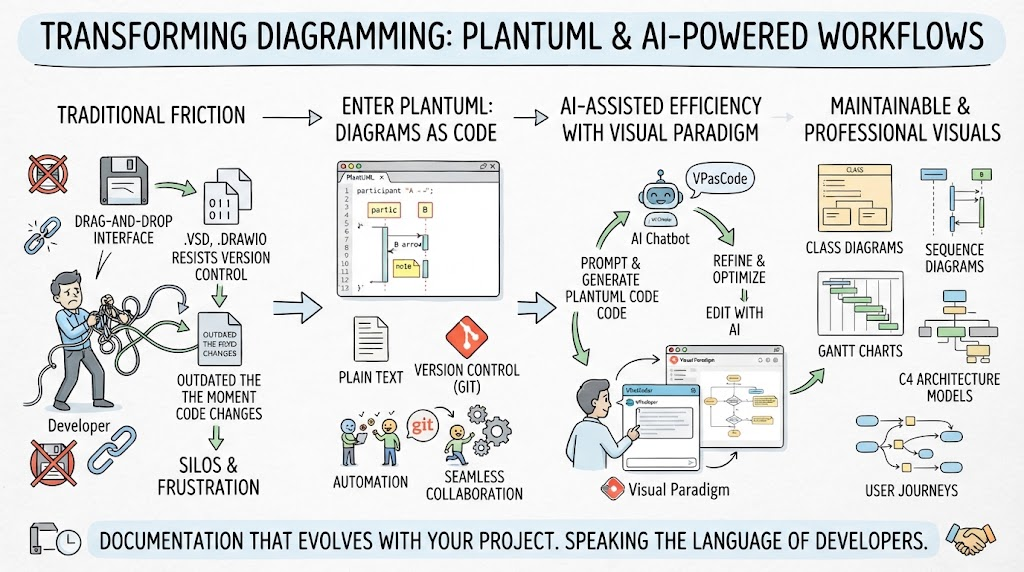
PlantUML は、プレーンテキストの説明から UML 図を作成できるオープンソースツールです。主なメリットは以下の通りです:
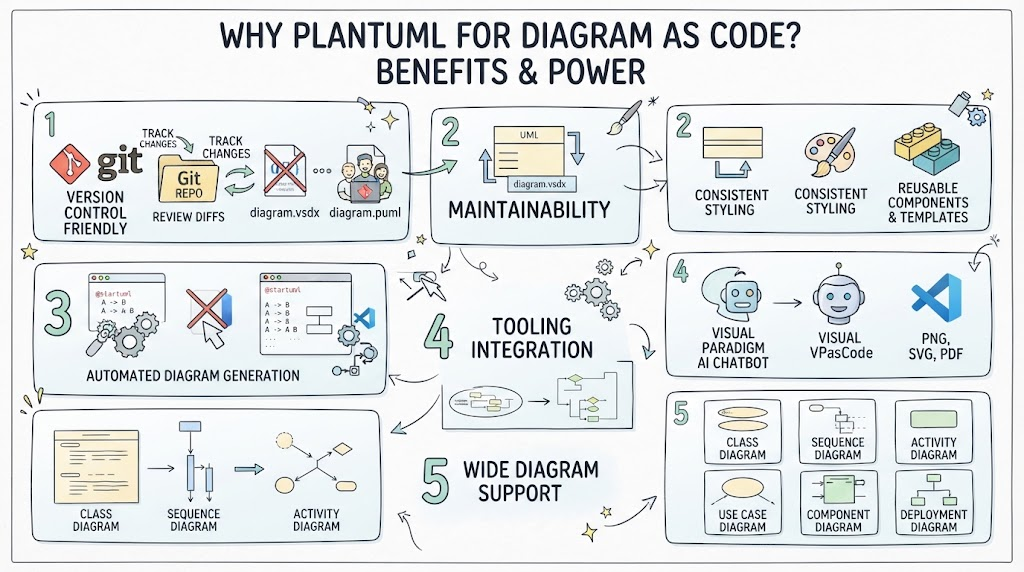
1. バージョン管理に最適
-
テキストベースの図は Git リポジトリに保存可能
-
変更の追跡、差分レビュー、コラボレーションが容易
-
マージが困難なバイナリファイルが存在しない
2. 保守性
-
図の更新と修正が容易
-
すべての図で一貫したスタイル
-
再利用可能なコンポーネントとテンプレート
3. 開発者中心
-
コードで図を作成(ドラッグ&ドロップ不要)
-
IDE やドキュメントツールとの統合
-
コードからの自動図生成
4. ツール連携
-
インテリジェントな図の提案のために、Visual Paradigm AI チャットボットと連携
-
VPasCode は高機能な編集体験を提供します
-
複数の出力形式に対応(PNG、SVG、PDF)
5. 広範な図のサポート
-
クラス図、シーケンス図、アクティビティ図
-
ユースケース図、コンポーネント図、デプロイメント図
-
その他多くの専門的な図の種類
ツール:Visual Paradigm AI チャットボット + VPasCode
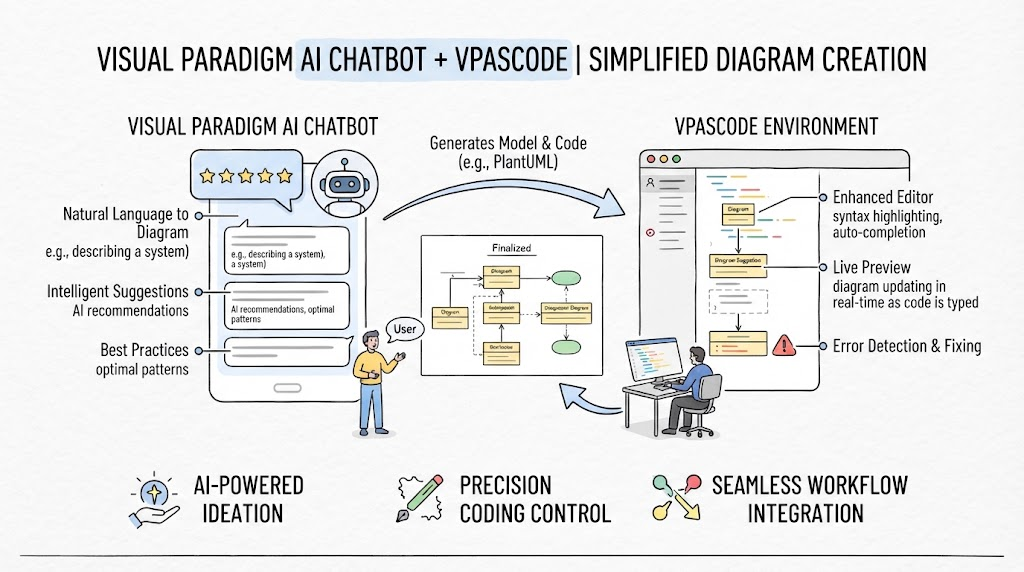
Visual Paradigm AI チャットボット
-
インテリジェントな提案: 図の構造に対する AI 駆動の推奨を取得
-
自然言語から図へ: システムを平易な英語で記述し、PlantUML コードを取得
-
ベストプラクティス: 最適な図のパターンと規約を学習
VPasCode
-
高機能エディタ: 構文ハイライト、自動補完、エラー検出
-
ライブプレビュー: 入力しながら図がリアルタイムで更新される様子を確認
-
連携: Visual Paradigm のモデリングツールスイート全体とシームレスに連携
PlantUML 図の例
1. クラス図
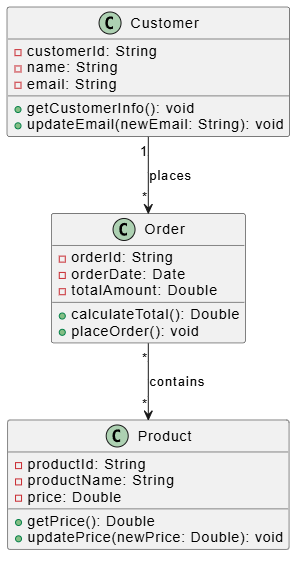
@startuml
class Customer {
    -customerId: String
    -name: String
    -email: String
    +getCustomerInfo(): void
    +updateEmail(newEmail: String): void
}

class Order {
    -orderId: String
    -orderDate: Date
    -totalAmount: Double
    +calculateTotal(): Double
    +placeOrder(): void
}

class Product {
    -productId: String
    -productName: String
    -price: Double
    +getPrice(): Double
    +updatePrice(newPrice: Double): void
}

Customer "1" --> "*" Order : places
Order "*" --> "*" Product : contains
@enduml
2. シーケンス図
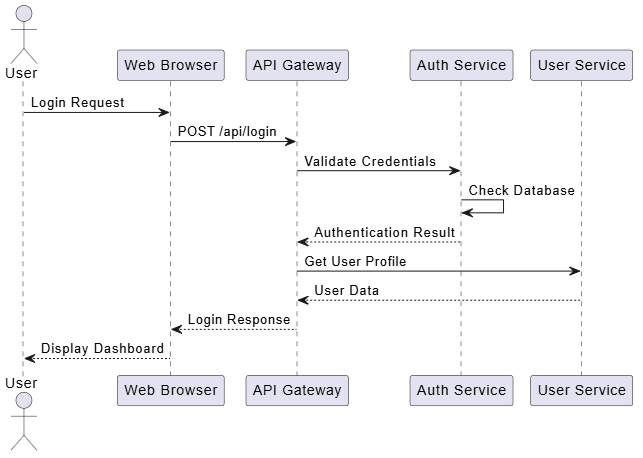
@startuml
actor User
participant "Web Browser" as Browser
participant "API Gateway" as Gateway
participant "Auth Service" as Auth
participant "User Service" as UserService

User -> Browser : Login Request
Browser -> Gateway : POST /api/login
Gateway -> Auth : Validate Credentials
Auth -> Auth : Check Database
Auth --> Gateway : Authentication Result
Gateway -> UserService : Get User Profile
UserService --> Gateway : User Data
Gateway --> Browser : Login Response
Browser --> User : Display Dashboard
@enduml
3. アクティビティ図
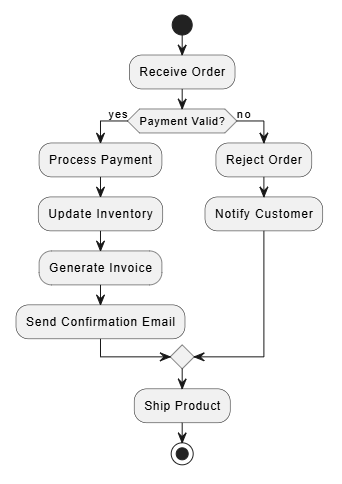
@startuml
start
:Receive Order;
if (Payment Valid?) then (yes)
  :Process Payment;
  :Update Inventory;
  :Generate Invoice;
  :Send Confirmation Email;
else (no)
  :Reject Order;
  :Notify Customer;
endif
:Ship Product;
stop
@enduml
4. ユースケース図
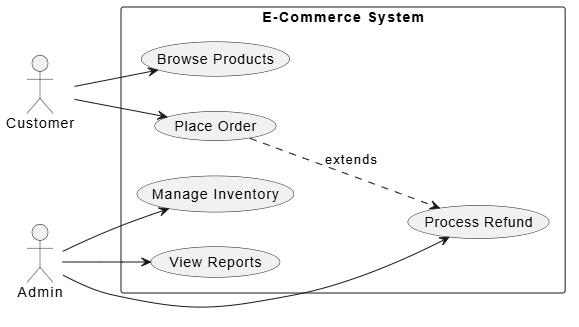
@startuml
left to right direction
actor "Customer" as Customer
actor "Admin" as Admin

rectangle "E-Commerce System" {
  usecase "Browse Products" as UC1
  usecase "Place Order" as UC2
  usecase "Manage Inventory" as UC3
  usecase "View Reports" as UC4
  usecase "Process Refund" as UC5
}

Customer --> UC1
Customer --> UC2
Admin --> UC3
Admin --> UC4
Admin --> UC5
UC2 ..> UC5 : extends
@enduml
5. コンポーネント図
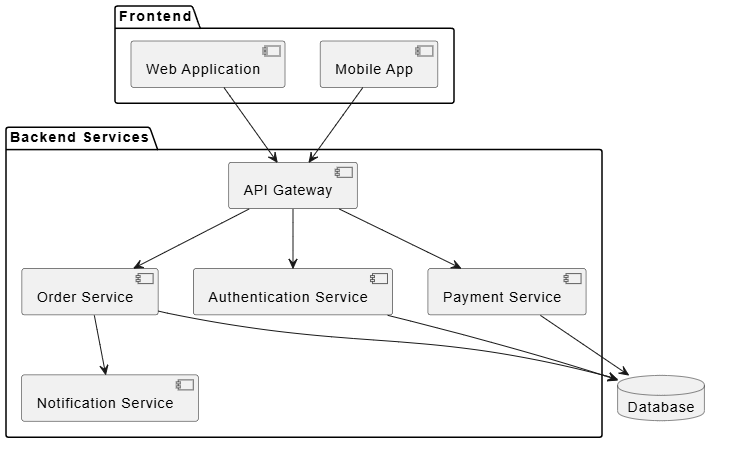
@startuml
package "フロントエンド" {
  [Web アプリケーション] as WebApp
  [モバイルアプリ] as MobileApp
}

package "バックエンドサービス" {
  [API ゲートウェイ] as Gateway
  [認証サービス] as AuthService
  [注文サービス] as OrderService
  [支払いサービス] as PaymentService
  [通知サービス] as NotificationService
}

database "データベース" as DB

WebApp --> Gateway
MobileApp --> Gateway
Gateway --> AuthService
Gateway --> OrderService
Gateway --> PaymentService
OrderService --> NotificationService
AuthService --> DB
OrderService --> DB
PaymentService --> DB
@enduml
6. デプロイメント図
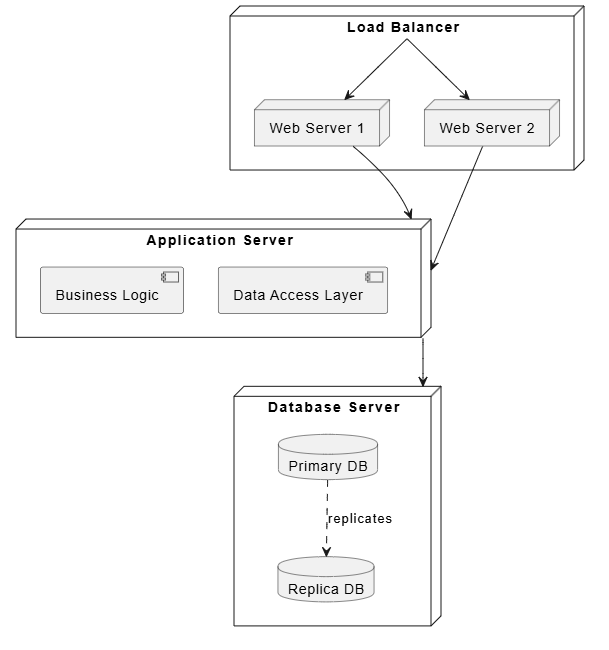
@startuml
node "ロードバランサー" as LB {
  node "Web サーバー 1" as WS1
  node "Web サーバー 2" as WS2
}

node "アプリケーションサーバー" as AppServer {
  component "ビジネスロジック" as BL
  component "データアクセス層" as DAL
}

node "データベースサーバー" as DBServer {
  database "プライマリ DB" as PrimaryDB
  database "レプリカ DB" as ReplicaDB
}

LB --> WS1
LB --> WS2
WS1 --> AppServer
WS2 --> AppServer
AppServer --> DBServer
PrimaryDB ..> ReplicaDB : 複製
@enduml
7. 状態図
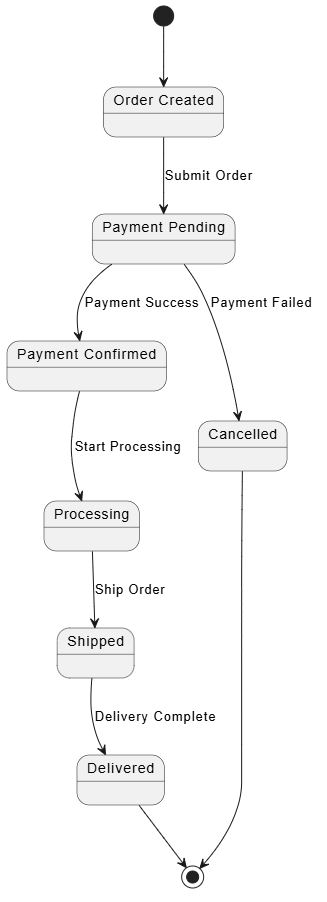
@startuml
state "注文作成" as Created
state "支払い保留" as PaymentPending
state "支払い確認" as PaymentConfirmed
state "処理中" as Processing
state "出荷" as Shipped
state "配達完了" as Delivered
state "キャンセル" as Cancelled

[*] --> Created
Created --> PaymentPending : 注文送信
PaymentPending --> PaymentConfirmed : 支払い成功
PaymentPending --> Cancelled : 支払い失敗
PaymentConfirmed --> Processing : 処理開始
Processing --> Shipped : 注文出荷
Shipped --> Delivered : 配達完了
Cancelled --> [*]
Delivered --> [*]
@enduml
8. オブジェクト図
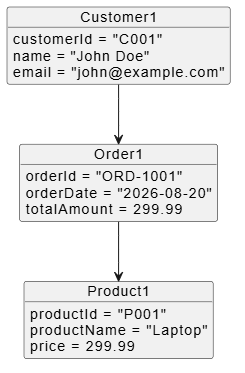
@startuml
object Customer1 {
  customerId = "C001"
  name = "John Doe"
  email = "[email protected]"
}

object Order1 {
  orderId = "ORD-1001"
  orderDate = "2026-08-20"
  totalAmount = 299.99
}

object Product1 {
  productId = "P001"
  productName = "Laptop"
  price = 299.99
}

Customer1 --> Order1
Order1 --> Product1
@enduml
9. タイミング図
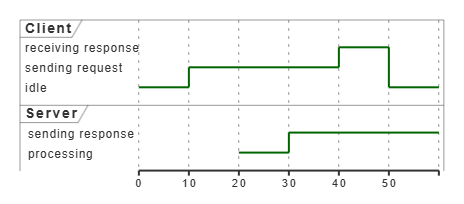
@startuml
robust "クライアント" as Client
robust "サーバー" as Server

@0
Client is idle
@10
Client is "sending request"
@20
Server is processing
@30
Server is "sending response"
@40
Client is "receiving response"
@50
Client is idle
@enduml
10. マインドマップ
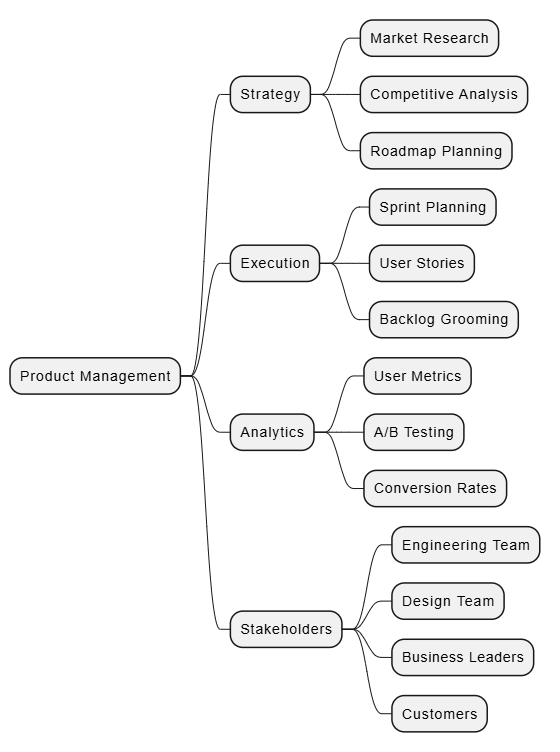
@startmindmap
* 製品管理
** 戦略
*** 市場調査
*** 競合分析
*** ロードマップ計画
** 実行
*** スプリント計画
*** ユーザーストーリー
*** バックログ整備
** 分析
*** ユーザー指標
*** A/B テスト
*** 転換率
** 利害関係者
*** エンジニアリングチーム
*** デザインチーム
*** ビジネスリーダー
*** 顧客
@endmindmap
11. ワイヤーフレーム (Salt)
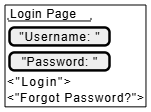
@startsalt
{+
  {"ログインページ"
    ["ユーザー名: "]
    ["パスワード: "]
    <"ログイン">
    <"パスワードをお忘れですか?">
  }
}
@endsalt
12. ネットワーク図
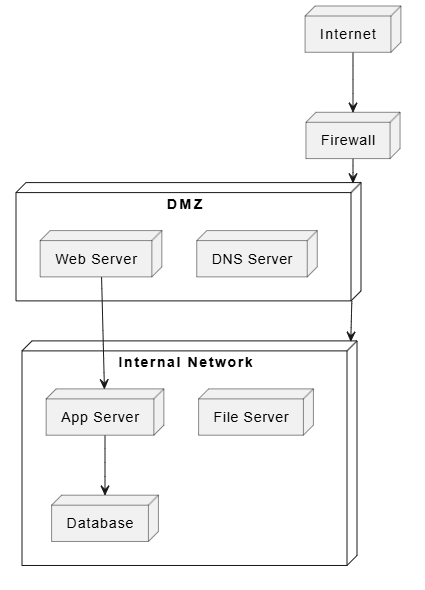
@startuml
node "インターネット" as Internet
node "ファイアウォール" as FW
node "DMZ" as DMZ {
  node "Web サーバー" as WS
  node "DNS サーバー" as DNS
}
node "内部ネットワーク" as Internal {
  node "アプリケーションサーバー" as AppSrv
  node "データベース" as DB
  node "ファイルサーバー" as FileSrv
}

Internet --> FW
FW --> DMZ
DMZ --> Internal
WS --> AppSrv
AppSrv --> DB
@enduml
13. ガントチャート
@startgantt
title プロジェクトのタイムライン

projectstarts 2026-09-01

-- 計画 --
[要件定義] 2026-09-01 に開始し、10 日間継続
[設計フェーズ] 2026-09-11 に開始し、14 日間継続

-- 開発 --
[バックエンド開発] 2026-09-25 に開始し、20 日間継続
[フロントエンド開発] 2026-09-25 に開始し、18 日間継続

-- テスト --
[単体テスト] 2026-10-15 に開始し、10 日間継続
[結合テスト] 2026-10-25 に開始し、7 日間継続

-- デプロイ --
[本番環境デプロイ] 2026-11-01 に開始し、3 日間継続
@endgantt
14. 概念モデル図(ERD)
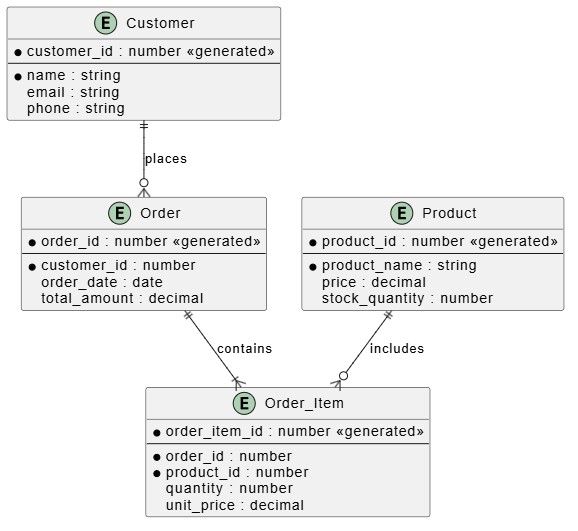
@startuml
entity "顧客" as Customer {
  * customer_id : number <<generated>>
  --
  * name : string
  email : string
  phone : string
}

entity "注文" as Order {
  * order_id : number <<generated>>
  --
  * customer_id : number
  order_date : date
  total_amount : decimal
}

entity "商品" as Product {
  * product_id : number <<generated>>
  --
  * product_name : string
  price : decimal
  stock_quantity : number
}

entity "注文項目" as OrderItem {
  * order_item_id : number <<generated>>
  --
  * order_id : number
  * product_id : number
  quantity : number
  unit_price : decimal
}

Customer ||--o{ Order : 注文する
Order ||--|{ OrderItem : 含む
Product ||--o{ OrderItem : 含む
@enduml
15. アーキテクチャ図(C4 モデルスタイル)
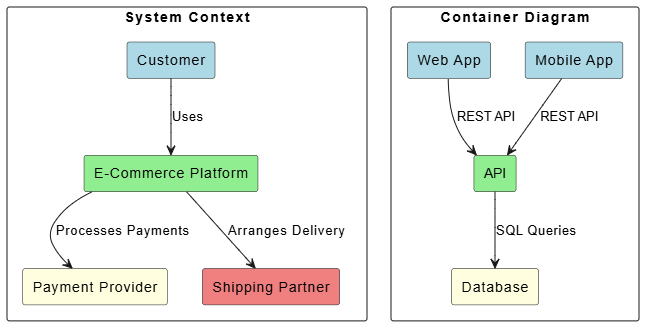
@startuml
skinparam backgroundColor white
skinparam rectangleBackgroundColor white

rectangle "システムコンテキスト" {
  rectangle "顧客" as Customer #LightBlue
  rectangle "E コマースプラットフォーム" as Platform #LightGreen
  rectangle "決済プロバイダー" as Payment #LightYellow
  rectangle "配送パートナー" as Shipping #LightCoral
}

Customer --> Platform : 利用する
Platform --> Payment : 決済を処理
Platform --> Shipping : 配送を手配

rectangle "コンテナ図" {
  rectangle "Web アプリ" as WebApp #LightBlue
  rectangle "モバイルアプリ" as MobileApp #LightBlue
  rectangle "API" as API #LightGreen
  rectangle "データベース" as DB #LightYellow
}

WebApp --> API : REST API
MobileApp --> API : REST API
API --> DB : SQL クエリ
@enduml
ベストプラクティス
1. 図はシンプルに保つ
-
1 つの図ごとに 1 つの側面に焦点を当てる
-
要素が多すぎて混雑しないようにする
2. 一貫した命名規則を使用する
-
図全体で命名規則に従う
-
クラス、アクター、コンポーネントには意味のある名前を使用する
3. 図を文書化する
-
タイトルと説明文を追加する
-
追加の文脈にはメモを使用する
4. 複雑なシステムをモジュール化する
-
大規模なシステムを小さく管理しやすい図に分割する
-
整理にはパッケージグループ化を使用する
5. AI ツールを活用する
-
初期の図の構造には Visual Paradigm AI チャットボットを使用する
-
VPasCode で洗練化とカスタマイズを行う
6. バージョン管理
-
PlantUML ファイルを Git にコミットする
-
図の変更を説明する意味のあるコミットメッセージを使用する
Visual Paradigm + VPasCode の始め方
-
Visual Paradigm をインストールする VPasCode プラグイン付き
-
新しい PlantUML ファイルを作成する (.puml 拡張子)
-
入力を開始する 図のコードを入力する
-
AI チャットボットを使用するシステムを記述することで提案を行う
-
リアルタイムでプレビュー編集しながら
-
エクスポート希望する形式(PNG、SVG、PDF)へ
結論
PlantUMLをVisual Paradigm AIチャットボットおよびVPasCodeと組み合わせることで、プロフェッショナルな図を作成するための強力かつ開発者フレンドリーなアプローチが実現します。テキストベースであるため、保守性、バージョン管理との互換性、簡単な共同作業が保証され、AI搭載ツールが図の作成を加速し、ベストプラクティスを確保します。
ソフトウェアアーキテクチャの文書化、プロジェクトの計画、システム設計の伝達など、あらゆるニーズに対してPlantUMLは拡張可能な包括的なソリューションを提供します。