


UML 圖型通常分為「結構」圖型,描述系統由什麼組成,以及「行為」圖型,描述系統做什麼。以下範例採用單一線上商店情境,以便比較與調整。此處參考的正式規格為 UML 2.5.1。
PlantUML 可直接呈現許多 UML 記號。少數專用圖型類型——特別是配置圖、複合結構圖、通訊圖與互動概覽圖——可能以實用的 PlantUML 近似方式表達,而非使用專用圖型渲染器。註解會標示這些情況。
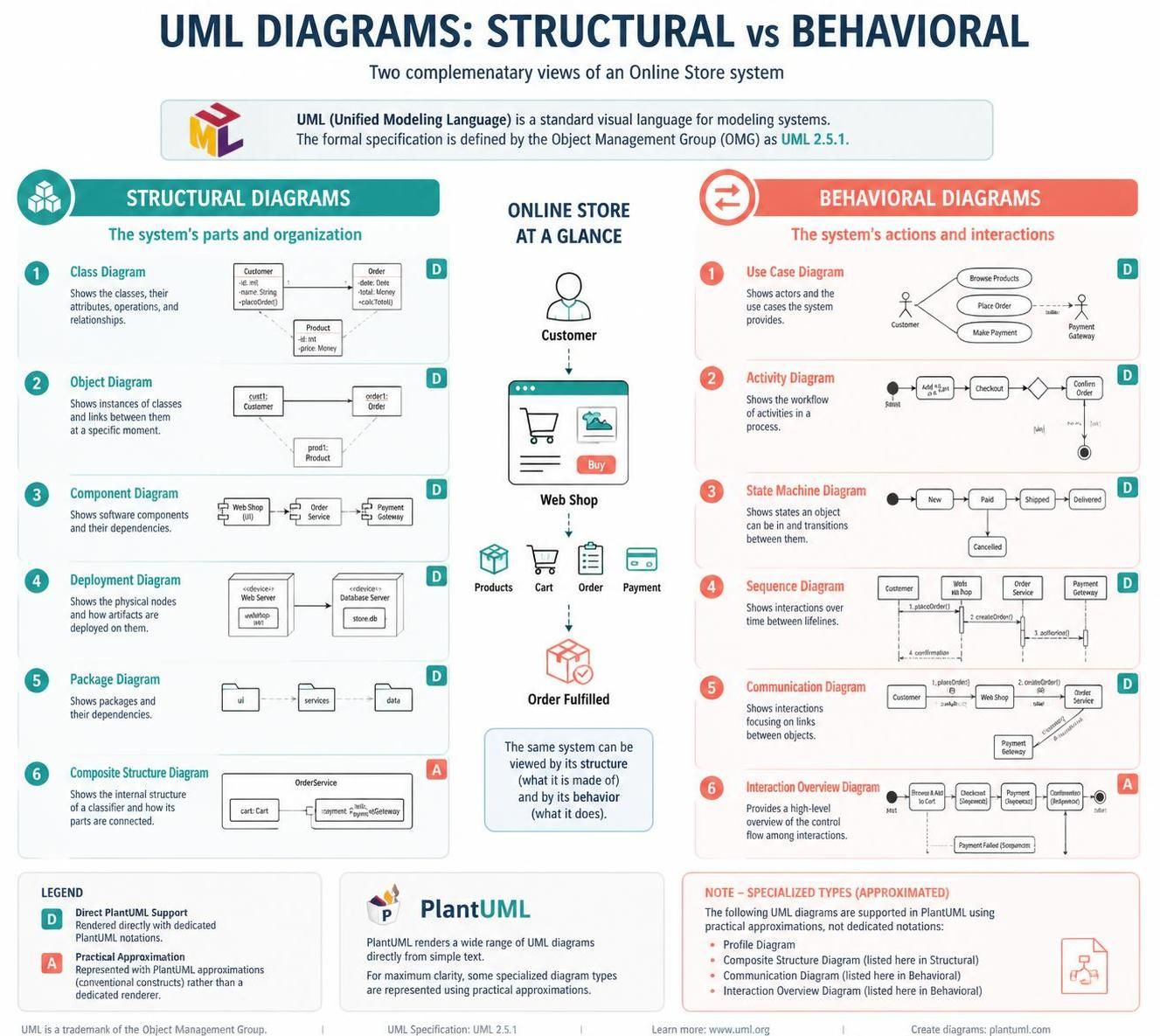
結構圖
1. 類別圖
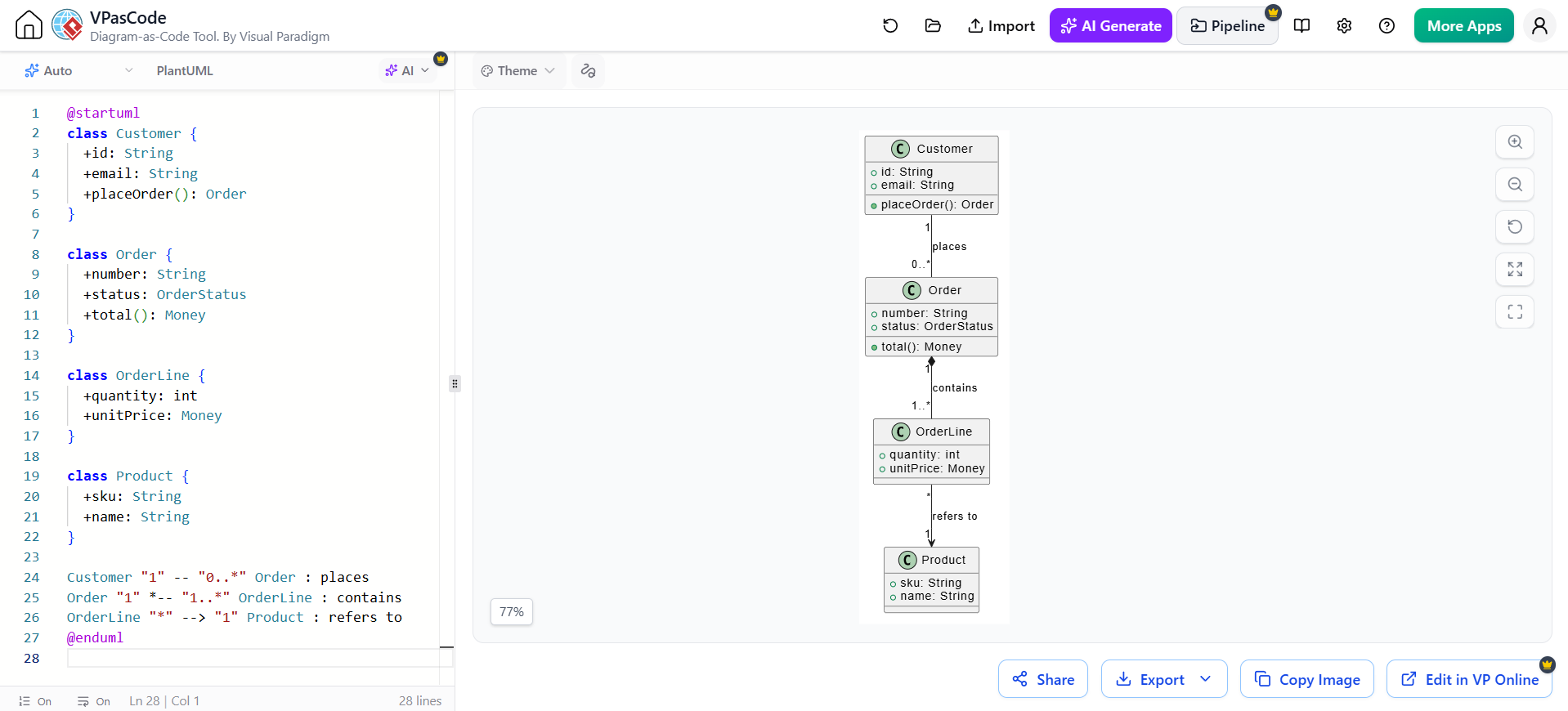
顯示系統的類別、其資料與操作,以及關聯、繼承與組合等關係。可用於討論領域模型或物件導向設計。
@startuml
class Customer {
  +id: String
  +email: String
  +placeOrder(): Order
}

class Order {
  +number: String
  +status: OrderStatus
  +total(): Money
}

class OrderLine {
  +quantity: int
  +unitPrice: Money
}

class Product {
  +sku: String
  +name: String
}

Customer "1" -- "0..*" Order : places
Order "1" *-- "1..*" OrderLine : contains
OrderLine "*" --> "1" Product : refers to
@enduml
閱讀說明:一位客戶可以下達多個訂單;一個訂單包含一或多個明細;每個明細指向一個產品。實心菱形表示組合關係:訂單擁有其明細。
2. 物件圖
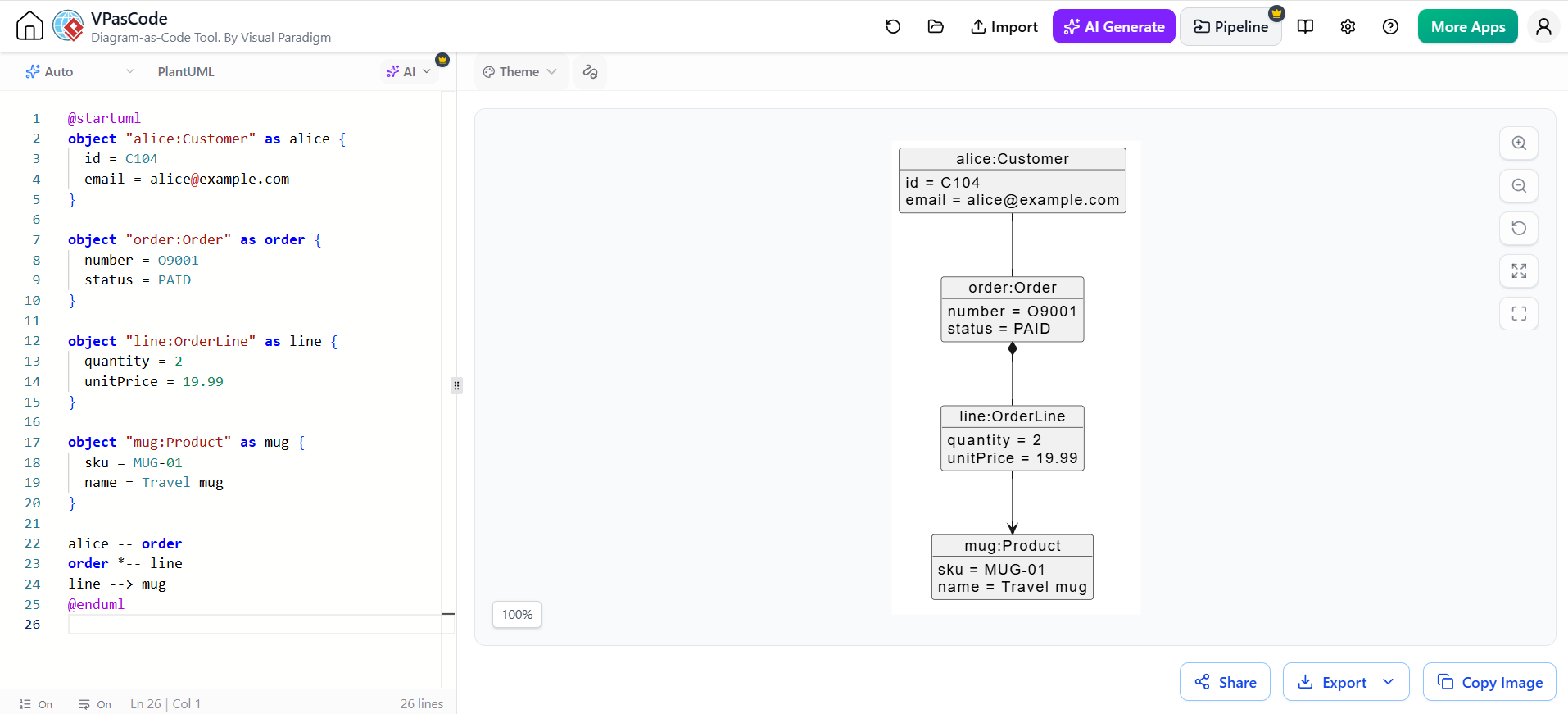
顯示特定時刻的具體實例與連結。可用於說明範例資料,或結合特定情境解釋類別模型。在 PlantUML 中,請使用物件記號。
@startuml
object "alice:Customer" as alice {
  id = C104
  email = [email protected]
}

object "order:Order" as order {
  number = O9001
  status = PAID
}

object "line:OrderLine" as line {
  quantity = 2
  unitPrice = 19.99
}

object "mug:Product" as mug {
  sku = MUG-01
  name = Travel mug
}

alice -- order
order *-- line
line --> mug
@enduml
3. 元件圖
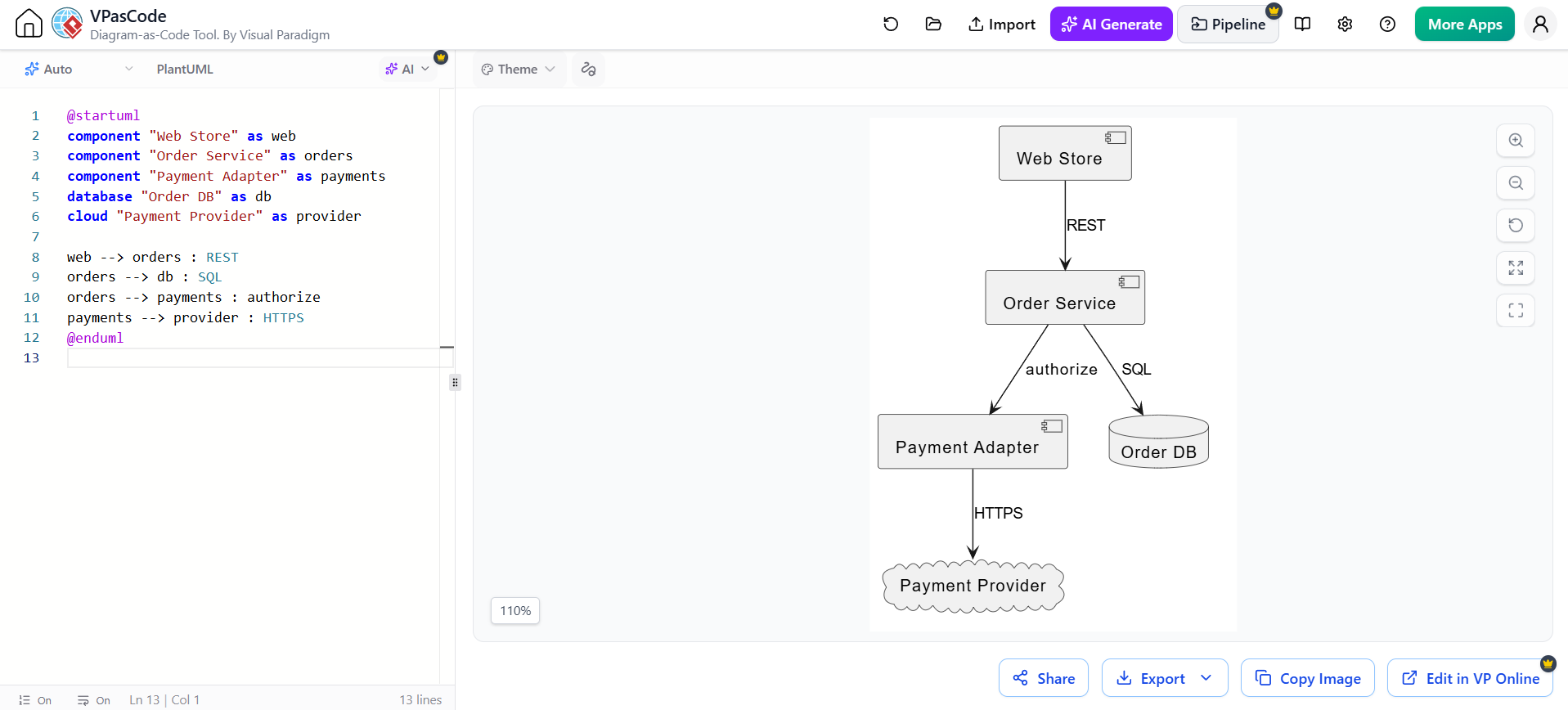
顯示可部署或可替換的軟體元件及其相依關係。可用於溝通應用程式架構與整合邊界。
@startuml
component "Web Store" as web
component "Order Service" as orders
component "Payment Adapter" as payments
database "Order DB" as db
cloud "Payment Provider" as provider

web --> orders : REST
orders --> db : SQL
orders --> payments : authorize
payments --> provider : HTTPS
@enduml
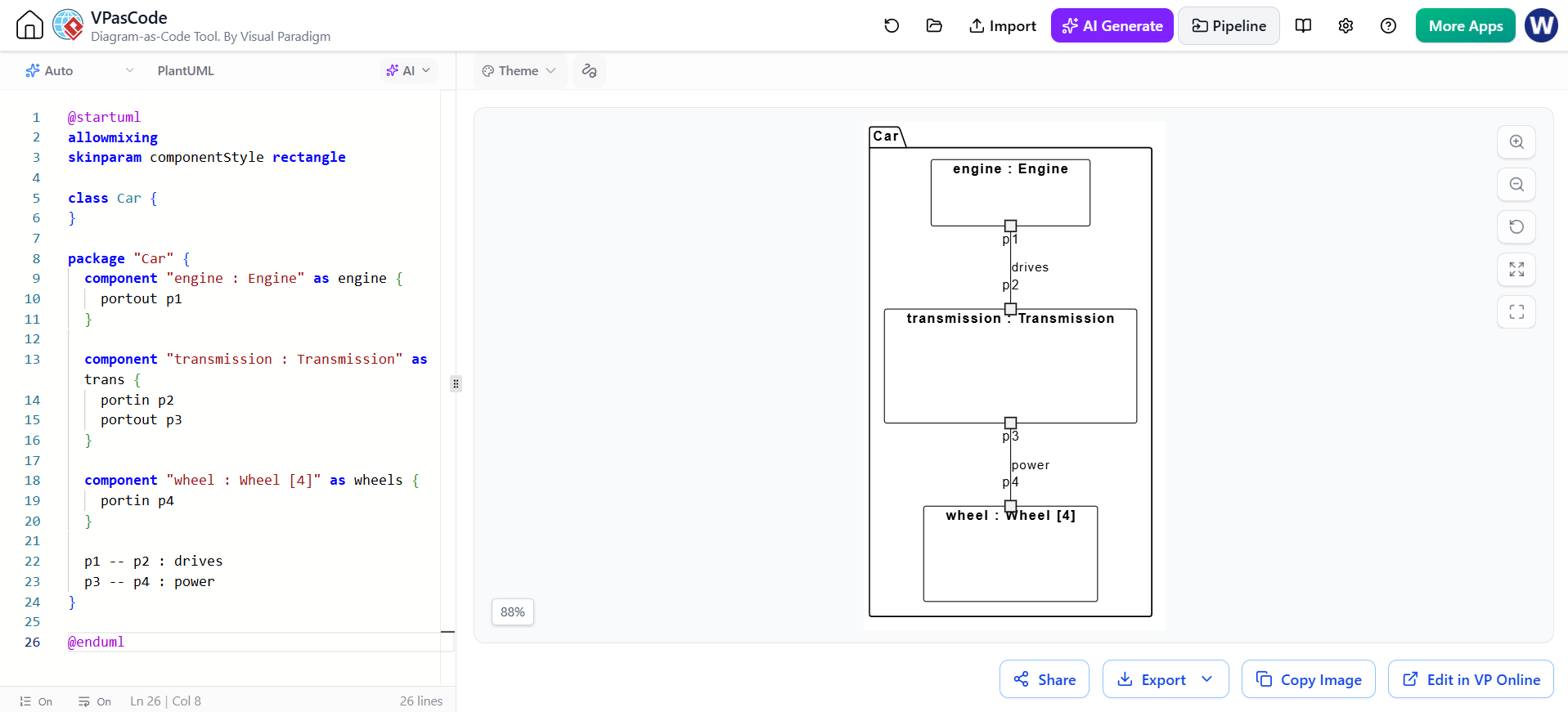
4. 複合結構圖
顯示分類器(如元件或類別)的內部組件,以及這些組件如何透過閘口連接。當內部協作比周圍系統架構更重要時,此圖型尤為有用。
PlantUML 未提供普遍支援的專用組合結構語法。此類結構圖風格的草圖可傳達各部件及其連接關係:
@startuml
allowmixing
skinparam componentStyle rectangle

class Car {
}

package "Car" {
  component "engine : Engine" as engine {
    portout p1
  }

  component "transmission : Transmission" as trans {
    portin p2
    portout p3
  }

  component "wheel : Wheel [4]" as wheels {
    portin p4
  }

  p1 -- p2 : drives
  p3 -- p4 : power
}

@enduml請將此視為結構草圖;它並未顯示正式的 UML 連接埠或連接器語義。
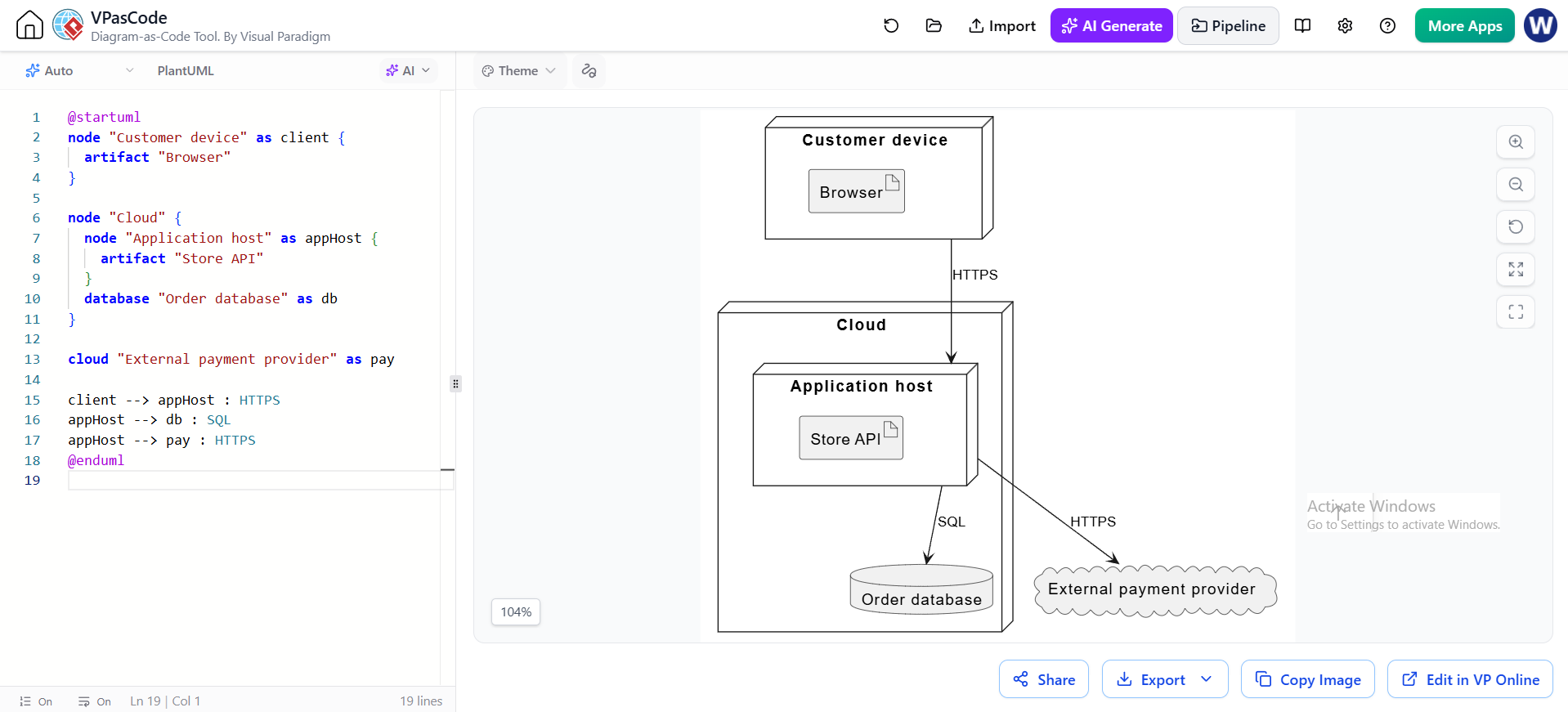
5. 部署圖
將軟體構建產物或服務映射至硬體節點與執行環境。可用於說明軟體的執行位置,以及執行時節點之間的通訊方式。
@startuml
node "Customer device" as client {
  artifact "Browser"
}

node "Cloud" {
  node "Application host" as appHost {
    artifact "Store API"
  }
  database "Order database" as db
}

cloud "External payment provider" as pay

client --> appHost : HTTPS
appHost --> db : SQL
appHost --> pay : HTTPS
@enduml
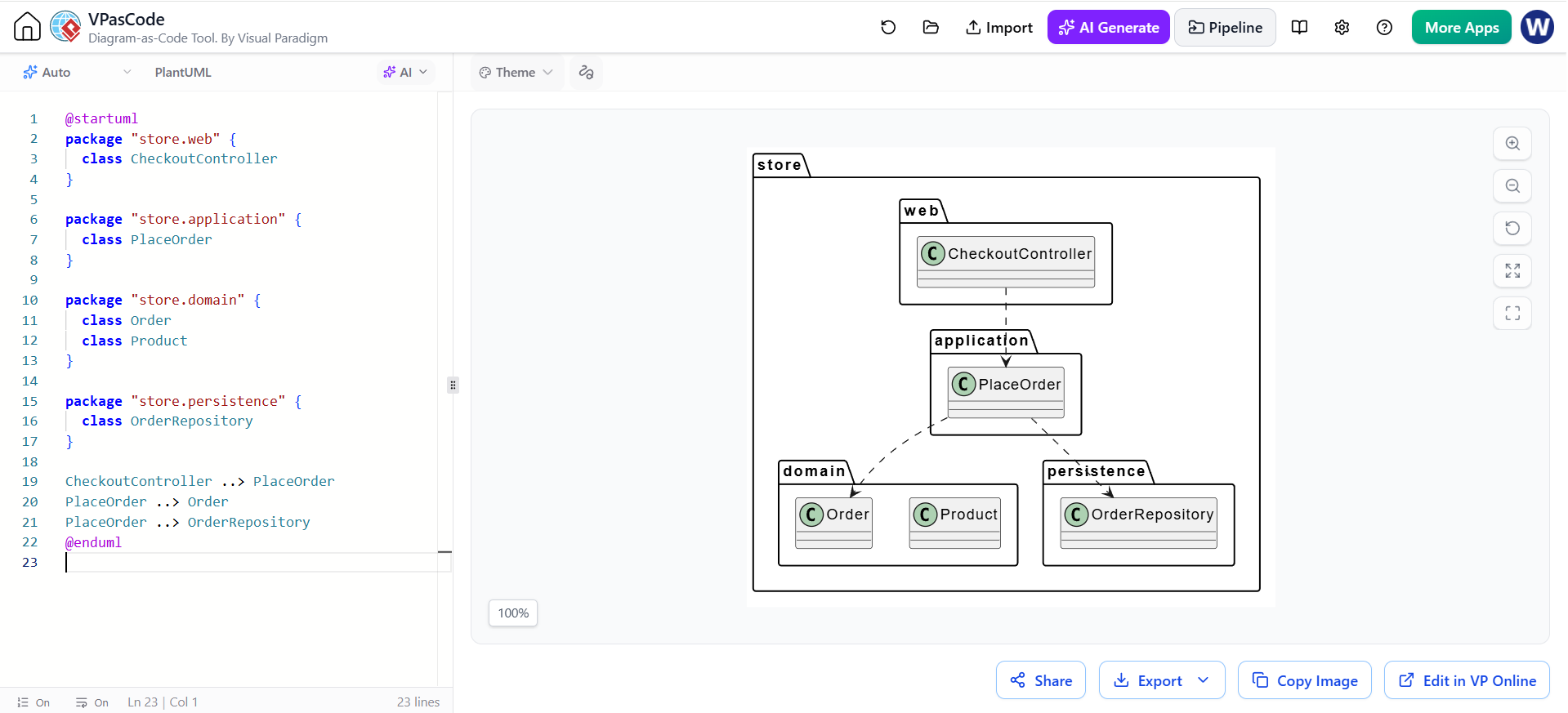
6. 套件圖
將模型元素分組至命名空間或層級,並顯示這些組之間的相依關係。可用於說明程式碼組織與架構方向。
@startuml
package "store.web" {
  class CheckoutController
}

package "store.application" {
  class PlaceOrder
}

package "store.domain" {
  class Order
  class Product
}

package "store.persistence" {
  class OrderRepository
}

CheckoutController ..> PlaceOrder
PlaceOrder ..> Order
PlaceOrder ..> OrderRepository
@enduml
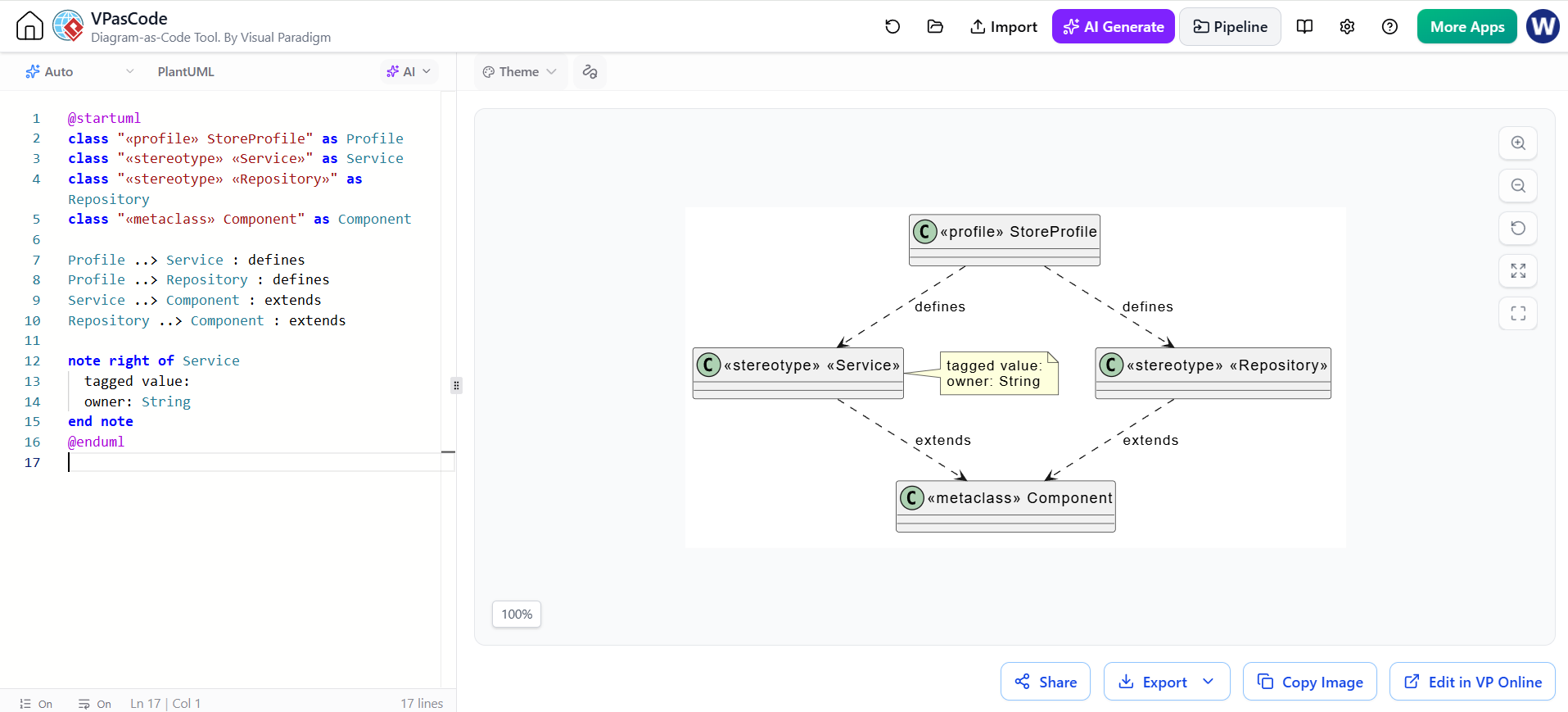
7. 設定檔圖
使用標記、標籤值與約束條件,定義針對特定領域的 UML 擴充。當專案需要一套超越標準 UML 的一致建模詞彙時,可使用此圖。
PlantUML 可將設定檔概念以 UML 風格的草圖呈現,但這並非專用的設定檔圖渲染器。
@startuml
class "«profile» StoreProfile" as Profile
class "«stereotype» «Service»" as Service
class "«stereotype» «Repository»" as Repository
class "«metaclass» Component" as Component

Profile ..> Service : defines
Profile ..> Repository : defines
Service ..> Component : extends
Repository ..> Component : extends

note right of Service
  tagged value:
  owner: String
end note
@enduml
行為圖
8. 使用案例圖
顯示外部參與者及其與系統目標的互動。可用於界定範圍,並在高階層級捕捉功能需求。
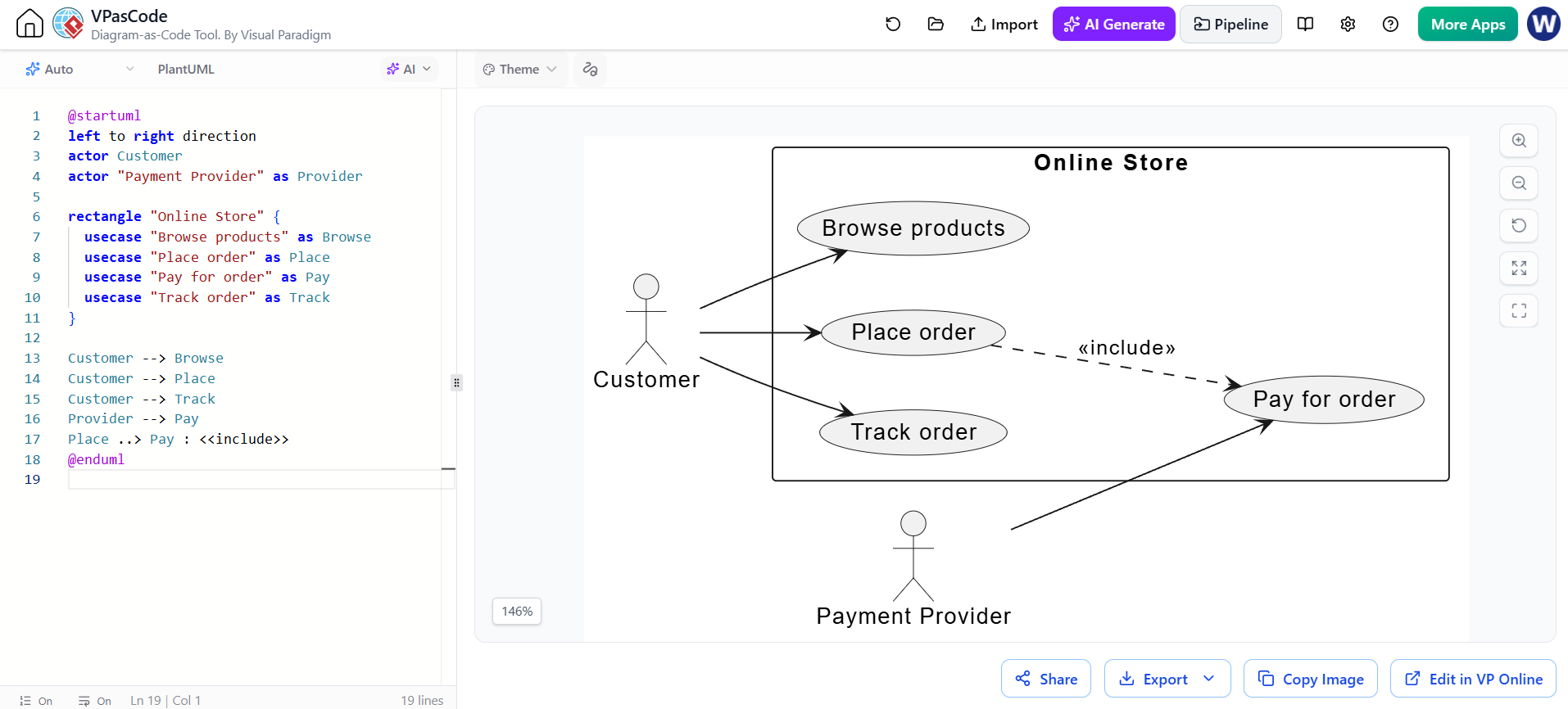
@startuml
方向由左至右
參與者 顧客
參與者 "支付供應商" 作為 Provider

矩形 "線上商店" {
  用例 "瀏覽商品" 作為 Browse
  用例 "下訂單" 作為 Place
  用例 "支付訂單" 作為 Pay
  用例 "追蹤訂單" 作為 Track
}

顧客 --> Browse
顧客 --> Place
顧客 --> Track
Provider --> Pay
Place ..> Pay : <<include>>
@enduml
9. 活動圖
模擬工作流程:包含動作、決策、平行路徑與交接點。適用於業務流程、操作程序或演算法的控制流程。
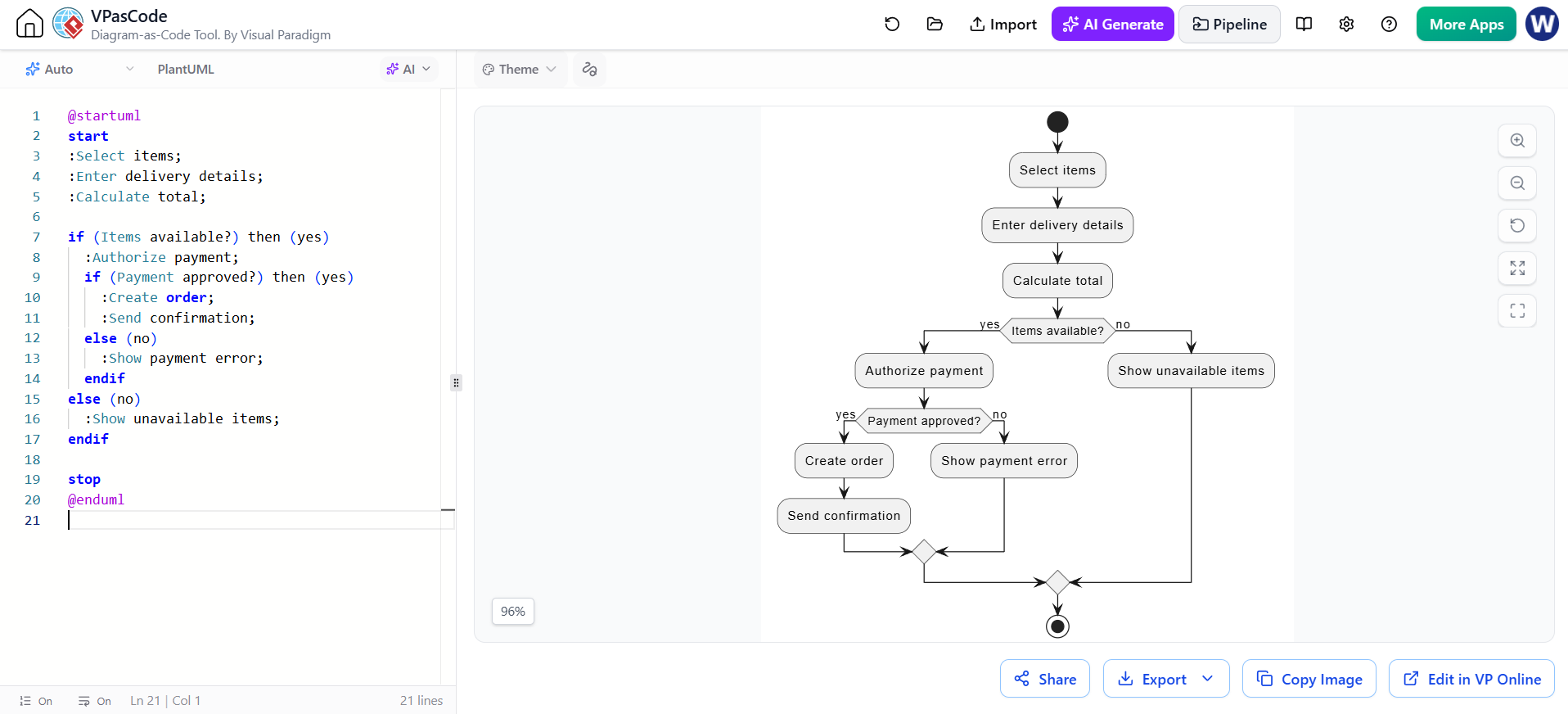
@startuml
開始
:選擇商品;
:輸入送貨詳情;
:計算總金額;

if (商品有貨?) then (是)
  :授權付款;
  if (付款核准?) then (是)
    :建立訂單;
    :發送確認;
  else (否)
    :顯示付款錯誤;
  endif
else (否)
  :顯示缺貨商品;
endif

結束
@enduml
10. 狀態機圖
描述實體可處置的狀態,以及引發狀態轉換的事件或條件。當物件的行為取決於其當前狀態時,請使用此圖。
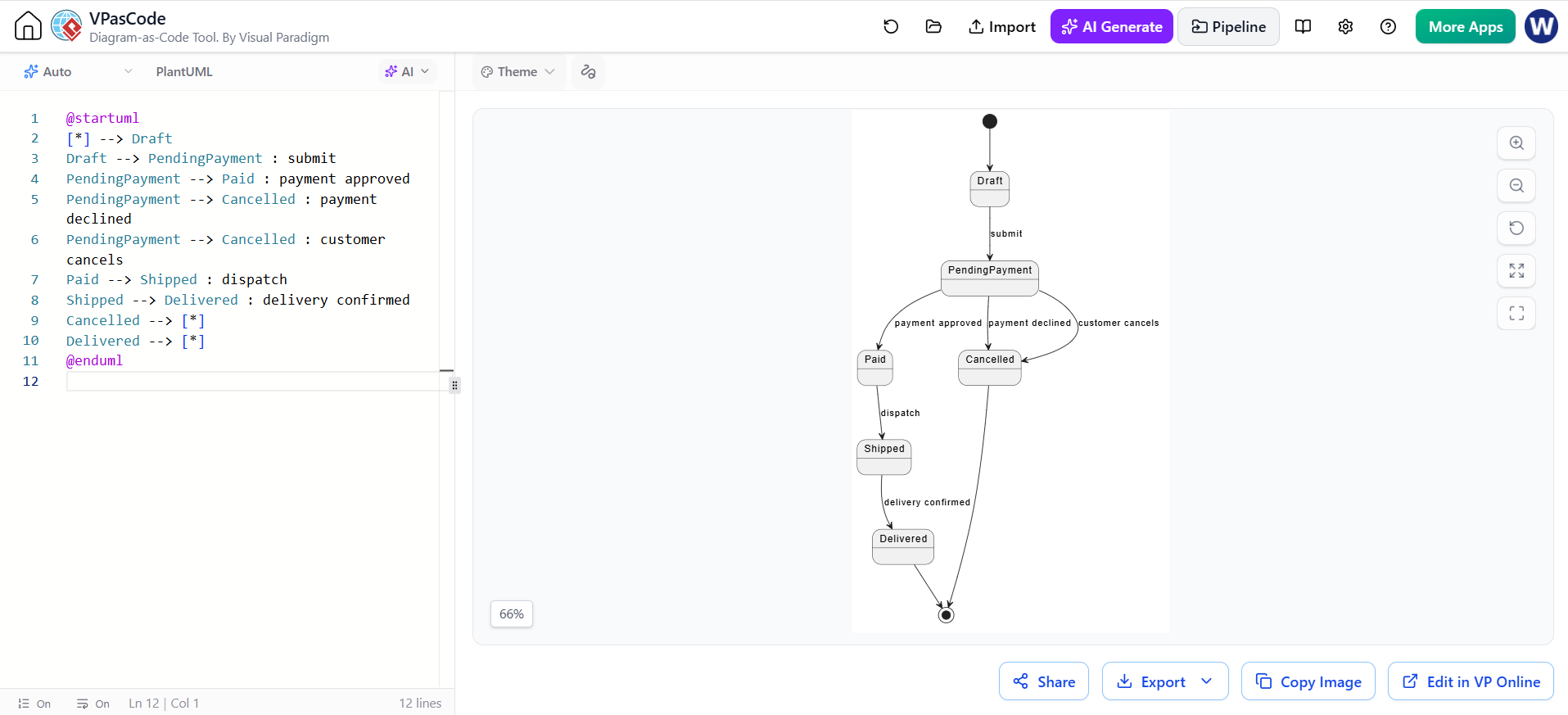
@startuml
[*] --> 草稿
草稿 --> 待付款 : 提交
待付款 --> 已付款 : 付款核准
待付款 --> 已取消 : 付款遭拒
待付款 --> 已取消 : 顧客取消
已付款 --> 已出貨 : 發貨
已出貨 --> 已送達 : 送貨確認
已取消 --> [*]
已送達 --> [*]
@enduml
11. 序列圖
顯示參與者之間依時間順序交換的訊息。適用於描述情境、API 呼叫流程或服務間的互動。
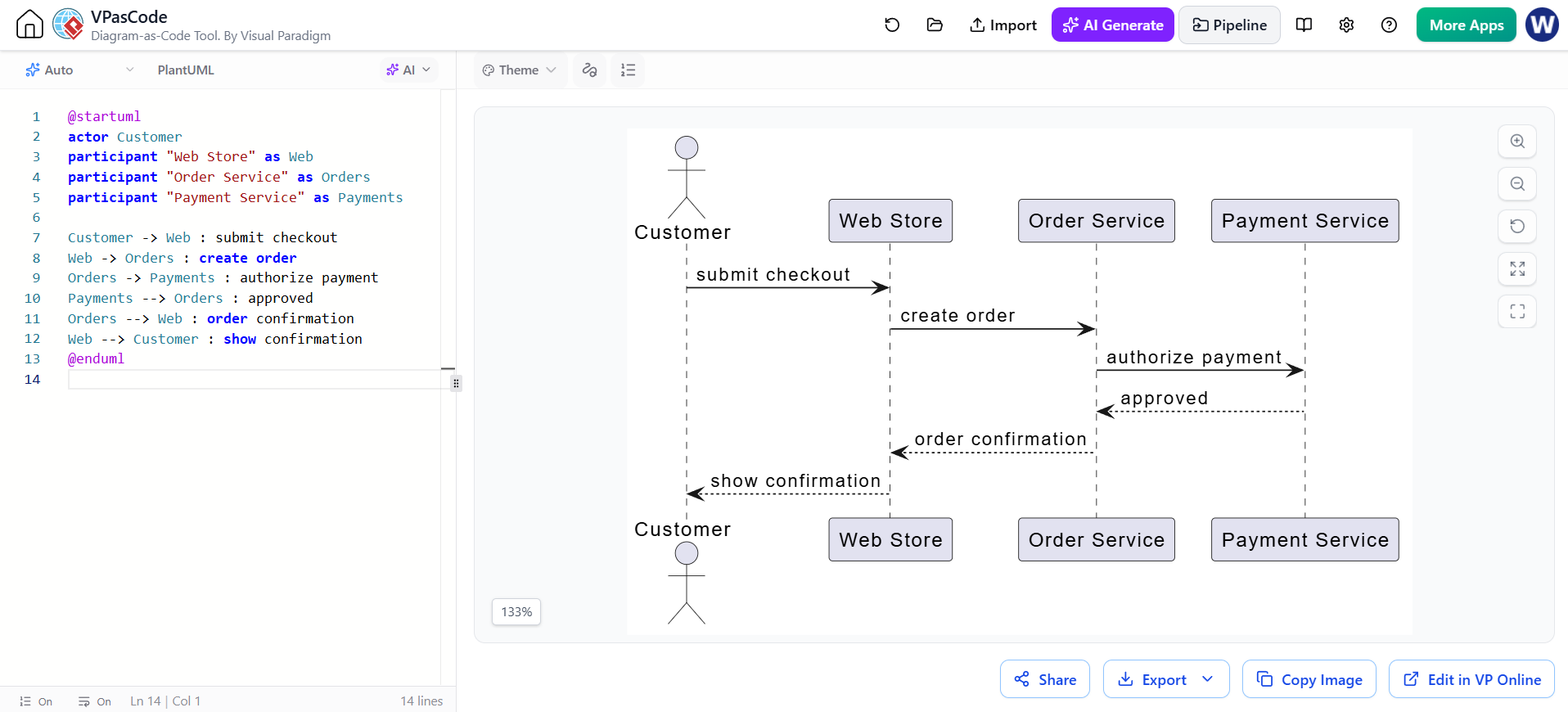
@startuml
參與者 顧客
參與者 "網路商店" 作為 Web
參與者 "訂單服務" 作為 Orders
參與者 "付款服務" 作為 Payments

顧客 -> Web : 提交結帳
Web -> Orders : 建立訂單
Orders -> Payments : 授權付款
Payments --> Orders : 核准
Orders --> Web : 訂單確認
Web --> Customer : 顯示確認
@enduml
12. 通訊圖
強調哪些物件進行協作及其間的連結;訊息編號顯示互動的順序。當協作參與者的網絡比時間軸更重要時,請使用此圖。
PlantUML 在其標準 UML 圖集中沒有專用的通訊圖渲染器。此物件連結草圖以序列編號標註訊息:
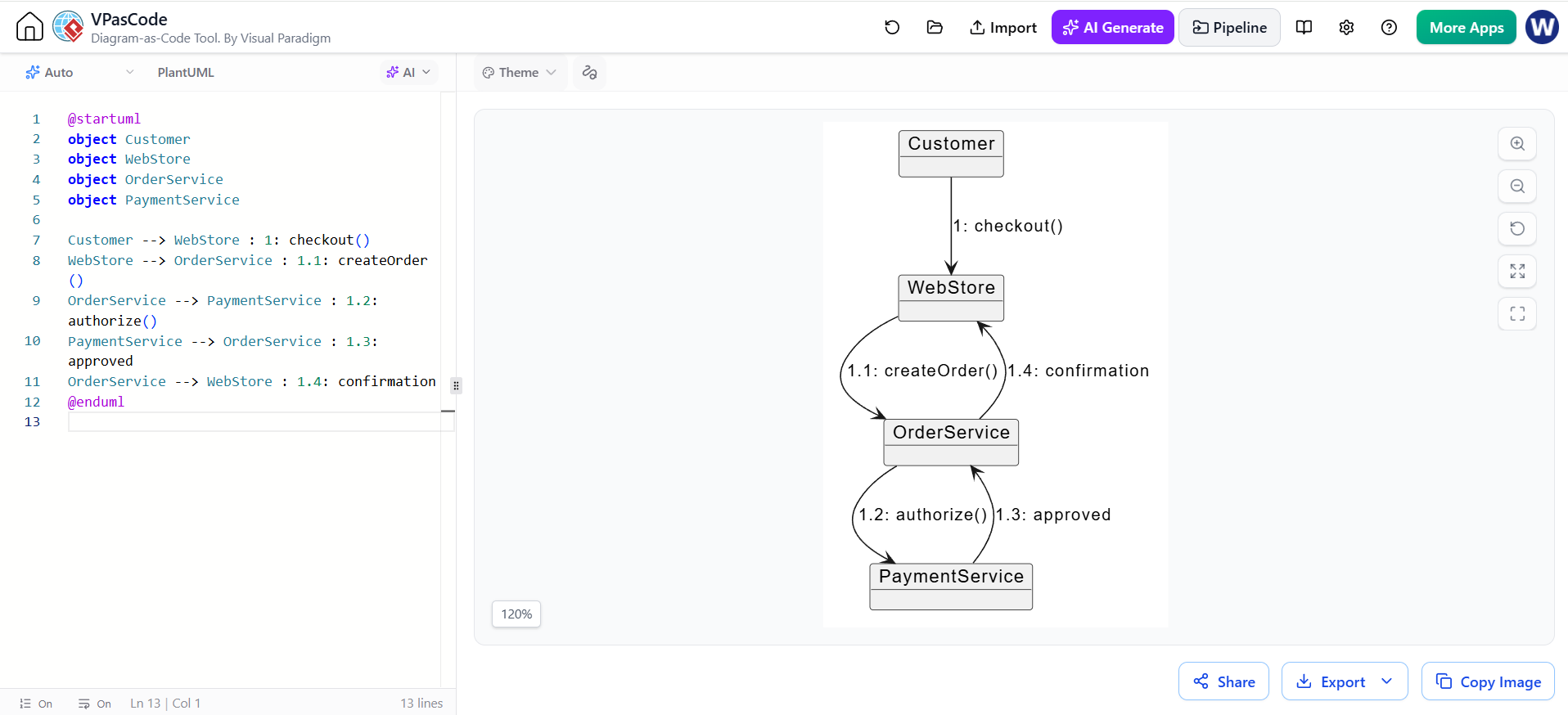
@startuml
物件 顧客
物件 WebStore
物件 OrderService
物件 PaymentService

顧客 --> WebStore : 1: checkout()
WebStore --> OrderService : 1.1: createOrder()
OrderService --> PaymentService : 1.2: authorize()
PaymentService --> OrderService : 1.3: approved
OrderService --> WebStore : 1.4: confirmation
@enduml
13. 互動概覽圖
提供互動的高階控制流程視圖,結合活動式流程與對互動情境的參照。適用於展示多個序列層級的情境如何融入更大的流程中。
此 PlantUML 範例以活動圖作為概覽,並以情境名稱代表所參照的互動:
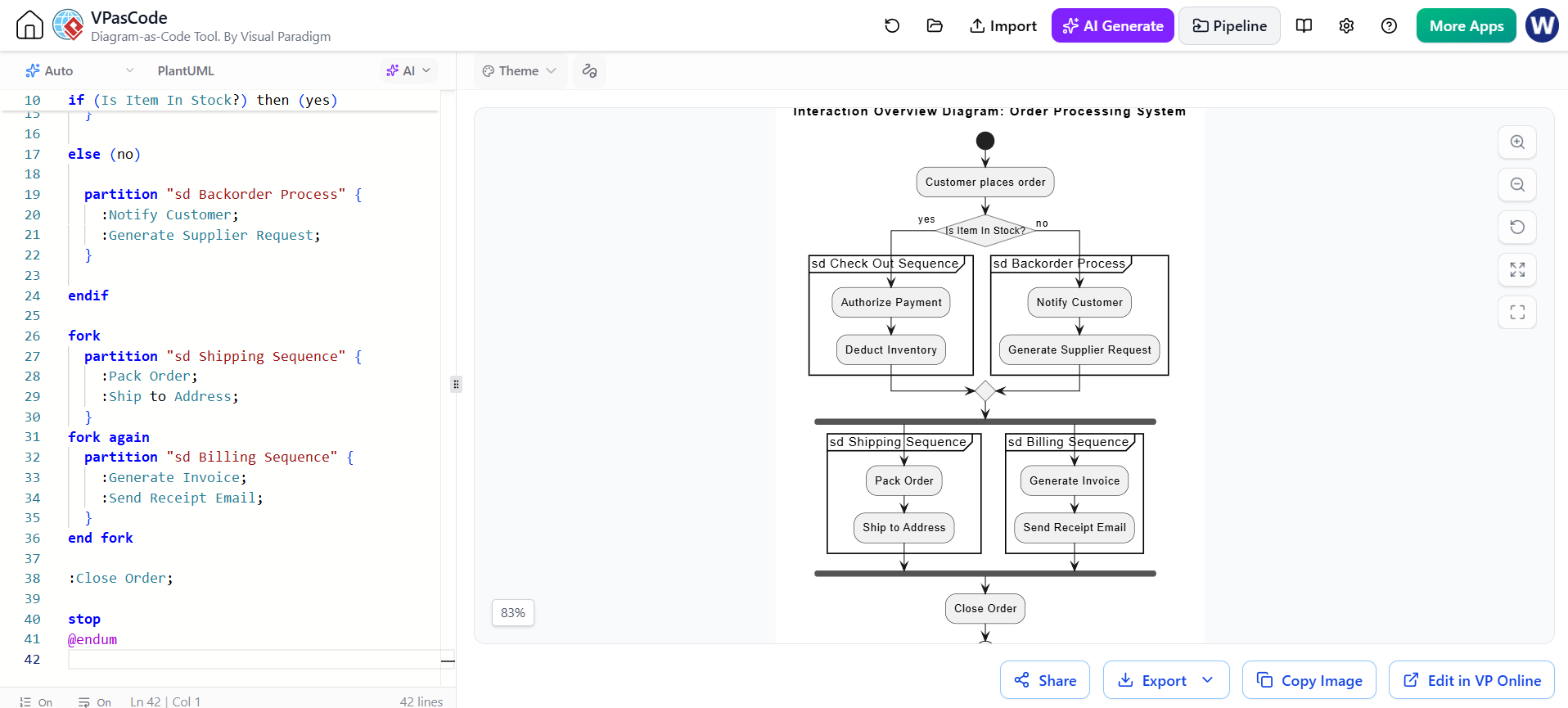
@startuml
skinparam conditionStyle InsideDiamond

title 互動概覽圖:訂單處理系統

start

:客戶下訂單;

if (商品有庫存?) then (是)

  partition "sd 結帳序列" {
    :授權付款;
    :扣減庫存;
  }

else (否)

  partition "sd 延後訂單處理" {
    :通知客戶;
    :產生供應商請求;
  }

endif

fork
  partition "sd 運送序列" {
    :打包訂單;
    :運送至地址;
  }
fork again
  partition "sd 帳單序列" {
    :產生發票;
    :發送收據電子郵件;
  }
end fork

:關閉訂單;

stop
@enduml針對每個情境內部的詳細訊息交換,請建立獨立的序列圖。
14. 時序圖
顯示狀態或值隨時間軸的變化。適用於時間敏感行為、通訊協定、硬體互動,或涉及持續時間與截止日期的需求。
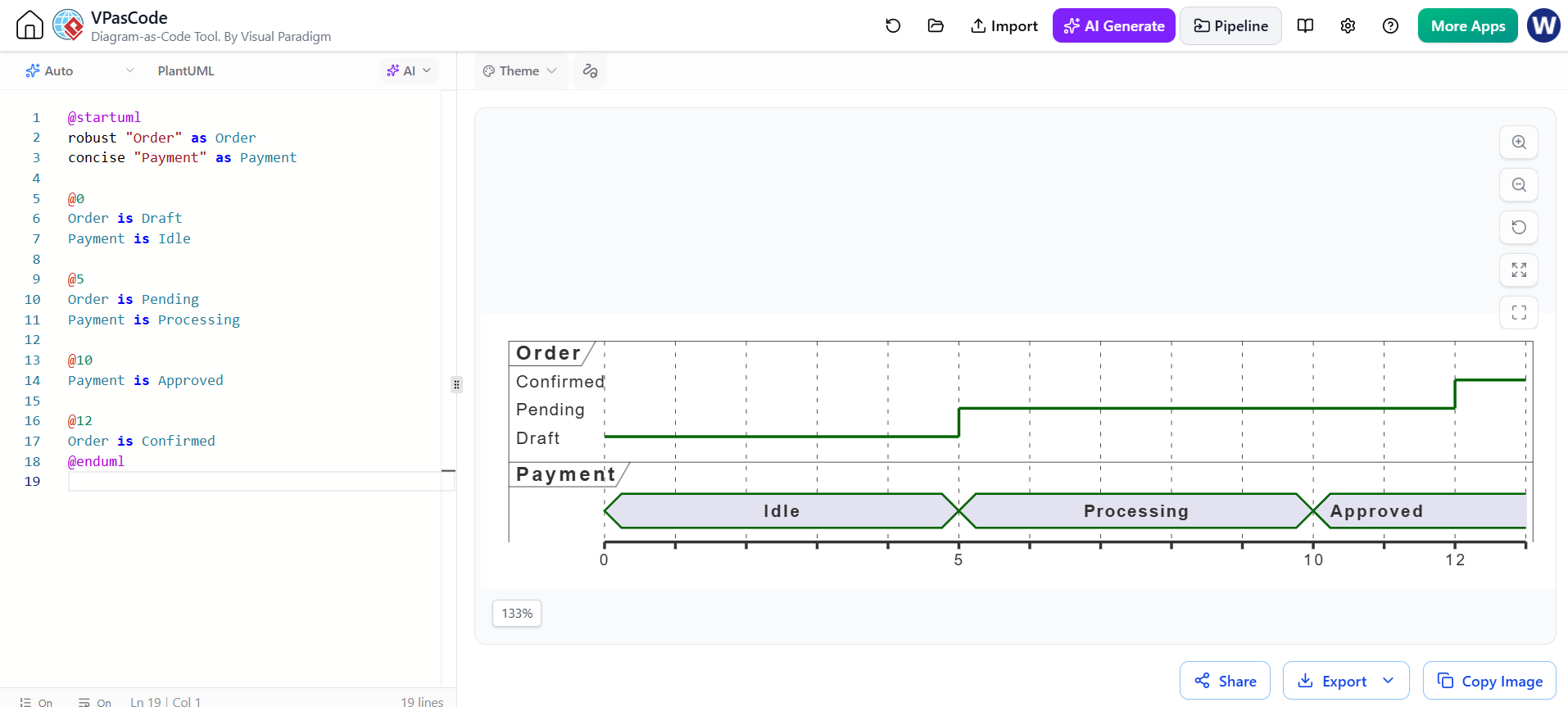
@startuml
robust "訂單" as Order
concise "付款" as Payment

@0
訂單為草稿
付款為閒置

@5
訂單為待處理
付款為處理中

@10
付款已核准

@12
訂單已確認
@enduml
選擇圖表
從您希望圖表回答的問題開始:
-
系統中包含什麼?類別、物件、元件、複合結構、套件、配置或部署。
-
系統做什麼?使用案例、活動或狀態機。
-
參與者如何協作?序列、通訊、互動概覽或時序。
讓每個圖表專注於單一目的,在圖表間使用一致的名稱,並僅包含受眾與當前決策所需的足夠細節。PlantUML 程式碼片段僅為起點:請檢查您的渲染器所支援的語法,特別是針對特殊圖表類型。